No-Script Suite Lite icon

No-Script Suite Lite Chrome Extension Analysis

Privacy, Security & Ad Blockers

Chrome extension ID: ahnanjpbkghcdgmlchbcfoiefnifjeni

No-Script Suite Lite is a browser extension designed to block execution of JavaScript, images, and other media from untrusted sources. Users can manage content via a whitelist/blacklist system and choose between different blocking engines to control site permissions.

Developer:chYer
Version:0.3.9
Size:144KiB
Last updated:

Overview

Installs

20K+

Rating

3.5

182 reviews

Languages

1 locales

Includes English

Market analysis

Review-backed positioning, friction, and market signals for this Chrome extension.

Backed by review samples

Macro category

Privacy, Security & Ad Blockers

Pricing friction

Low review signal

Complaint intensity

High review signal

Listing & review signals
Observed signals from store listing text and review samples.

Listing positioning

The extension positions itself as a lightweight security tool for granular control over website content. It offers users the ability to whitelist trusted sites while blocking scripts, images, and other media to enhance browser security.

Inferred product pattern

Basic browser security wrapper with persistent stability and usability issues.

Review-backed pain points

Users frequently report that the extension forgets whitelist settings after updates or browser restarts. There are consistent complaints regarding the lack of visibility into what is currently being blocked, making troubleshooting broken websites difficult.

Observed feature gaps

Lack of persistent storage for whitelist settings, poor support for global wildcard/regex rules, and absence of a clear 'temporary allow' feature for active page elements.

Tags
Script BlockerPrivacy ToolContent SecurityBrowser Security
Target users

- Privacy-conscious users

- Advanced browser users

- Users seeking script control

Primary use cases

- Blocking unwanted scripts

- Whitelisting trusted websites

- Managing third-party media and object loading

Positive themes

- Lightweight footprint

- Works well for basic use-cases

- Simple toolbar popup interface

Negative themes

- Frequent loss of user configuration/whitelist data

- Non-intuitive UI for managing permissions

- Lack of granular control compared to established alternatives

- Difficulty with regex or wildcard configurations

Observed friction

- Performance complaints detected

- Privacy complaints detected

- None identified; the product is free.

Evidence boundary: Analysis based on 182 reviews, highlighting significant technical instability regarding setting persistence and usability friction for power users. Review data spans several years, potentially reflecting older versions; may not represent current version stability.
Complaint summaries
Review-backed complaint signals grouped by operational area.

Support

Users express high frustration with configuration loss and the lack of guidance on complex filtering.

Reliability

Frequent reports of configuration resets after updates and the extension failing to initialize on browser start.

Privacy

One user expressed concern regarding an unspecified tracker being added in a past update.

Access & pricing

- Free usage observed

- No account requirement observed

- Free plan or free usage claimed

Store listing facts

Listing assets

- Screenshots: 4

- Videos: 1

- Languages: 1

Trust signals

- Developer contact

- Official website

Store metadata

- Version: 0.3.9

- Size: 144KiB

- Last updated:

Store description excerpt
Short excerpt from the public Chrome Web Store listing; full copy is available on the official store page.
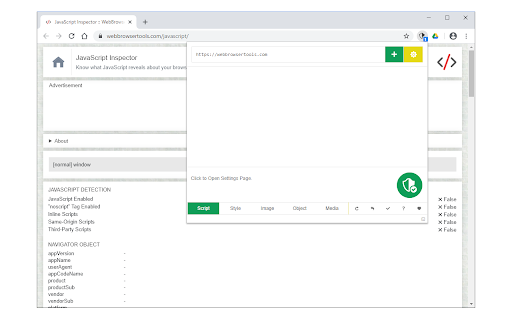
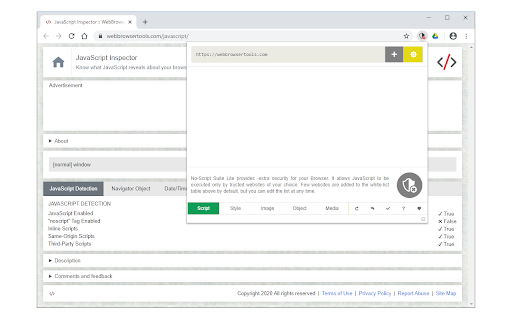
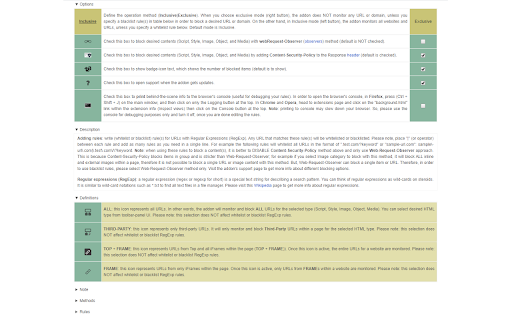
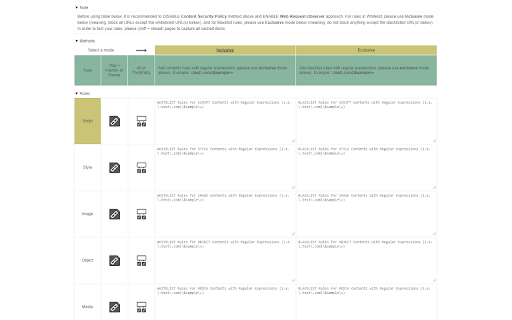
No-Script Suite Lite provides an extra security for your browser. It allows JavaScript (inline & external) to be executed only by trusted websites of your choice. Some websites are added to the white-list by default, but you can add or remove items at any time. Important features: a) Allows you to block all Scripts (inline and external) from untrusted websites (plus you can block Images, Objects, Styles and Media as well). b) Simple and very lite: this Addon does not use noticeable memory or CPU form your machine. c) You can easily switch the extension On or Off from the toolbar popup UI. d) Add or remove websites to the white-list table easily from toolbar-popup. e) Beside scripts, you can also block style-sheets, images, objects and media from untrusted sources. To activate, open toolbar-popup and click on the desired option at the bottom of the panel. f) Choose desired blocking engin…

Listing SEO keywords

Search intent keywords
Keyword signals for evaluating how users may discover, compare, or search for this extension category.

Core discovery

Chrome script blockerNo-Script extensionblock JavaScript Chromebrowser security tool

Comparison

alternative to NoScriptNoScript for Chrome

Problem

whitelist reset issuecannot block scriptsextension forgets settings

Alternative

privacy badgeruBlock Origin

Similar extensions

Jump to related discovery paths:

FAQ

What is No-Script Suite Lite mainly used for?
No-Script Suite Lite is a browser extension designed to block execution of JavaScript, images, and other media from untrusted sources. Users can manage content via a whitelist/blacklist system and choose between different blocking engines to control site permissions.
What market signals stand out?
Visible niche traction with moderate review base. Last known update: 08/18/2025.
What should builders compare before entering this space?
Compare install concentration, rating quality, update recency, screenshots, developer portfolio, listing claims, and review-backed friction signals.
Is this page review-backed?
Backed by review samples. This page combines store metadata with selected review signals, while raw store metrics remain visible for comparison.

Screenshots

No-Script Suite Lite screenshot

Links

Website: mybrowseraddon.com

Videos: Watch

Recommended Chrome extensions

Related listings from the same category, trending peers, and the same publisher portfolio.

Browse tools
Video & Audio Downloader icon

Video & Audio Downloader

chYer

Easily download video & audio streams via toolbar popup.

Installs

80K+

Rating

3.6

AdBlocker for YouTube™ icon

AdBlocker for YouTube™

chYer

Removes all annoying ads and banners from YouTube!

Installs

40K+

Rating

4.1

Norton Safe Search icon

Norton Safe Search

NortonLifeLock Inc

Search safely online by enabling Norton Safe Search as your default search provider for maximum protection on Chrome.

Installs

5.0M+

Rating

2.4

Shazam: Find song names from your browser icon

Shazam: Find song names from your browser

Shazam

Identify music, search lyrics & more

Installs

5.0M+

Rating

4.7

IE Tab icon

IE Tab

Blackfish Software

Display web pages using IE within Chrome. Use Java, Silverlight, ActiveX, Sharepoint, and more.

Installs

4.0M+

Rating

4.3

Microsoft Bing Homepage & Search for Chrome icon

Microsoft Bing Homepage & Search for Chrome

Microsoft Corporation

Set Microsoft Bing as your default homepage and default search engine

Installs

4.0M+

Rating

3.8

Immersive Translate: AI Web, PDF & Video Translator icon

Immersive Translate: AI Web, PDF & Video Translator

Immersive Translate

Free Translate Website, Translate PDF & Epub eBook, Translate Video Subtitles in Bilingual

Installs

3.0M+

Rating

4.0

BetterTTV icon

BetterTTV

NightDev, LLC

BetterTTV enhances Twitch and YouTube with new features, emotes, and more.

Installs

3.0M+

Rating

4.6

Monica: All-In-One AI Assist & Smartest  AI Agent icon

Monica: All-In-One AI Assist & Smartest AI Agent

Monica Team

One stop AI Assistant with GPT, Claude, Gemini: Chat, Write, Translate, Search, Summarize, image generator, video generation

Installs

3.0M+

Rating

4.9

Ad Blocker: Stands AdBlocker icon

Ad Blocker: Stands AdBlocker

Stands

Stands AdBlocker – it's a free ad blocker for YouTube, Twitch, Pop-Ups, Video Ads, and websites. Block ads everywhere with Stands!

Installs

3.0M+

Rating

4.8