Clear Site Data icon

Clear Site Data Chrome Extension Analysis

Developer & Designer Tools

Chrome extension ID: aihgofjefdlhpnmeakpnjjeajofpcbhj

A productivity tool that provides a one-click interface to delete browser storage elements like IndexedDB, Local Storage, and Service Workers. It essentially brings the functionality of Chrome DevTools' 'Clear Site Data' to a more accessible extension popup.

Version:0.0.9
Size:11.13KiB
Last updated:

Overview

Installs

10K+

Rating

4.5

52 reviews

Languages

1 locales

Includes English (United States)

Market analysis

Review-backed positioning, friction, and market signals for this Chrome extension.

Backed by review samples

Macro category

Developer & Designer Tools

Pricing friction

Low review signal

Complaint intensity

Moderate review signal

Listing & review signals
Observed signals from store listing text and review samples.

Listing positioning

The extension positions itself as a utility to quickly clear specific site data such as cache, storage, and cookies for the current site or all sites. It emphasizes the ability to define excluded origins to prevent certain sites from being wiped.

Inferred product pattern

DevTools-lite utility for rapid browser storage management.

Review-backed pain points

Users are frustrated by the lack of documentation on how to format the 'Exclude Origin' list and find the confirmation process tedious.

Observed feature gaps

Missing auto-reload of the page after clearing, lack of hotkey support, and no 'clear and close' functionality.

Tags
Cache CleanerDeveloper ToolsSite DataBrowser ProductivityCookies Manager
Target users

- Web developers

- QA testers

- Privacy-conscious power users

Primary use cases

- Rapidly clearing site storage during development

- Wiping session data without navigating deep browser settings

- Selective data clearing using origin exclusions

Positive themes

- Accurately mirrors DevTools data clearing functionality

- Useful ability to exclude specific origins

Negative themes

- Redundancy with native Chrome settings

- Poor UX due to excessive confirmation clicks

- Lack of clear instructions for the exclusion format

- Outdated maintenance

Observed friction

- No pricing friction observed as the tool appears to be free.

Evidence boundary: Analysis based on store listing descriptions and a sample of 10 helpful reviews across various ratings. The review sample size is small compared to the total user base, and some reviews are outdated.
Complaint summaries
Review-backed complaint signals grouped by operational area.

Support

No formal support complaints, though users noted a lack of instructional guidance in the UI.

Reliability

Some users report the extension is outdated or fails to log them out of certain sites.

Privacy

No privacy complaints found.

Access & pricing

- Free usage observed

- No account requirement observed

- Free plan or free usage claimed

Store listing facts

Listing assets

- Screenshots: 1

- Videos: 0

- Languages: 1

Trust signals

- Privacy policy

- Developer contact

- Official website

Store metadata

- Version: 0.0.9

- Size: 11.13KiB

- Last updated:

Store description excerpt
Short excerpt from the public Chrome Web Store listing; full copy is available on the official store page.
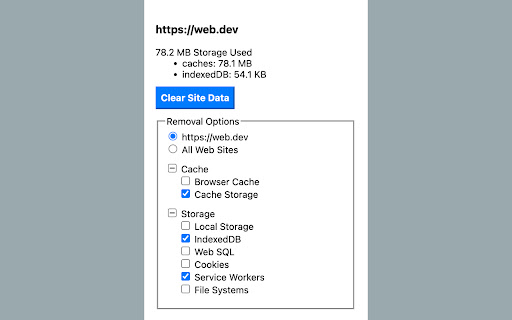
When you click this extension icon, it will show you the storage used info of current (https) site. You can clear data for current site or all web sites, including these data types: Cache ● Browser Cache ● Cache Storage Storage ● Local Storage ● IndexedDB ● Web SQL ● Cookies ● Service Workers ● File Systems Others (only when select for all web sites) ● Download List ● Visited History ● Stored Form Data ● Stored Passwords When you select clearing data for all web sites, you can add excluded origins which are excluded from deletion. Note: [1]. Origin format: <scheme> "://" <hostname> [ ":" <port> ]

Listing SEO keywords

Search intent keywords
Keyword signals for evaluating how users may discover, compare, or search for this extension category.

Core discovery

clear site datachrome cache cleanerdelete cookies current siteclear local storage extension

Comparison

Clear Site Data vs Chrome SettingsClear Site Data vs CCleaner

Problem

how to clear site storageclear indexeddb chromeremove site cookies quickly

Alternative

site data cleaner alternativechrome devtools clear storage alternative

Similar extensions

Jump to related discovery paths:

FAQ

What is Clear Site Data mainly used for?
A productivity tool that provides a one-click interface to delete browser storage elements like IndexedDB, Local Storage, and Service Workers. It essentially brings the functionality of Chrome DevTools' 'Clear Site Data' to a more accessible extension popup.
What market signals stand out?
Visible niche traction with limited review base. Last known update: 08/23/2022.
What should builders compare before entering this space?
Compare install concentration, rating quality, update recency, screenshots, developer portfolio, listing claims, and review-backed friction signals.
Is this page review-backed?
Backed by review samples. This page combines store metadata with selected review signals, while raw store metrics remain visible for comparison.

Screenshots

Clear Site Data screenshot

Links

Website: guokai.dev

Privacy policy: https://guokai.dev/privacy/

Recommended Chrome extensions

Related listings from the same category, trending peers, and the same publisher portfolio.

Browse developer