
OCR Chrome Extension Analysis
Web Scraping & Data ExtractionStore listing title: OCR - Image Reader
Chrome extension ID: bhbhjjkcoghibhibegcmbomkbakkpdbo
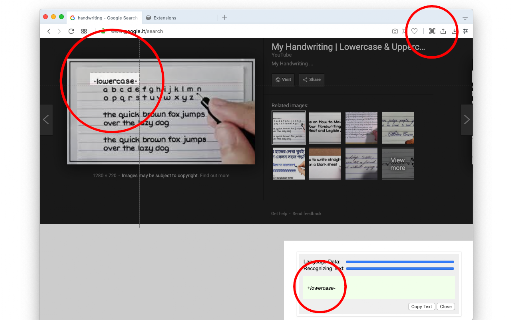
An offline browser tool that allows users to select and capture any region on an active web page to recognize and copy the text within. It runs entirely on the client side, keeping user data local and supporting numerous languages with a built-in progress tracker.
Overview
Installs
200K+
Rating
★ 4.1
243 reviews
Languages
1 locales
Includes English
Market analysis
Review-backed positioning, friction, and market signals for this Chrome extension.
Macro category
Web Scraping & Data Extraction
Pricing friction
Low review signal
Complaint intensity
Moderate review signal
Listing positioning
The extension positions itself as a powerful offline optical character recognition tool that captures browser screen regions to extract text. It highlights local browser-level processing using Tesseract.js and IBM Granite-Docling engines, supporting over 100 languages. Additionally, the listing emphasizes zero long-term resource usage by loading and unloading libraries as needed.
Inferred product pattern
Client-side browser utility wrapping the open-source Tesseract.js library for offline screen-capture OCR.
Review-backed pain points
Some users experience complete blockages where the extension fails to run, throwing 'missing Host Permissions' or 'SecurityError' messages with no clear resolution path. Another recurring frustration is the offline engine getting stuck on 'loading language traineddata' without completing the process.
Observed feature gaps
Based on user feedback, there is a clear gap in user onboarding and troubleshooting documentation to resolve permission errors. Additionally, accuracy struggles with special characters (such as German umlauts) and a glitchy language dropdown selection menu are noted gaps.
- Users needing to copy text from restricted or copy-protected web pages
- Students and researchers transcribing text from PDFs, slides, and images
- Multilingual users requiring offline character recognition
- Extracting text content from images, protected web pages, and PDF documents
- Quick screen-capture based transcription directly to the clipboard
- Translating or transcribing foreign language text offline
- High extraction accuracy and convenience compared to online tools
- Appreciation for local, offline data processing and privacy
- Successful text detection for non-English scripts, such as Bangla and Malayalam
- Instant copy-to-clipboard functionality after selection
- Getting stuck indefinitely on the language data loading phase
- Missing host permissions errors or security errors that prevent execution
- UI bugs where the language selection dropdown collapses repeatedly
- Inaccuracies with specific fonts, special characters, and umlauts
- Performance complaints detected
- No pricing friction or monetization issues were observed in the public data; the extension is presented and reviewed as a free, offline utility.
Support
Users complain about a lack of documentation or troubleshooting guides on the developer's website to help resolve common initial permission and setup errors.
Reliability
A subset of reviews notes reliability issues such as the extension icon not responding when clicked, freezing during training data fetch, and inconsistent OCR accuracy under non-standard fonts.
Privacy
There are no privacy complaints. Users explicitly praise the local, offline nature of the application for keeping data secure on their browser.
- Free usage observed
- No account requirement observed
- Free plan or free usage claimed
Store listing facts
- Screenshots: 1
- Videos: 1
- Languages: 1
- Developer contact
- Official website
- Version: 0.5.0
- Size: 7.76MiB
- Last updated:
Listing SEO keywords
Core discovery
Comparison
Problem
Alternative
Similar extensions
Jump to related discovery paths:
FAQ
Screenshots
Links
Website: webextension.org
Videos: Watch