
Clear Browsing Data Chrome Extension Analysis
Automation & Workflow EfficiencyChrome extension ID: bjilljlpencdcpihofiobpnfgcakfdbe
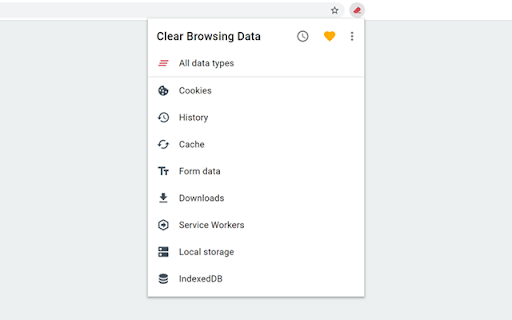
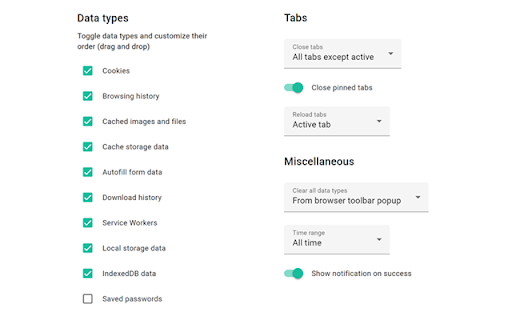
This extension provides a customizable interface to wipe various browser data types, including IndexedDB, service workers, and autofill forms. It offers configuration options for the toolbar button and advanced browser maintenance features like tab management.
Overview
Installs
20K+
Rating
★ 4.1
38 reviews
Languages
1 locales
Includes English
Market analysis
Review-backed positioning, friction, and market signals for this Chrome extension.
Macro category
Automation & Workflow Efficiency
Pricing friction
Low review signal
Complaint intensity
High review signal
Listing positioning
Clear Browsing Data positions itself as a streamlined, toolbar-accessible tool for immediate deletion of browser cookies, history, and cache. It emphasizes efficiency through a 'one-click' execution model and highlights its open-source, non-data-collecting nature.
Inferred product pattern
Open-source utility extension focused on high-speed browser maintenance.
Review-backed pain points
The most severe pain point is the lack of a 'confirmation' prompt, which has resulted in permanent loss of user history for some individuals. Users also report frustration regarding configuration resets after extension updates.
Observed feature gaps
Reviewers frequently request a 'whitelist' for cookies to avoid being logged out of important sites, and the ability to clear data scoped only to the currently active website.
- Privacy-conscious users
- Developers
- Power users seeking to automate browser cleanup
- Clearing browser history and cache
- Deleting specific data types (cookies, service workers)
- Maintaining browser performance via rapid data purging
- Effective performance in clearing data
- Cross-browser compatibility (Firefox/Edge)
- Simple, functional interface
- Lack of confirmation dialogue leading to accidental data loss
- Aggressive default settings
- Occasional functional failure due to browser API changes
- Loss of configuration settings after updates
- Performance complaints detected
- None; the product is free and open-source, with an optional donation link.
Support
Users are directed to GitHub for support; complaints center on lack of active maintenance during periods where the extension stops working.
Reliability
Significant concern regarding accidental data deletion without confirmation and periodic functional failures linked to browser updates.
Privacy
None; the developer explicitly states they do not collect personal data.
- Free usage observed
- No account requirement observed
- Free plan or free usage claimed
Store listing facts
- Screenshots: 2
- Videos: 0
- Languages: 1
- Privacy policy
- Developer contact
- Official website
- Support link
- Version: 5.1.2
- Size: 472KiB
- Last updated:
Listing SEO keywords
Core discovery
Comparison
Problem
Alternative
Similar extensions
Jump to related discovery paths:
FAQ
Screenshots
Links
Website: github.com
Privacy policy: https://github.com/dessant/clear-browsing-data/wiki/Privacy-policy
Support links: https://github.com/dessant/clear-browsing-data/issues