Open in PDF Reader icon

Open in PDF Reader Chrome Extension Analysis

Automation & Workflow Efficiency

Chrome extension ID: cehiomcamjpnfmemkmpjadaclohoibgo

A utility extension that enables users to send PDF links directly to an external PDF viewer application. It requires the installation of a native client to execute OS-level commands to open the files.

Developer:rynu.smith
Version:0.3.7
Size:53.63KiB
Last updated:

Overview

Installs

90K+

Rating

3.5

50 reviews

Languages

1 locales

Includes English

Market analysis

Review-backed positioning, friction, and market signals for this Chrome extension.

Backed by review samples

Macro category

Automation & Workflow Efficiency

Pricing friction

Low review signal

Complaint intensity

Moderate review signal

Listing & review signals
Observed signals from store listing text and review samples.

Listing positioning

The product positions itself as a bridge between the web browser and professional desktop PDF software. It emphasizes the ability to bypass the built-in browser viewer in favor of specialized tools like Adobe Acrobat or FoxIt.

Inferred product pattern

Local OS bridge utility that redirects web triggers to desktop applications.

Review-backed pain points

Users report the extension not appearing in the right-click menu and the native client installation not triggering automatically.

Observed feature gaps

Lack of reliable compatibility with Chromium-based alternatives like Brave and potential breakage in recent Chrome updates.

Tags
PDF ViewerWorkflow UtilityExternal App IntegrationProductivity Tool
Target users

- Power users of Adobe Acrobat or FoxIt

- Professionals requiring advanced PDF editing/signing

- Users who prefer desktop software over browser-based PDF viewers

Primary use cases

- Opening web-based PDF links in external desktop readers

- Transferring currently open browser PDFs to an external application

- Automating the download and open process for PDFs

Positive themes

- Addressing browser limitations

- Seamless functionality for some users

Negative themes

- Installation failures

- Compatibility issues with Brave and newer Chrome versions

- Failure of the context menu to appear

Observed friction

- Performance complaints detected

- No pricing friction observed; the tool appears to be free.

Evidence boundary: Analysis based on store listing descriptions and a selection of 10 user reviews. The review sample is small, and some feedback dates back several years, which may not reflect current performance.
Complaint summaries
Review-backed complaint signals grouped by operational area.

Support

No direct support interaction complaints, but users express frustration over the tool simply not working.

Reliability

Significant reliability issues cited regarding the context menu and general functionality in recent browser versions.

Privacy

No privacy complaints observed.

Access & pricing

- Free usage observed

- No account requirement observed

- Free plan or free usage claimed

Store listing facts

Listing assets

- Screenshots: 1

- Videos: 1

- Languages: 1

Trust signals

- Privacy policy

- Developer contact

- Official website

Store metadata

- Version: 0.3.7

- Size: 53.63KiB

- Last updated:

Store description excerpt
Short excerpt from the public Chrome Web Store listing; full copy is available on the official store page.
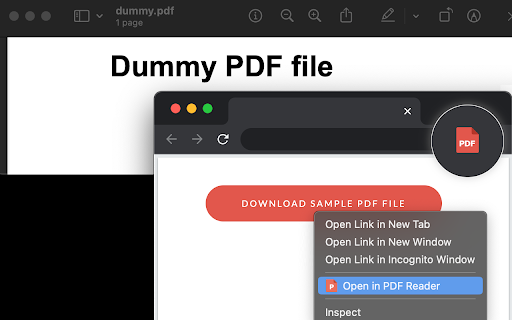
The "Open in PDF viewer" extension opens PDF files directly in your favorite external PDF viewer application. To use the extension, right-click on a PDF link and select the "Open in PDF viewer" item. The extension downloads the PDF file in your default downloads directory and then executes the external command to open the downloaded file with the default PDF viewer (e.g. Adobe Acrobat Reader or FoxIt PDF reader). Note that to execute an OS-level command, you need to install a native client. Native client installation guide appears on the first usage. Features: 1. Open PDF files from right-click context menu 2. Transfer already opened PDF files to the external PDF viewer by pressing the browser's action button 3. Detect PDF links and open them with left-click 4. Open the external PDF viewer with a user-defined delay 5. Supports most common PDF viewers Change Logs: 0.1.1: It is now possib…

Listing SEO keywords

Search intent keywords
Keyword signals for evaluating how users may discover, compare, or search for this extension category.

Core discovery

open PDF in external viewerChrome PDF to Adobe Acrobatbypass Chrome PDF viewer

Comparison

Chrome PDF viewer vs Adobe Acrobatbest PDF extension for external reader

Problem

PDF not opening in AdobeChrome forces PDF to open in browser

Alternative

PDF reader extension alternativesOpen in PDF reader alternatives

Similar extensions

Jump to related discovery paths:

FAQ

What is Open in PDF Reader mainly used for?
A utility extension that enables users to send PDF links directly to an external PDF viewer application. It requires the installation of a native client to execute OS-level commands to open the files.
What market signals stand out?
Visible niche traction with limited review base. Last known update: 11/18/2025.
What should builders compare before entering this space?
Compare install concentration, rating quality, update recency, screenshots, developer portfolio, listing claims, and review-backed friction signals.
Is this page review-backed?
Backed by review samples. This page combines store metadata with selected review signals, while raw store metrics remain visible for comparison.

Screenshots

Open in PDF Reader screenshot

Links

Recommended Chrome extensions

Related listings from the same category, trending peers, and the same publisher portfolio.

Browse workflow