

Super Video Speed Controller Chrome Extension Analysis
Automation & Workflow EfficiencyChrome extension ID: chnccghejnflbccphgkncbmllhfljdfa
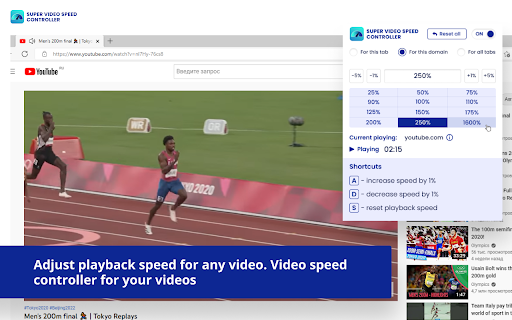
Super Video Speed Controller is a browser extension that enables users to override standard video player playback speeds. Users can adjust speed incrementally or through set presets, and interact with the controller via an icon-based toolbar menu.
Overview
Installs
200K+
Rating
★ 4.5
210 reviews
Languages
54 locales
Includes Deutsch, English, English (United Kingdom), English (United States)...
Market analysis
Review-backed positioning, friction, and market signals for this Chrome extension.
Macro category
Automation & Workflow Efficiency
Pricing friction
Low review signal
Complaint intensity
Moderate review signal
Listing positioning
The store listing positions this product as a universal tool to adjust video playback speeds across various websites. It emphasizes compatibility with most video players and provides control via custom presets and keyboard shortcuts.
Inferred product pattern
Utility-focused browser extension providing overlay controls for video DOM elements.
Review-backed pain points
The most significant pain point is the inability to customize or disable default keyboard shortcuts (A, S, D), which interferes with typing on websites like LeetCode and NYTimes. Additionally, users report UI design complaints regarding the large, bright interface and occasional functional instability.
Observed feature gaps
Lack of custom hotkey mapping, no option to resize or theme the UI (e.g., dark mode), and inability to set custom speed intervals.
- Video content consumers
- Educational video viewers
- Power users managing playback speed
- Accelerating educational content
- Skipping through slow video segments
- Customizing video player behavior
- Works on customized video players where others fail
- Convenient basic functionality
- Lack of shortcut customization
- UI design issues (excessive window size, bright colors)
- Conflicts with website typing (A/S/D keys)
- Alleged affiliate link injection
- Performance complaints detected
- Privacy complaints detected
- No direct pricing friction reported; product appears to be free with no specific subscription gate mentioned.
Support
Users report dissatisfaction with the lack of developer response regarding broken features and missing customization options.
Reliability
Reports exist of the extension occasionally failing to register inputs or stopping work on major platforms like YouTube after updates.
Privacy
A specific user review claims the extension injects affiliate tracking tags into Amazon product URLs.
- Free usage observed
- No account requirement observed
- Free plan or free usage claimed
Store listing facts
- Screenshots: 1
- Videos: 0
- Languages: 54
- Privacy policy
- Developer contact
- Official website
- Version: 1.3.2.3
- Size: 514KiB
- Last updated:
Listing SEO keywords
Core discovery
Comparison
Problem
Alternative
Similar extensions
Jump to related discovery paths:
FAQ
Screenshots
Links
Website: super-video-speed-controller.com
Privacy policy: https://super-video-speed-controller.com/privacy/