Turbo Downloader for Instagram icon

Turbo Downloader for Instagram Chrome Extension Analysis

Video & Image Downloaders

Chrome extension ID: cpgaheeihidjmolbakklolchdplenjai

Turbo Downloader for Instagram is a browser extension that injects download buttons directly into the Instagram web interface. It allows users to save media locally from individual posts or perform bulk downloads of entire accounts.

Version:4.12.16
Size:257KiB
Last updated:

Overview

Installs

600K+

Rating

3.6

1,400 reviews

Languages

1 locales

Includes English

Market analysis

Review-backed positioning, friction, and market signals for this Chrome extension.

Backed by review samples

Macro category

Video & Image Downloaders

Pricing friction

Low review signal

Complaint intensity

High review signal

Listing & review signals
Observed signals from store listing text and review samples.

Listing positioning

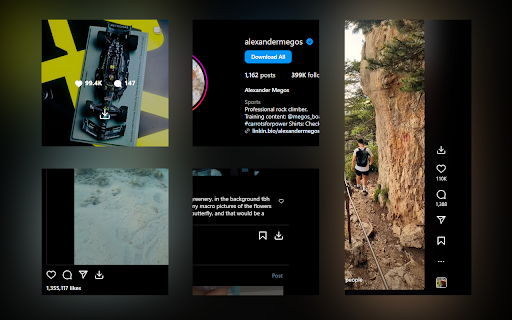
The extension positions itself as an all-in-one utility for downloading Instagram photos, videos, stories, and reels. It highlights convenience features such as hover-to-download, hotkey support, and bulk account downloading capabilities.

Inferred product pattern

A formerly well-regarded utility tool suffering from significant code rot, maintenance neglect, and a pivot toward intrusive monetization tactics.

Review-backed pain points

Users frequently report that the extension breaks after Instagram interface updates, specifically regarding multi-image post selection, story downloads, and the appearance of the download button itself.

Observed feature gaps

Frequent loss of core functionality (download buttons failing to render) and difficulty handling Instagram's dynamic DOM changes for carousel posts and stories.

Tags
Instagram DownloaderMedia SaverBulk Download
Target users

- Instagram power users

- Content curators

- Social media managers

Primary use cases

- Downloading Instagram photos and videos

- Saving Instagram Stories

- Bulk downloading media from Instagram accounts

Positive themes

- Formerly reliable performance

- Convenience of integration

- Useful bulk download feature

Negative themes

- Broken download buttons on specific media types

- Failure to download multi-image posts correctly

- Allegations of adware/malware behavior

- General reliability degradation after updates

Observed friction

- Performance complaints detected

- Privacy complaints detected

- None noted; extension appears to be free, but users report recent intrusive ad behavior.

Evidence boundary: Evidence is drawn from 1,384 user reviews highlighting a significant decline in quality, reliability, and recent reports of adware activity. Reviews represent a snapshot of user dissatisfaction; actual functional status may vary based on specific browser configurations or Instagram updates.
Complaint summaries
Review-backed complaint signals grouped by operational area.

Support

Users perceive a lack of active developer response or interest in maintaining the product as it has aged.

Reliability

High; users consistently report that buttons disappear, media is not captured correctly, or the extension crashes/fails to trigger downloads.

Privacy

Severe; multiple reviews accuse the extension of injecting unauthorized banner advertisements into pages, labeling it as adware/malware.

Access & pricing

- Ad-supported model observed

- No account requirement observed

- Free plan or free usage claimed

Store listing facts

Listing assets

- Screenshots: 2

- Videos: 0

- Languages: 1

Trust signals

- Developer contact

Store metadata

- Version: 4.12.16

- Size: 257KiB

- Last updated:

Store description excerpt
Short excerpt from the public Chrome Web Store listing; full copy is available on the official store page.
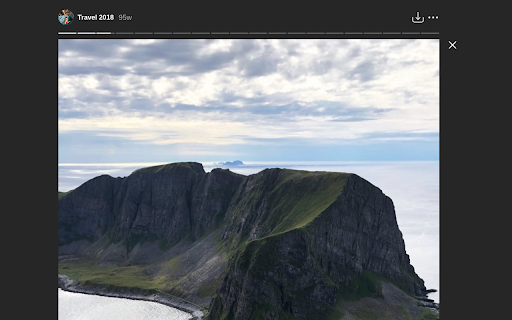
Turbo Downloader for Instagram adds a button to every Instagram post, Reel, and Story so you can quickly and easily download anything while browsing Instagram. The “Download All” button added to Instagram accounts lets you bulk download all their posts in one click. NOTE: Please reload your Instagram tabs after installing or updating to load the extension. While browsing Instagram, just hover over a post preview and click the download button to save it. If there are multiple images/videos in the post, they’ll all be saved. If you’re looking at a post or Reel, check next to the bookmark and share icons for the download button, or try the hotkey Ctrl + Shift + D or Cmd + Shift + D. A story can be saved with the download button in the top right corner. When downloading an entire Instagram account, you’ll be prompted to choose a folder. A new folder will be created inside that folder with t…

Listing SEO keywords

Search intent keywords
Keyword signals for evaluating how users may discover, compare, or search for this extension category.

Core discovery

Instagram downloader extensionsave Instagram photosdownload Instagram reelsInstagram story saver

Comparison

best Instagram downloaderTurbo Downloader alternative

Problem

extension not workingdownload button missingadware

Alternative

Instagram downloader toolmedia downloader chrome extension

Similar extensions

Jump to related discovery paths:

FAQ

What is Turbo Downloader for Instagram mainly used for?
Turbo Downloader for Instagram is a browser extension that injects download buttons directly into the Instagram web interface. It allows users to save media locally from individual posts or perform bulk downloads of entire accounts.
What market signals stand out?
Established adoption with substantial review base. Last known update: 02/24/2026.
What should builders compare before entering this space?
Compare install concentration, rating quality, update recency, screenshots, developer portfolio, listing claims, and review-backed friction signals.
Is this page review-backed?
Backed by review samples. This page combines store metadata with selected review signals, while raw store metrics remain visible for comparison.

Screenshots

Turbo Downloader for Instagram screenshot

Recommended Chrome extensions

Related listings from the same category, trending peers, and the same publisher portfolio.

Browse social