Toggl 2.0 icon

Toggl 2.0 Chrome Extension Analysis

Automation & Workflow Efficiency

Chrome extension ID: djchhhhpmaigfigeklaoekfgjdpmegdj

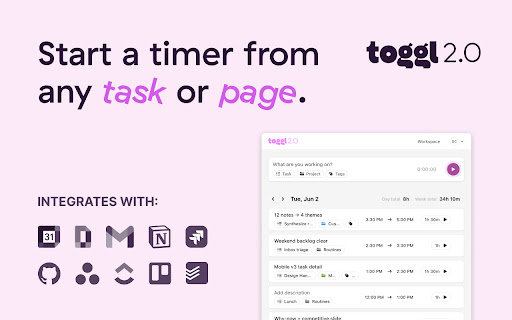
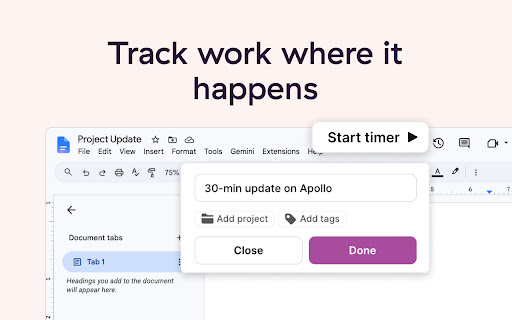
This extension allows users to start and stop time trackers within external websites like Asana, Trello, and Google Suite. It aims to eliminate context-switching by keeping time logs accurate and synchronized with the broader Toggl web and mobile platforms.

Developer:Toggl
Version:0.20.0
Size:3.47MiB
Last updated:

Overview

Installs

0

Rating

3.0

2 reviews

Languages

1 locales

Includes English

Market analysis

Review-backed positioning, friction, and market signals for this Chrome extension.

Backed by review samples

Macro category

Automation & Workflow Efficiency

Pricing friction

Low review signal

Complaint intensity

Moderate review signal

Listing & review signals
Observed signals from store listing text and review samples.

Listing positioning

The Toggl Extension positions itself as an integrated time-tracking utility that embeds timers directly into popular third-party web tools. It emphasizes seamless syncing with the main Toggl ecosystem to improve personal and team productivity.

Inferred product pattern

Browser-based companion utility for a primary SaaS time-tracking platform.

Review-backed pain points

Users perceive the extension as an incomplete, alpha-stage product that lacks specific productivity-focused features and suffers from interface scaling issues.

Observed feature gaps

Absence of built-in Pomodoro timers and lack of visible active timer status within the extension icon.

Tags
Time TrackingProductivityTask ManagementWorkflow Automation
Target users

- Freelancers

- Project Managers

- Remote Teams

- Knowledge Workers

Primary use cases

- Tracking time on tasks within third-party apps

- Monitoring daily and weekly time summaries

- Syncing browser-based timers with Toggl web/mobile

Positive themes

- Successful data synchronization with the web app

- General functionality is effective for basic tracking

Negative themes

- Missing advanced features like Pomodoro timers

- Poor UI scaling for the popup interface

- Perceived as being in an early/alpha development state

Observed friction

- No complaints regarding pricing identified in the provided review samples.

Evidence boundary: Evidence is derived from the Chrome Web Store listing and two recent user reviews highlighting the extension's development stage and functional limitations. The sample size is very small, representing only two user reviews, which may not reflect the full user base's experience.
Complaint summaries
Review-backed complaint signals grouped by operational area.

Support

No support-related complaints identified.

Reliability

Users suggest the product is currently in an alpha/beta state and lacks interface polish.

Privacy

No privacy-related complaints identified.

Access & pricing

- Free entry with paid features

- Account required for core usage

- Free plan or free usage claimed

Store listing facts

Listing assets

- Screenshots: 3

- Videos: 0

- Languages: 1

Trust signals

- Privacy policy

- Developer contact

Store metadata

- Version: 0.20.0

- Size: 3.47MiB

- Last updated:

Store description excerpt
Short excerpt from the public Chrome Web Store listing; full copy is available on the official store page.
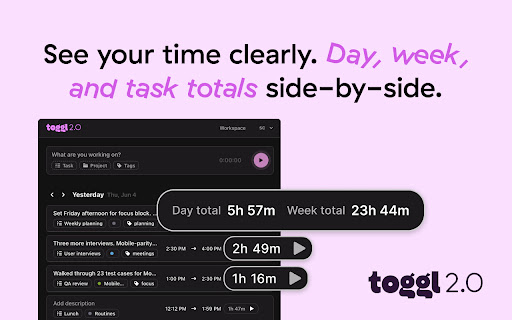
Overview Track time effortlessly without leaving your browser. The Toggl extension brings accurate, real-time time tracking into the websites you already use — so you can stay focused, keep better habits, and power smarter planning across your day. Whether you work in Asana, Trello, Google Suite, or other supported tools, you can start a timer directly from the page or task you’re on. Your time logs sync instantly with Toggl, helping you stay organized and understand where your time really goes. What you can do with the Toggl Extension Start and stop timers anywhere — no need to open a separate tab. Auto-capture task names from supported tools to keep time logs clean and accurate. See your daily and weekly totals at a glance to stay on track. Use real data to power smarter planning in Toggl’s web and mobile app. How to get started 1. Click Add to Chrome 2. Log in to Toggl from the exten…

Listing SEO keywords

Search intent keywords
Keyword signals for evaluating how users may discover, compare, or search for this extension category.

Core discovery

time tracking extensionToggl browser integrationtask timerproductivity tool

Comparison

Toggl vs manual time trackingtime tracking alternatives

Problem

track time in TrelloAsana timer integrationlost productivity tracking

Alternative

Harvest extensionClockify browser extension

Similar extensions

Jump to related discovery paths:

FAQ

What is Toggl 2.0 mainly used for?
This extension allows users to start and stop time trackers within external websites like Asana, Trello, and Google Suite. It aims to eliminate context-switching by keeping time logs accurate and synchronized with the broader Toggl web and mobile platforms.
What market signals stand out?
Early or small audience with limited review base. Last known update: 06/25/2026.
What should builders compare before entering this space?
Compare install concentration, rating quality, update recency, screenshots, developer portfolio, listing claims, and review-backed friction signals.
Is this page review-backed?
Backed by review samples. This page combines store metadata with selected review signals, while raw store metrics remain visible for comparison.

Screenshots

Toggl 2.0 screenshot

Links

Recommended Chrome extensions

Related listings from the same category, trending peers, and the same publisher portfolio.

Browse workflow