Download Manager icon

Download Manager Chrome Extension Analysis

Automation & Workflow Efficiency

Chrome extension ID: dohgcaflmannldfmlicmeddigjcofhmo

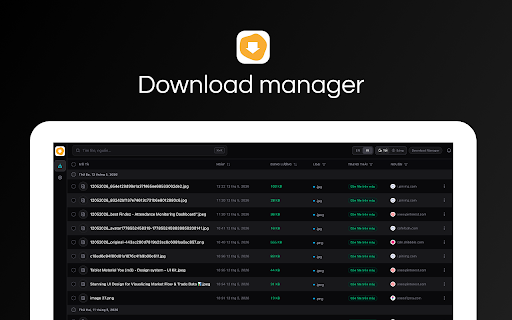
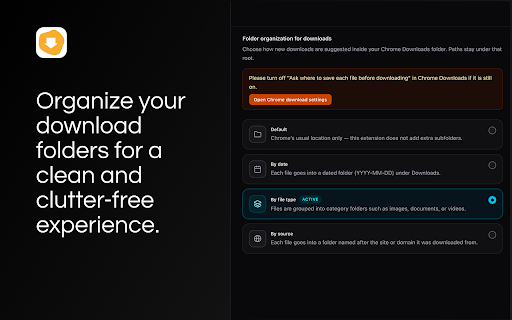
Download Manager is a browser extension that organizes downloaded files into smart folders based on date, file type, or source. It provides a streamlined interface for searching and filtering downloads and includes a specialized tool for saving images from restricted websites.

Developer:extension.vn
Version:1.0.2
Size:146KiB
Last updated:

Overview

Installs

793

Rating

5.0

1 reviews

Languages

2 locales

Includes English, Tiếng Việt

Market analysis

Review-backed positioning, friction, and market signals for this Chrome extension.

No review samples found

Macro category

Automation & Workflow Efficiency

Pricing friction

Low review signal

Complaint intensity

Low review signal

Listing & review signals
Observed signals from store listing text and review samples.

Listing positioning

The product is positioned as a modern, clean, and fast replacement for Chrome's native downloads page. It emphasizes efficiency through smart folder organization and improved file management capabilities.

Inferred product pattern

Native browser feature enhancement providing a superior UI and automated organization logic.

Review-backed pain points

Review-backed data is not available.

Observed feature gaps

The listing explicitly notes that some protected or restricted files may still be undownloadable due to website limitations.

Tags
Download ManagerFile OrganizationOpen SourceDark ModeProductivity
Target users

- Power users who download large volumes of files

- Users seeking better file organization

- Open-source software enthusiasts

Primary use cases

- Automatically sorting downloads into subfolders

- Searching and filtering download history

- Bypassing 'Save image as' restrictions on social media or CDNs

Positive themes

No positive theme data.

Negative themes

No negative theme data.

Observed friction

- No pricing friction observed; the product is presented as open-source.

Evidence boundary: Data extracted from the Chrome Web Store listing and developer GitHub reference. No user reviews were provided for analysis, limiting the ability to validate claims with user experience data.
Complaint summaries
Review-backed complaint signals grouped by operational area.

Support

Review-backed data is not available.

Reliability

Review-backed data is not available.

Privacy

Review-backed data is not available.

Access & pricing

- Free usage observed

- No account requirement observed

- Free plan or free usage claimed

Store listing facts

Listing assets

- Screenshots: 4

- Videos: 0

- Languages: 2

Trust signals

- Privacy policy

- Developer contact

- Official website

Store metadata

- Version: 1.0.2

- Size: 146KiB

- Last updated:

Store description excerpt
Short excerpt from the public Chrome Web Store listing; full copy is available on the official store page.
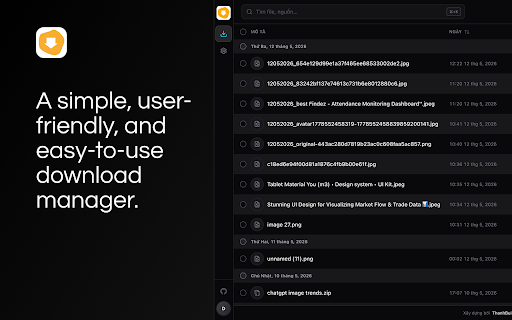
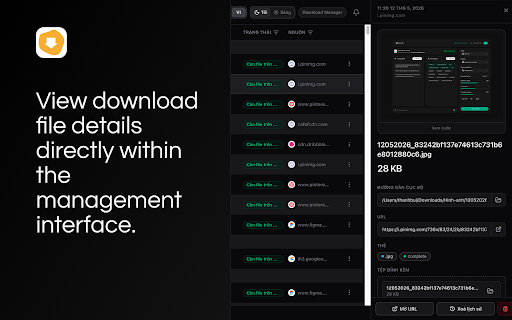
Download Manager is a clean, fast, and modern replacement for Chrome’s default downloads page—built to make managing your files simple, organized, and efficient. Open it from the toolbar or access it when visiting chrome://downloads. With a streamlined interface, you can quickly search, filter, and sort your downloads, view detailed file information, and take actions—all in one place. ✨ Key Features: 1. Modern download manager UI Easily browse your files with search, filters, sorting, grouping by date, and a detailed view for each download (file path, source, actions). 2. Smart file organization Keep your Downloads folder clean automatically: - Default (enhanced Chrome behavior) - By date (e.g. YYYY-MM-DD/) - By file type (images, videos, documents, code, etc.) - By source (website/hostname) 3. Custom file handling Configure additional file extensions and fine-tune how files are categor…

Listing SEO keywords

Search intent keywords
Keyword signals for evaluating how users may discover, compare, or search for this extension category.

Core discovery

Chrome download managerorganize Chrome downloadssmart download folderssave images from social media

Comparison

Chrome default downloads vs Download Managerbest download manager for Chrome

Problem

Chrome downloads messycannot save image from websitehow to organize downloads by date

Alternative

Chrome download manager alternativedownload folder organizer extension

Similar extensions

Jump to related discovery paths:

FAQ

What is Download Manager mainly used for?
Download Manager is a browser extension that organizes downloaded files into smart folders based on date, file type, or source. It provides a streamlined interface for searching and filtering downloads and includes a specialized tool for saving images from restricted websites.
What market signals stand out?
Early or small audience with limited review base. Last known update: 06/20/2026.
What should builders compare before entering this space?
Compare install concentration, rating quality, update recency, screenshots, developer portfolio, listing claims, and review-backed friction signals.
Is this page review-backed?
No review samples found. This page combines store metadata with selected review signals, while raw store metrics remain visible for comparison.

Screenshots

Download Manager screenshot

Links

Recommended Chrome extensions

Related listings from the same category, trending peers, and the same publisher portfolio.

Browse tools
Cookie Editor icon

Cookie Editor

extension.vn

Simple yet powerful Cookie Editor that allow you to quickly create, edit and delete cookies without leaving your tab.

Installs

100K+

Rating

4.3

Proxy Switcher and Manager icon

Proxy Switcher and Manager

extension.vn

Manage and switch proxies quickly from the side panel

Installs

5K+

Rating

4.8

Keywords Everywhere - Keyword Tool icon

Keywords Everywhere - Keyword Tool

Axeman Technology Solutions LLP

Keyword search volume, cpc and competition for 15+ websites like Google™ Search Console, YouTube™, Amazon™ & more

Installs

1.0M+

Rating

4.5

WebChatGPT: Prompt library with web access icon

WebChatGPT: Prompt library with web access

WebChatGPT

Augment your ChatGPT prompts with relevant web search results through web browsing.

Installs

1.0M+

Rating

4.2

Ecosia - The search engine that plants trees icon

Ecosia - The search engine that plants trees

Ecosia GmbH

This extension sets your search engine to Ecosia and customizes your new tab page so you can plant trees with every search.

Installs

1.0M+

Rating

4.7

BlockSite Block Websites & Stay Focused icon

BlockSite Block Websites & Stay Focused

BlockSite

Stay focused and boost productivity: Custom blocklist, Scheduled site blocking, and Password protection.

Installs

1.0M+

Rating

4.5

YouTube Summary with ChatGPT & Claude icon

YouTube Summary with ChatGPT & Claude

Glasp

Summarize YouTube videos, web articles, and PDFs to save time, powered by ChatGPT, Claude, Mistral AI, and Gemini.

Installs

1.0M+

Rating

4.3

Screen Recorder & Screenshot App for Chrome | Scrnli icon

Screen Recorder & Screenshot App for Chrome | Scrnli

scrnli

Screen recorder for Chrome: capture, edit, share screenshots and videos instantly

Installs

1.0M+

Rating

4.7

Transpose ▲▼ pitch ▹ speed ▹ loop icon

Transpose ▲▼ pitch ▹ speed ▹ loop

Tune73

Change the pitch and speed of music and loop sections directly on YouTube, Spotify and many other streaming platforms.

Installs

1.0M+

Rating

4.5

CSFloat Market Checker icon

CSFloat Market Checker

CSFloat Inc.

Shows the float value, paint seed, and more of Counter-Strike (CS:GO & CS2) items on the Steam Market or Inventories

Installs

1.0M+

Rating

3.9