Refractify Myopic Defocus icon

Refractify Myopic Defocus Chrome Extension Analysis

Niche Lifestyle & Gaming Hacks

Chrome extension ID: dpnfdlnkgojjihdmgmacnmheflkojijm

This extension modifies the visual rendering of websites by applying a specialized defocus overlay to help mitigate eye strain. Users can browse the web with the filter active to potentially reduce the physical eye impact of prolonged screen time. The tool is fully open-source with its code hosted publicly on GitHub.

Developer:Refractify
Version:1.2.0
Size:532KiB
Last updated:

Overview

Installs

2K+

Rating

4.0

6 reviews

Languages

1 locales

Includes English

Market analysis

Review-backed positioning, friction, and market signals for this Chrome extension.

Backed by review samples

Macro category

Niche Lifestyle & Gaming Hacks

Pricing friction

Low review signal

Complaint intensity

Moderate review signal

Listing & review signals
Observed signals from store listing text and review samples.

Listing positioning

Refractify Myopic Defocus is positioned as a research-informed eye wellness tool that applies a visual defocus effect to any website. The developer claims the effect mimics the physical refractive properties of the human eye to make screens appear as though they are at a greater distance. It is presented as an open-source, experimental extension aimed at myopia prevention.

Inferred product pattern

An open-source browser overlay utility designed to promote visual health through real-time CSS/GPU-driven rendering effects.

Review-backed pain points

The primary user pain point is a severe performance trade-off. Users report that running the visual filter causes significant browser lag, drops in video frame rates, and extremely high GPU utilization.

Observed feature gaps

Reviews indicate a critical need for rendering optimization to prevent GPU spikes. There is also an apparent lack of user-facing settings to adjust the intensity of the defocus effect or toggle performance-saving modes.

Tags
Eye CareMyopia PreventionScreen FilterVision Health
Target users

- Desk professionals experiencing screen-induced eye strain

- Users interested in experimental myopia prevention techniques

- Open-source software advocates

Primary use cases

- Simulating a myopic defocus effect during active web browsing

- Alleviating visual fatigue during long periods of computer use

Positive themes

- Initial eye comfort and relaxation during use

- Appreciation for innovative and novel wellness concepts

Negative themes

- Significant drop in browser frame rates and lag

- Excessive GPU utilization during extended use

- Noticeable lag on media-heavy websites like YouTube

Observed friction

- Performance complaints detected

- No pricing friction was observed as the extension is open-source and free to use.

Evidence boundary: Based on the official Chrome Web Store listing details, developer website information, and 4 user reviews in English and Chinese. The findings are limited by a small sample size of 6 total store reviews, meaning performance experiences may vary depending on individual hardware configurations.
Complaint summaries
Review-backed complaint signals grouped by operational area.

Support

There are no customer support, account blocking, or refund complaints registered in the available reviews.

Reliability

Users report substantial performance issues, specifically severe lag on certain websites, browser frame rate drops during video playback, and high GPU consumption.

Privacy

No privacy or security concerns have been raised by users in the available reviews.

Access & pricing

- Free usage observed

- No account requirement observed

- Free plan or free usage claimed

Store listing facts

Listing assets

- Screenshots: 1

- Videos: 0

- Languages: 1

Trust signals

- Privacy policy

- Developer contact

- Official website

Store metadata

- Version: 1.2.0

- Size: 532KiB

- Last updated:

Store description excerpt
Short excerpt from the public Chrome Web Store listing; full copy is available on the official store page.
Applies a Myopic Defocus effect on any website. This makes the screen look on the retina naturally as if it was at a greater distance. This effect is based on the physical refractive properties of the human eye. This effect is being researched for its myopia prevention properties. The source code is available on Github.

Listing SEO keywords

Search intent keywords
Keyword signals for evaluating how users may discover, compare, or search for this extension category.

Core discovery

myopic defocus chrome extensionscreen filter for myopiaeye strain reduction extensionrefractify browser tool

Comparison

refractify vs f.luxmyopic defocus vs blue light filter

Problem

how to prevent myopia from screensreduce computer eye strainchrome extension high GPU lag

Alternative

screen dimmerseye comfort extensionsblue light blockers

Similar extensions

Jump to related discovery paths:

FAQ

What is Refractify Myopic Defocus mainly used for?
This extension modifies the visual rendering of websites by applying a specialized defocus overlay to help mitigate eye strain. Users can browse the web with the filter active to potentially reduce the physical eye impact of prolonged screen time. The tool is fully open-source with its code hosted publicly on GitHub.
What market signals stand out?
Early or small audience with limited review base. Last known update: 02/10/2024.
What should builders compare before entering this space?
Compare install concentration, rating quality, update recency, screenshots, developer portfolio, listing claims, and review-backed friction signals.
Is this page review-backed?
Backed by review samples. This page combines store metadata with selected review signals, while raw store metrics remain visible for comparison.

Screenshots

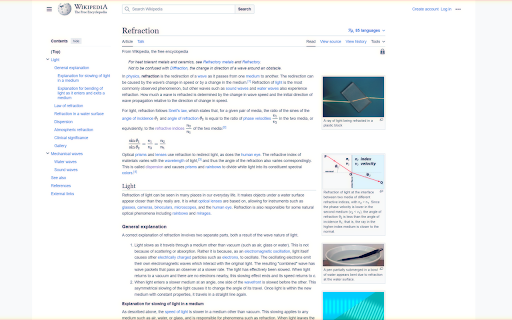
Refractify Myopic Defocus screenshot

Links

Recommended Chrome extensions

Related listings from the same category, trending peers, and the same publisher portfolio.

Browse well_being
AppBlock - Block sites & Stay focused icon

AppBlock - Block sites & Stay focused

MobileSoft s.r.o.

Block distracting webs and stay focused on your work.

Installs

50K+

Rating

4.7

eyeCare - Protect your vision icon

eyeCare - Protect your vision

sks.ideas

Notifies you in multiple ways to take breaks and helps you with eye exercises based on 20-20-20 rule and with lower back exercises.

Installs

50K+

Rating

4.3

Pikashow for PC - Windows and Mac icon

Pikashow for PC - Windows and Mac

info.prasathguru

The Extension provide Pikashow Features and Updates Status.

Installs

50K+

Rating

3.0

SocialFocus — Hide Feeds, Shorts & Distractions icon

SocialFocus — Hide Feeds, Shorts & Distractions

yevhen.tretiakov

Hide distractions on social media.

Installs

40K+

Rating

4.6

Time Tracker - Web Habit Builder icon

Time Tracker - Web Habit Builder

Victor Zhang

Track time, analyze your habits and block addictive sites

Installs

20K+

Rating

4.9

color picker for website - monster pick icon

color picker for website - monster pick

andrewlevin144

Get color from web pages, color picker, color extractor. Free, faster, better than Color picker, color pick, Eyedropper, Colorzilla

Installs

20K+

Rating

5.0

Recipes icon

Recipes

Recipes

Bring the joy of cooking to your browser! Recipes App enhances your search experience by setting your default search to…

Installs

20K+

Rating

Water Reminder icon

Water Reminder

Dylan B.

Choose to have an audio, visual, or audio and visual reminder to take a drink, along with a wide audio selection.

Installs

20K+

Rating

4.5

PostureMinder icon

PostureMinder

msherringbone

Reminds you to sit up straight with pop-up notifications at specified time intervals.

Installs

20K+

Rating

4.4

Advanced Profanity Filter icon

Advanced Profanity Filter

FrostCo LLC

Advanced Profanity Filter helps to clean up bad language on the websites you and your family visit.

Installs

10K+

Rating

4.5