TinySketch icon

TinySketch Chrome Extension Analysis

Niche Lifestyle & Gaming Hacks

Chrome extension ID: eekbbmglbfldjpgbmajenafphnfjonnc

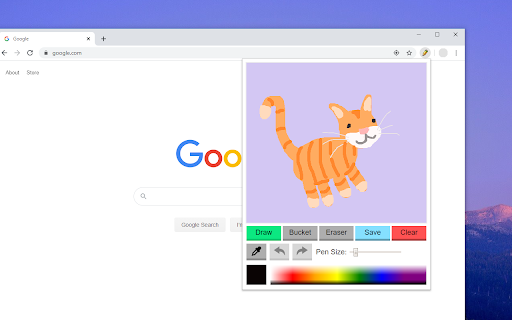
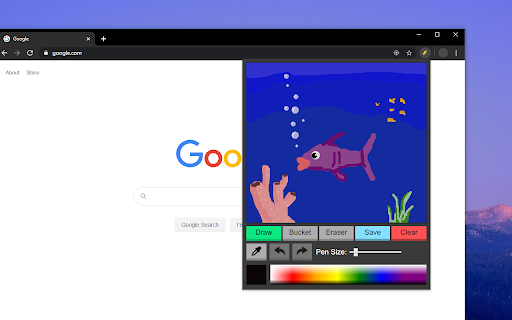
An objective browser-based sketching tool that provides users with a digital canvas. It includes essential tools such as a pen, eraser, bucket fill, and eyedropper, supporting both mouse and touchscreen input.

Developer:Adam Howard
Version:3.2.1
Size:22.21KiB
Last updated:

Overview

Installs

100K+

Rating

4.1

294 reviews

Languages

1 locales

Includes English

Market analysis

Review-backed positioning, friction, and market signals for this Chrome extension.

Backed by review samples

Macro category

Niche Lifestyle & Gaming Hacks

Pricing friction

Low review signal

Complaint intensity

Moderate review signal

Listing & review signals
Observed signals from store listing text and review samples.

Listing positioning

TinySketch is positioned as a simple, free utility for users to create and save quick, fun drawings directly within the Chrome browser. The listing emphasizes a low-friction experience with one-click drawing and basic editing tools.

Inferred product pattern

Single-purpose casual utility tool provided for free to a mass audience for non-professional use.

Review-backed pain points

Users are frustrated by the limited color selection (specifically missing cyan and magenta), the bucket tool failing to fill similar colors, and the absence of a zoom function.

Observed feature gaps

Missing advanced geometric shapes (circles, squares), a professional color wheel, a zoom tool, and the ability to name or organize saved drawings.

Tags
Drawing ToolDigital SketchingQuick SketchFun Utility
Target users

- Casual browser users

- Digital doodlers

- Students

- Users needing quick visual notes

Primary use cases

- Quick sketching while browsing

- Creating simple digital doodles

- Making basic visual annotations

Positive themes

- Simplicity and ease of use

- Useful for quick, non-professional sketching

- Appreciation for basic tools like bucket fill and eraser

Negative themes

- Limited color palette/gamut

- Buggy bucket fill tool

- Lack of advanced drawing shapes

- Inconsistent undo button functionality

Observed friction

- No pricing friction observed; product is claimed to be free.

Evidence boundary: Data extracted from the store listing and 10 representative user reviews. Review sample is a small subset of total users; no external website provided for deeper policy analysis.
Complaint summaries
Review-backed complaint signals grouped by operational area.

Support

No support or account-related complaints observed in the provided samples.

Reliability

Some users report reliability issues with the bucket fill tool and the undo button.

Privacy

No privacy or security complaints observed.

Access & pricing

- Free usage observed

- No account requirement observed

- Free plan or free usage claimed

Store listing facts

Listing assets

- Screenshots: 2

- Videos: 0

- Languages: 1

Trust signals

- Developer contact

Store metadata

- Version: 3.2.1

- Size: 22.21KiB

- Last updated:

Store description excerpt
Short excerpt from the public Chrome Web Store listing; full copy is available on the official store page.
TinySketch is a simple to use free extension that allows you to create and save quick and fun drawings while using Chrome! ——————————————————————————————————————— NEW FEATURES in Version 3: - Undo / Redo Buttons! About time right? - Dark mode! If your browser uses dark mode SketchPad updates accordingly. - Most recent used pen size and color are saved! Other Features: Touchscreen support, pen & eraser resizing, auto-saved drawings, bucket fill tool, eyedropper tool, and larger color palette!

Listing SEO keywords

Search intent keywords
Keyword signals for evaluating how users may discover, compare, or search for this extension category.

Core discovery

chrome drawing extensionbrowser sketch toolfree online doodle padbrowser paint tool

Comparison

TinySketch vs SketchbookTinySketch vs Ibis Paintbest browser drawing extension

Problem

how to draw in chromequick sketch browser toolsimple digital doodle extension

Alternative

TinySketch alternativesfree browser sketch pad

Similar extensions

Jump to related discovery paths:

FAQ

What is TinySketch mainly used for?
An objective browser-based sketching tool that provides users with a digital canvas. It includes essential tools such as a pen, eraser, bucket fill, and eyedropper, supporting both mouse and touchscreen input.
What market signals stand out?
Established adoption with moderate review base. Last known update: 06/05/2025.
What should builders compare before entering this space?
Compare install concentration, rating quality, update recency, screenshots, developer portfolio, listing claims, and review-backed friction signals.
Is this page review-backed?
Backed by review samples. This page combines store metadata with selected review signals, while raw store metrics remain visible for comparison.

Screenshots

TinySketch screenshot

Recommended Chrome extensions

Related listings from the same category, trending peers, and the same publisher portfolio.

Browse fun