Capturables - All You Need Is Capture icon

Capturables Chrome Extension Analysis

Video & Image Downloaders

Store listing title: Capturables - All You Need Is Capture

Chrome extension ID: efgcpheifanopniaglaoeeecglncljkf

A Chrome extension that allows users to record various types of web content, including tabs and media elements, as video files. It utilizes browser-native capture capabilities and provides warnings regarding CPU and RAM consumption.

Developer:loadmonkey
Version:1.2.8
Size:103KiB
Last updated:

Overview

Installs

50K+

Rating

4.3

90 reviews

Languages

2 locales

Includes English, 日本語

Market analysis

Review-backed positioning, friction, and market signals for this Chrome extension.

Backed by review samples

Macro category

Video & Image Downloaders

Pricing friction

Low review signal

Complaint intensity

Moderate review signal

Listing & review signals
Observed signals from store listing text and review samples.

Listing positioning

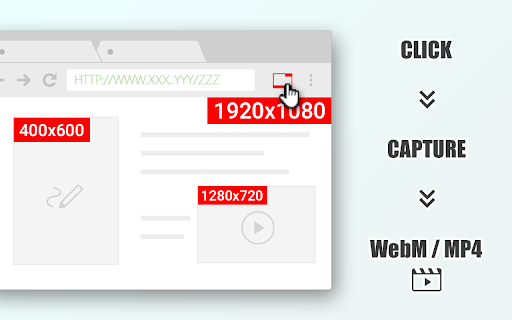
The product is positioned as a versatile tool to capture browser tabs, video/canvas elements, and entire screens, saving them specifically as video files. It emphasizes simplicity and intuitive use while explicitly stating it is a capture tool, not a downloader.

Inferred product pattern

Browser-native media capture utility for archiving web content.

Review-backed pain points

Users frequently report a 'RenderError: No recovery is possible' which leads to the total loss of recorded data. There are also significant complaints regarding the extension hanging during the saving process and failing to capture audio on various sites.

Observed feature gaps

Lack of AV1 codec support (users noted preference over VP8) and the absence of a file-splitting feature for large recordings to prevent data loss.

Tags
Screen CaptureTab RecorderVideo CaptureWeb Archiving
Target users

- Content creators

- Web researchers

- Users archiving streaming content

- Tutorial creators

Primary use cases

- Recording browser tab activity

- Capturing web-based video elements

- Saving canvas animations as video

- Full screen recording

Positive themes

No positive theme data.

Negative themes

- Technical instability and crashes

- Audio capture failure

- High system resource consumption

- Data loss on long recordings

Observed friction

- Performance complaints detected

- No pricing friction observed in provided data.

Evidence boundary: Analysis based on the store listing and 10 provided review samples. No high-rating review samples were provided, preventing the extraction of positive themes despite the high average store score.
Complaint summaries
Review-backed complaint signals grouped by operational area.

Support

No direct support interaction complaints, but users express frustration over recurring bugs.

Reliability

Severe reliability issues reported, including 'Network_failed' and 'RenderError' messages that result in the loss of hours of recording.

Privacy

No privacy complaints observed.

Access & pricing

- Free usage observed

- No account requirement observed

- Free plan or free usage claimed

Store listing facts

Listing assets

- Screenshots: 1

- Videos: 0

- Languages: 2

Trust signals

- Privacy policy

- Developer contact

- Official website

Store metadata

- Version: 1.2.8

- Size: 103KiB

- Last updated:

Store description excerpt
Short excerpt from the public Chrome Web Store listing; full copy is available on the official store page.
#### Note #### This is not a downloader. It also cannot capture screens as image files. Capture any content on a tab, taking full advantage of the latest features available in the browser. Captures can be of entire tabs, video elements, canvas elements, media sources, entire windows, and entire screens. Very intuitive and simple to use. All capture results are saved as "video files". Screen capture consumes significant CPU resources depending on resolution and quality to encode the video internally. Depending on your PC environment, the frame rate may be reduced, or frames may drop if the processing is not completed in time. In most cases, video and audio quality will be degraded because the video is not downloaded, but only captured and saved. Please note that this extension is not responsible for the content of any media you captured. We recommend ensuring the copyright and permission…

Listing SEO keywords

Search intent keywords
Keyword signals for evaluating how users may discover, compare, or search for this extension category.

Core discovery

capture browser tabsave web videorecord canvas elementchrome screen recorder

Comparison

Capturables vs Stream Recorder

Problem

save video from tabrecord web contentbrowser tab to video

Alternative

Stream Recorder alternativeweb video capture tool

Similar extensions

Jump to related discovery paths:

FAQ

What is Capturables mainly used for?
A Chrome extension that allows users to record various types of web content, including tabs and media elements, as video files. It utilizes browser-native capture capabilities and provides warnings regarding CPU and RAM consumption.
What market signals stand out?
Visible niche traction with limited review base. Last known update: 08/06/2024.
What should builders compare before entering this space?
Compare install concentration, rating quality, update recency, screenshots, developer portfolio, listing claims, and review-backed friction signals.
Is this page review-backed?
Backed by review samples. This page combines store metadata with selected review signals, while raw store metrics remain visible for comparison.

Screenshots

Capturables - All You Need Is Capture screenshot

Links

Recommended Chrome extensions

Related listings from the same category, trending peers, and the same publisher portfolio.

Browse tools