

Tabs Outliner Chrome Extension Analysis
Automation & Workflow EfficiencyChrome extension ID: eggkanocgddhmamlbiijnphhppkpkmkl
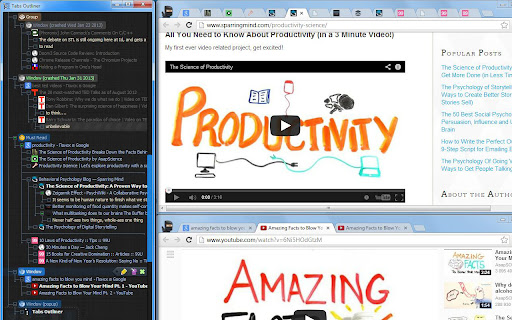
Tabs Outliner is a browser extension that combines tab management, session management, and a tree-like personal information organizer. It allows users to close and save tabs within their original context, freeing up system resources while keeping them accessible. The tool aims to reduce mental load and prevent data loss from browser crashes.
Overview
Installs
100K+
Rating
★ 4.4
3,324 reviews
Languages
1 locales
Includes English
Market analysis
Review-backed positioning, friction, and market signals for this Chrome extension.
Macro category
Automation & Workflow Efficiency
Pricing friction
Low review signal
Complaint intensity
High review signal
Listing positioning
Tabs Outliner is presented as a next-generation session manager and browsing notebook, designed to tackle the problem of having too many open tabs. It emphasizes its ability to reduce cognitive overload and serve as a 'secondary brain' for users, particularly those with ADHD, by visually organizing and saving workflows without losing context.
Inferred product pattern
A tab and session management tool that organizes browsing history and links into a tree-like structure, with optional paid features for enhanced functionality. The product appears to have had periods of active development but is now facing significant user-reported functionality and support issues.
Review-backed pain points
Users report that the extension has become non-functional, with features like reopening tabs and accessing paid features no longer working. Some users experienced data loss and frustration due to the developer's lack of response and the project's apparent abandonment.
Observed feature gaps
Based on reviews, there are significant concerns about the extension's current functionality and maintenance. Specific issues include the inability to launch saved windows/tabs, loss of paid feature access, and the developer's silence regarding these problems, indicating a potential gap in ongoing support and updates.
- Power users with many open tabs
- Individuals experiencing information overload
- Users with ADHD
- Professionals seeking workflow organization
- Managing and organizing a large number of open tabs
- Saving and restoring browsing sessions
- Organizing information and notes within a hierarchical structure
- Recovering from browser crashes or system restarts
- Effective tab and session organizer
- Useful for session recovery
- Great for tab hoarders (when functional)
- Extension is defunct and non-functional
- Paid features not working or not disclosed upfront
- Developer is unresponsive and project appears abandoned
- Loss of functionality after Chrome updates
- Performance complaints detected
- One review mentioned the surprise of having to pay for basic features like keyboard shortcuts after initially believing the software was free or shared generously, indicating a potential disclosure issue with the pricing model.
Support
Multiple reviews highlight the developer's unresponsiveness to emails and support inquiries, as well as the removal of support forums, leading to a perception of an abandoned project and a lack of customer support.
Reliability
Users report that the extension is defunct and non-functional, with features like launching tabs and sessions no longer working. This lack of reliability is a primary complaint, with some users noting that it breaks after Chrome updates and is no longer maintained.
Privacy
No direct privacy complaints were observed. However, one review noted a warning from Chrome that the extension's website was trying to steal information, suggesting potential website security issues rather than extension-level privacy concerns.
- Free entry with paid features
- No clear access signal
- Limited free usage observed
Store listing facts
- Screenshots: 1
- Videos: 1
- Languages: 1
- Privacy policy
- Developer contact
- Official website
- Version: 1.4.167
- Size: 1.46MiB
- Last updated:
Listing SEO keywords
Core discovery
Comparison
Problem
Alternative
Similar extensions
Jump to related discovery paths:
FAQ
Screenshots
Links
Website: tabsoutliner.com
Privacy policy: https://sites.google.com/view/tabsoutliner-privacy-policy
Videos: Watch