MP3 Converter icon

MP3 Converter Chrome Extension Analysis

Video & Image Downloaders

Chrome extension ID: flildjghnbmjppbenicihiaaadkpkika

This tool enables users to convert various audio and video files into MP3 format directly within the browser. It processes files locally using either native browser decoders or an integrated FFmpeg-based engine, allowing users to save the output to their default download folder.

Developer:balvin.perrie
Version:0.4.3
Size:9.87MiB
Last updated:

Overview

Installs

50K+

Rating

4.3

91 reviews

Languages

6 locales

Includes Deutsch, English, Nederlands, français...

Market analysis

Review-backed positioning, friction, and market signals for this Chrome extension.

Backed by review samples

Macro category

Video & Image Downloaders

Pricing friction

Low review signal

Complaint intensity

Moderate review signal

Listing & review signals
Observed signals from store listing text and review samples.

Listing positioning

The extension positions itself as a local, pure-JavaScript tool for converting media files to MP3 format. It emphasizes ease of use through drag-and-drop functionality, context menu integration, and support for both local files and remote links.

Inferred product pattern

Client-side media conversion utility utilizing browser native APIs and WASM-based FFmpeg.

Review-backed pain points

The most significant pain point is user expectation regarding YouTube integration; many users seek the tool for downloading YouTube content, which the extension does not support, leading to negative feedback.

Observed feature gaps

Lack of direct YouTube link support (despite user demand) and potential performance degradation when processing large files within the browser context.

Tags
Audio ConverterMedia UtilityFile ConversionMP3FFmpeg
Target users

- Audiobook listeners

- Content creators

- General file format converters

Primary use cases

- Converting local video files to audio

- Extracting audio from online media links

- ID3 tag management

Positive themes

- Ease of use

- Simplicity of interface

- Effectiveness with long-duration files

- No unnecessary bloat

Negative themes

- Inability to download YouTube links

- Broken functionality after site updates

- Performance lag during conversion

Observed friction

- Performance complaints detected

- No pricing friction identified; the extension appears to be free with no clear monetization triggers in user reviews.

Evidence boundary: The analysis is based on 91 reviews and the provided extension listing, confirming high user satisfaction for file conversion but significant expectation misalignment regarding YouTube. Review data is limited to a subset of comments and does not represent the full user base of 60,000 users.
Complaint summaries
Review-backed complaint signals grouped by operational area.

Support

Users occasionally express frustration regarding feature breakage following external website updates, rather than a lack of developer support.

Reliability

Some users report occasional lag or complete failure to convert specific media formats, particularly when browser-native engines struggle with certain file types.

Privacy

None observed.

Access & pricing

- Free usage observed

- No account requirement observed

- Free plan or free usage claimed

Store listing facts

Listing assets

- Screenshots: 1

- Videos: 1

- Languages: 6

Trust signals

- Privacy policy

- Developer contact

- Official website

Store metadata

- Version: 0.4.3

- Size: 9.87MiB

- Last updated:

Store description excerpt
Short excerpt from the public Chrome Web Store listing; full copy is available on the official store page.
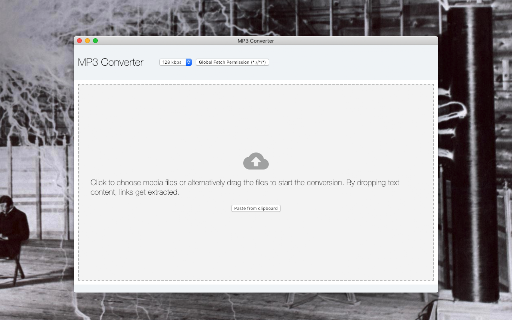
This extension adds a button to the toolbar area which brings up the actual conversion tool. Just drop one or multiple media files (both video or audio types are supported) and wait for the extension to convert audio streams to MP3 format. After a successful conversion, files will be placed in your default download directory. You can press each item in the UI to navigate to the converted MP3 file. Conversion Process: local files -> read content -> decode -> convert remote files -> download -> decode -> convert Note that you can copy media links to the clipboard and then use the "Parse content from clipboard" option to extract media links from the clipboard. Also, it is possible to select media links in a browser tab and drop selection into the converter window. The extension will extract all the links and convert media links Notes: 1. This extension uses pure JavaScript engine to conver…

Listing SEO keywords

Search intent keywords
Keyword signals for evaluating how users may discover, compare, or search for this extension category.

Core discovery

MP3 converter extensionconvert video to audio chromeextract audio from file

Comparison

online mp3 converter vs extensionbest audio converter chrome

Problem

converter not workingcannot convert youtube video

Alternative

ffmpeg browser toolaudio extraction extension

Similar extensions

Jump to related discovery paths:

FAQ

What is MP3 Converter mainly used for?
This tool enables users to convert various audio and video files into MP3 format directly within the browser. It processes files locally using either native browser decoders or an integrated FFmpeg-based engine, allowing users to save the output to their default download folder.
What market signals stand out?
Visible niche traction with limited review base. Last known update: 08/09/2025.
What should builders compare before entering this space?
Compare install concentration, rating quality, update recency, screenshots, developer portfolio, listing claims, and review-backed friction signals.
Is this page review-backed?
Backed by review samples. This page combines store metadata with selected review signals, while raw store metrics remain visible for comparison.

Screenshots

MP3 Converter screenshot

Links

Recommended Chrome extensions

Related listings from the same category, trending peers, and the same publisher portfolio.

Browse tools