Picture in Picture - floating video player icon

Picture in Picture Chrome Extension Analysis

Tab & Bookmark Productivity

Store listing title: Picture in Picture - floating video player

Chrome extension ID: gmehookibnphigonphocphhcepbijeen

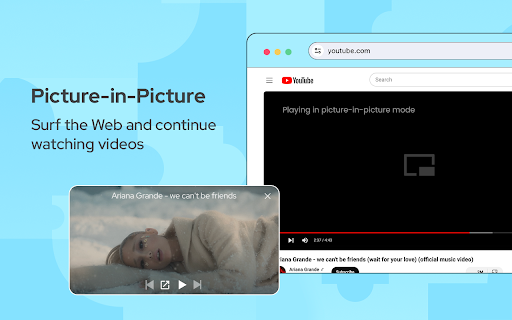
A productivity tool that enables Picture-in-Picture (PiP) mode for web-based videos. It creates a floating window that stays visible even when the user interacts with other browser tabs or applications.

Developer:PiP Extensions
Version:1.0.6
Size:34.25KiB
Last updated:

Overview

Installs

400K+

Rating

4.5

424 reviews

Languages

24 locales

Includes Deutsch, English, English (United States), Indonesia...

Market analysis

Review-backed positioning, friction, and market signals for this Chrome extension.

Backed by review samples

Macro category

Tab & Bookmark Productivity

Pricing friction

Low review signal

Complaint intensity

High review signal

Listing & review signals
Observed signals from store listing text and review samples.

Listing positioning

The extension is positioned as a universal floating video player that allows users to watch videos on any platform or streaming site while browsing other tabs. It emphasizes an 'always-on-top' functionality that can be repositioned along the screen borders.

Inferred product pattern

A utility-based multitasking tool that relies on overlaying video content, currently facing significant compatibility issues with DRM-protected streaming content.

Review-backed pain points

Users frequently report that the extension fails to work on major streaming services like Netflix and lacks support for closed captions (CC) or position memory.

Observed feature gaps

Lack of closed caption support and failure to remember the last window position.

Tags
Picture In PictureFloating Video PlayerVideo OverlayMultitasking Tool
Target users

- Video streamers

- Multitaskers

- General web users

Primary use cases

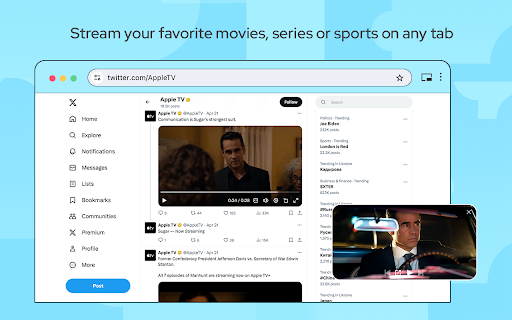
- Watching movies or series while surfing the web

- Multitasking with video content

Positive themes

- No high-rating review samples provided for positive theme extraction.

Negative themes

- Broken functionality on specific streaming sites

- Lack of feature parity with native browser PiP

- Inconsistent reliability

Observed friction

- Performance complaints detected

- No pricing friction mentioned in the provided review samples.

Evidence boundary: Analysis based on store listing descriptions and a sample of low-rating reviews highlighting compatibility issues. The review sample provided consists entirely of low-rating reviews, which may not represent the full sentiment of the 400,000+ users.
Complaint summaries
Review-backed complaint signals grouped by operational area.

Support

No support or account complaints identified in the provided samples.

Reliability

Significant complaints regarding the extension's inability to function reliably, particularly with Netflix and other video players.

Privacy

No privacy or security complaints identified in the provided samples.

Access & pricing

- No clear monetization signal

- No account requirement observed

- No clear pricing signal

Store listing facts

Listing assets

- Screenshots: 3

- Videos: 0

- Languages: 24

Trust signals

- Privacy policy

- Developer contact

- Official website

Store metadata

- Version: 1.0.6

- Size: 34.25KiB

- Last updated:

Store description excerpt
Short excerpt from the public Chrome Web Store listing; full copy is available on the official store page.
Picture-in Picture Extension (PiP) lets you play any video in floating video player mode, and it works on all platforms. PiP is a popped-out, always-on-top video player that floats on top of other windows. You can also reposition it along the screen border while you continue to surf the internet. Now stream your favorite movies, series or sports on any tab. Install Picture in Picture Chrome extension to enable the floating video. We support this feature on every streaming site. What is the mode and how it will be useful for you? You can also reposition it along the screen border while you continue to surf the internet. Allows you to watch videos in a floating window (always on top of other windows) so you can keep track of what you are watching when interacting with other sites or applications. Just click on the app icon to display the video player on YouTube or any other websites on th…

Listing SEO keywords

Search intent keywords
Keyword signals for evaluating how users may discover, compare, or search for this extension category.

Core discovery

Picture in PictureFloating Video PlayerPiP ExtensionAlways on top video

Comparison

Google PiPSafari PiP

Problem

Netflix PiP not workingfloating video player not workingPiP extension broken

Alternative

Video overlayFloating window player

Similar extensions

Jump to related discovery paths:

FAQ

What is Picture in Picture mainly used for?
A productivity tool that enables Picture-in-Picture (PiP) mode for web-based videos. It creates a floating window that stays visible even when the user interacts with other browser tabs or applications.
What market signals stand out?
Established adoption with moderate review base. Last known update: 02/06/2025.
What should builders compare before entering this space?
Compare install concentration, rating quality, update recency, screenshots, developer portfolio, listing claims, and review-backed friction signals.
Is this page review-backed?
Backed by review samples. This page combines store metadata with selected review signals, while raw store metrics remain visible for comparison.

Screenshots

Picture in Picture - floating video player screenshot

Links