Word Replacer Max icon

Word Replacer Max Chrome Extension Analysis

Automation & Workflow Efficiency

Chrome extension ID: gnemoflnihonmkiacnagnbnlppkamfgo

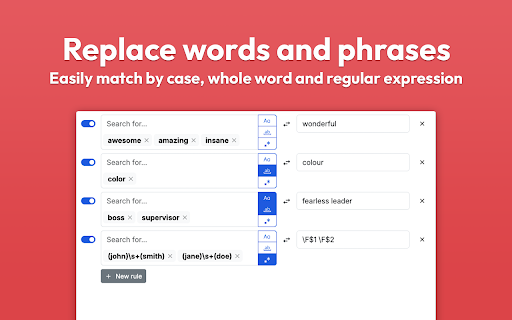
Word Replacer Max is a Chrome extension that allows users to set up rules to automatically replace specific text on web pages. It supports case sensitivity, whole word matching, and visual highlights for replaced text.

Developer:dan-lovelace
Version:0.21.0
Size:984KiB
Last updated:

Overview

Installs

10K+

Rating

4.3

43 reviews

Languages

1 locales

Includes English

Market analysis

Review-backed positioning, friction, and market signals for this Chrome extension.

Backed by review samples

Macro category

Automation & Workflow Efficiency

Pricing friction

Low review signal

Complaint intensity

Moderate review signal

Listing & review signals
Observed signals from store listing text and review samples.

Listing positioning

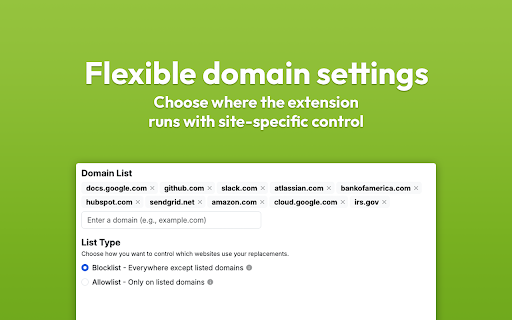
The product positions itself as a smart and powerful tool for automatically transforming text across the web. It emphasizes granular control through domain settings, pattern matching (including regex), and visual styling options.

Inferred product pattern

A utility-driven browser enhancement tool focused on localized text manipulation and web customization.

Review-backed pain points

Users reported that configuration settings are sometimes wiped randomly when exiting the browser, and some users experienced blank pages when using the extension on specific sites like X.com.

Observed feature gaps

Users expressed a desire for the ability to bulk-apply multiple replacement rules (such as simultaneous case and regex matching) to reduce manual effort.

Tags
Text ReplacementPattern MatchingBrowser UtilityProductivity Tool
Target users

- Content Creators

- Power Users

- Language Learners

Primary use cases

- Punctuation correction

- Web page personalization

- Meme creation

- Automated text formatting

Positive themes

- Effective punctuation and symbol replacement

- Capability to work within complex web apps like Notion

- Support for browser sync

Negative themes

- Inability to interact with certain input fields

- Loss of configuration settings upon browser restart

- Interference with page loading

Observed friction

- Performance complaints detected

- No pricing friction observed in the provided data.

Evidence boundary: Evidence derived from the store listing's feature set and user reviews covering functionality, reliability, and specific use cases. The analysis is based on a limited sample of 42 reviews.
Complaint summaries
Review-backed complaint signals grouped by operational area.

Support

No support complaints observed.

Reliability

Users reported reliability issues including settings being wiped and instances of the extension causing web pages to load blank.

Privacy

No privacy complaints observed; the listing claims rules stay private on the user's device.

Access & pricing

- No clear monetization signal

- No account requirement observed

- No clear pricing signal

Store listing facts

Listing assets

- Screenshots: 4

- Videos: 0

- Languages: 1

Trust signals

- Privacy policy

- Developer contact

- Official website

Store metadata

- Version: 0.21.0

- Size: 984KiB

- Last updated:

Store description excerpt
Short excerpt from the public Chrome Web Store listing; full copy is available on the official store page.
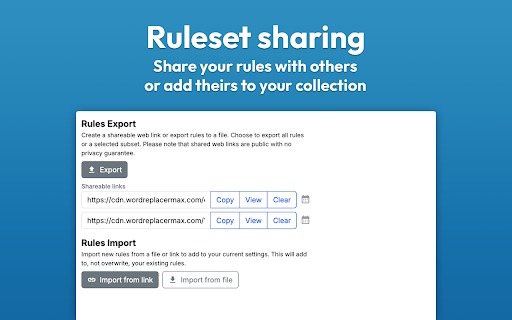
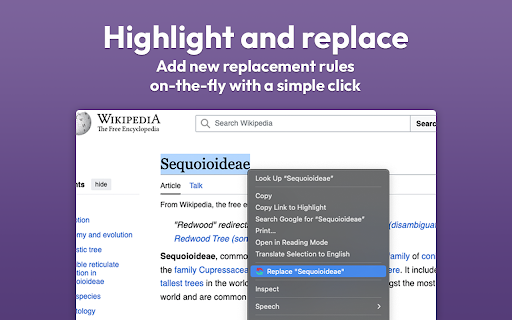
⚡️ Smart Text Replacement Set up rules to automatically transform text across the web. 🌐 Domain Controls Specify which sites your rules apply to using allow or block lists. 🤝 Share & Import Exchange rule sets with friends and teammates to share useful replacements. 🎯 Pattern Matching Fine-tune rules using whole word, case sensitivity, or regular expressions for exact control. 🎨 Visual Styling Optionally highlight changes with styles such as bold, italic, underline, or background colors to make them stand out. ✂️ Quick Replace Create new rules instantly by right-clicking text on any webpage. 🌗 Dark Mode Eye comfort for all times of day. -------------------------------------------------- Getting Started: 1. Install Word Replacer Max 2. Click the extension icon in your toolbar 3. Create your first replacement rule 4. Start browsing with your personalized web experience ---------------…

Listing SEO keywords

Search intent keywords
Keyword signals for evaluating how users may discover, compare, or search for this extension category.

Core discovery

text replacerregex text replacementword replacement extensionreplace text on websiteautomatic text replacement

Comparison

text replacement extensionsword replacer alternatives

Problem

replace text in notionautomatic punctuation fixerweb text transformer

Alternative

text replacerword replacement

Similar extensions

Jump to related discovery paths:

FAQ

What is Word Replacer Max mainly used for?
Word Replacer Max is a Chrome extension that allows users to set up rules to automatically replace specific text on web pages. It supports case sensitivity, whole word matching, and visual highlights for replaced text.
What market signals stand out?
Visible niche traction with limited review base. Last known update: 04/05/2026.
What should builders compare before entering this space?
Compare install concentration, rating quality, update recency, screenshots, developer portfolio, listing claims, and review-backed friction signals.
Is this page review-backed?
Backed by review samples. This page combines store metadata with selected review signals, while raw store metrics remain visible for comparison.

Screenshots

Word Replacer Max screenshot

Links

Recommended Chrome extensions

Related listings from the same category, trending peers, and the same publisher portfolio.

Browse well_being