SEO Checker icon

SEO Checker Chrome Extension Analysis

SEO & Traffic Analytics

Chrome extension ID: gnndagpbnededcmcgkooncejememefhf

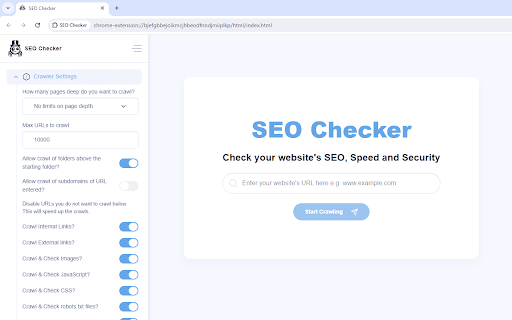
A technical website auditing tool that checks page titles, meta descriptions, headings, URLs, and broken links. It also includes security checks and specialized analysis for AI/LLM crawler optimization.

Developer:Akash
Version:1.4
Size:960KiB
Last updated:

Overview

Installs

8K+

Rating

4.7

14 reviews

Languages

6 locales

Includes Deutsch, English, Nederlands, español...

Market analysis

Review-backed positioning, friction, and market signals for this Chrome extension.

Backed by review samples

Macro category

SEO & Traffic Analytics

Pricing friction

Low review signal

Complaint intensity

Low review signal

Listing & review signals
Observed signals from store listing text and review samples.

Listing positioning

The product positions itself as an easy-to-use browser extension that identifies SEO, speed, and security issues before visitors do. It emphasizes the ability to scan thousands of pages to provide clear guidance on technical fixes.

Inferred product pattern

Browser-based lightweight technical SEO and security crawler for rapid site health checks.

Review-backed pain points

One user reported that the tool is slow and less comprehensive than Screaming Frog.

Observed feature gaps

Lack of depth for power users compared to desktop tools; user interest expressed in YouTube analytics integration.

Tags
SEO AuditWebsite SpeedSecurity ScannerTechnical SEOAI Optimization
Target users

- Website owners

- Beginner SEO specialists

- Web developers

- Non-technical site administrators

Primary use cases

- Technical SEO auditing

- Page speed optimization

- Security vulnerability scanning

- LLM crawler optimization

Positive themes

- User-friendly interface

- Cost-effective alternative to expensive tools

- Quick insights for non-experts

- Easier to use than complex desktop software

Negative themes

- Performance speed issues

- Lack of depth compared to professional crawlers

Observed friction

- Performance complaints detected

- No significant friction; users describe it as a great alternative to expensive tools.

Evidence boundary: Data extracted from the Chrome Web Store listing and 10 user review samples. Small sample size of available reviews relative to total user base.
Complaint summaries
Review-backed complaint signals grouped by operational area.

Support

No support or account-related complaints observed in the provided samples.

Reliability

One report of slow performance when compared to Screaming Frog.

Privacy

No privacy or security complaints observed in the provided samples.

Access & pricing

- Free entry with paid features

- No clear access signal

- Limited free usage observed

Store listing facts

Listing assets

- Screenshots: 5

- Videos: 1

- Languages: 6

Trust signals

- Privacy policy

- Developer contact

- Official website

- Support link

Store metadata

- Version: 1.4

- Size: 960KiB

- Last updated:

Store description excerpt
Short excerpt from the public Chrome Web Store listing; full copy is available on the official store page.
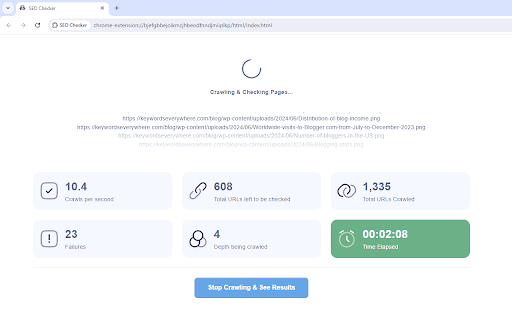
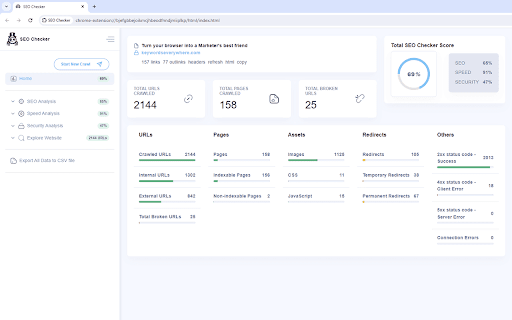
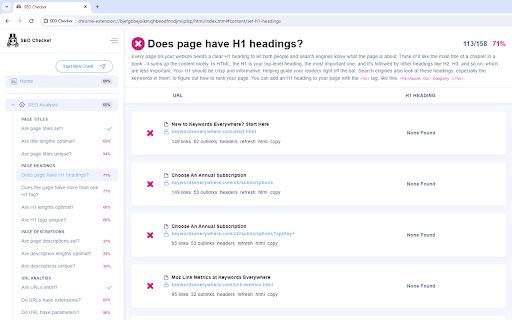
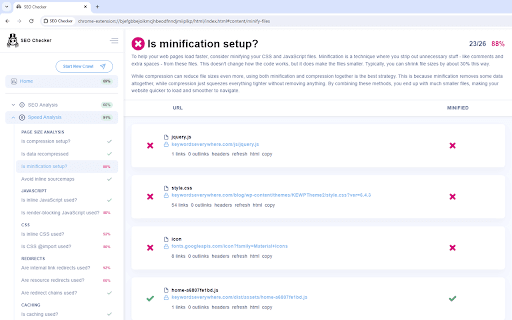
SEO Checker is an easy to use browser extension designed to help you optimize your website's SEO, page speed, and security. It efficiently scans thousands of pages on your site, pinpointing issues and providing clear guidance on how to fix them. Here's what SEO Checker checks for you: - Page Titles & Meta Descriptions: It scans your site's page titles and meta descriptions to identify those that are too long, too short, missing, or duplicated, helping you optimize these critical elements. - Page Headings: It checks if each page has a unique and properly optimized H1 heading. - URLs: It ensures your website's URLs follow best practices, making them easy to read and SEO-friendly. - Content Analysis: It looks for duplicate or thin content, checks if images have proper meta tags, and assesses how well your content works on mobile devices. - Broken Links: It identifies broken links (404 erro…

Listing SEO keywords

Search intent keywords
Keyword signals for evaluating how users may discover, compare, or search for this extension category.

Core discovery

SEO checker extensionwebsite speed audit tooltechnical SEO scanneron-page SEO analyzer

Comparison

SEO Checker vs Screaming Frogbest free SEO extensions

Problem

fix broken linksoptimize meta descriptionsslow website speedAI crawler optimization

Alternative

Screaming Frog alternativefree technical SEO tool

Similar extensions

Jump to related discovery paths:

FAQ

What is SEO Checker mainly used for?
A technical website auditing tool that checks page titles, meta descriptions, headings, URLs, and broken links. It also includes security checks and specialized analysis for AI/LLM crawler optimization.
What market signals stand out?
Early or small audience with limited review base. Last known update: 06/15/2026.
What should builders compare before entering this space?
Compare install concentration, rating quality, update recency, screenshots, developer portfolio, listing claims, and review-backed friction signals.
Is this page review-backed?
Backed by review samples. This page combines store metadata with selected review signals, while raw store metrics remain visible for comparison.

Screenshots

SEO Checker screenshot

Links

Recommended Chrome extensions

Related listings from the same category, trending peers, and the same publisher portfolio.

Browse tools