TinEye Reverse Image Search icon

TinEye Reverse Image Search Chrome Extension Analysis

Niche Lifestyle & Gaming Hacks

Chrome extension ID: haebnnbpedcbhciplfhjjkbafijpncjl

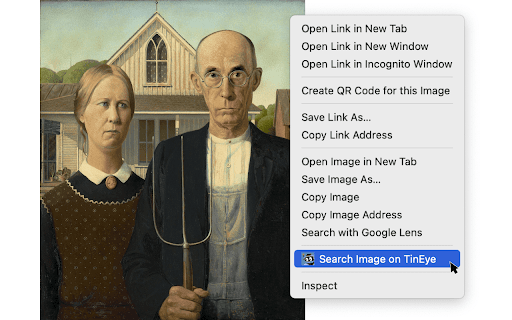
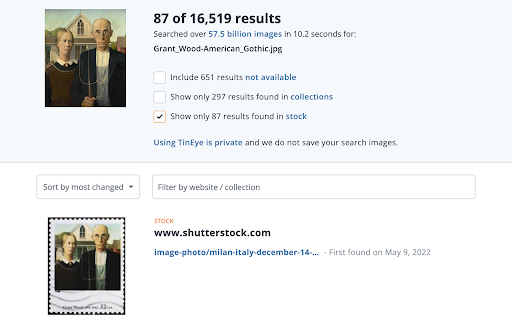
This extension enables users to right-click any image on the web to trigger a reverse search using the TinEye search engine. It includes configurable settings for result sorting and tab management, allowing users to verify images without saving search data.

Developer:TinEye
Version:2.0.4
Size:29.28KiB
Last updated:

Overview

Installs

400K+

Rating

4.5

1,397 reviews

Languages

1 locales

Includes English

Market analysis

Review-backed positioning, friction, and market signals for this Chrome extension.

Backed by review samples

Macro category

Niche Lifestyle & Gaming Hacks

Pricing friction

Low review signal

Complaint intensity

Moderate review signal

Listing & review signals
Observed signals from store listing text and review samples.

Listing positioning

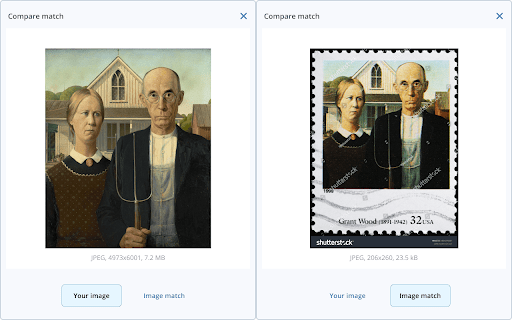
TinEye positions itself as the official, privacy-focused tool for performing reverse image searches directly from the browser. It emphasizes its ability to debunk fake images, identify image origins, and locate higher-resolution versions of online media.

Inferred product pattern

Single-purpose utility extension providing a wrapper for a proprietary search index.

Review-backed pain points

Users frequently report that the extension returns 'no results' even for common images, leading to a perception that it is less effective than browser-native search tools. Recent complaints focus on a persistent Cloudflare verification loop that prevents the service from functioning.

Observed feature gaps

Lack of parity with current search engine performance levels for image indexing and ongoing technical issues with bot-detection/CAPTCHA handling on the search results page.

Tags
Reverse Image SearchImage IdentificationVerificationDigital Forensics
Target users

- Digital investigators

- Content creators

- Privacy-conscious researchers

- Journalists

Primary use cases

- Verifying the origin of images

- Finding higher resolution image copies

- Debunking fake images

- Checking image usage rights

Positive themes

- Clear and simple integration

- Privacy-focused design

- Official, reliable branding

Negative themes

- Failure to return search results

- Cloudflare security loop issues

- Perceived inferiority compared to Google Reverse Image Search

- Reporting of broken functionality

Observed friction

- Performance complaints detected

- None observed; the service is presented as a free extension.

Evidence boundary: Data is derived from the official Chrome Web Store listing and a sample of 1397 user reviews, focusing on functionality complaints and feature set descriptions. Review sentiment is mixed; while the extension has a high volume of users, critical reviews highlight persistent technical roadblocks like the Cloudflare verification loop.
Complaint summaries
Review-backed complaint signals grouped by operational area.

Support

Users express frustration regarding the lack of functional search results, though this is framed as a product failure rather than a support issue.

Reliability

High frequency of reports regarding the Cloudflare loop preventing any utility, and general concerns over poor search result hit rates.

Privacy

No active privacy complaints found; the listing proactively addresses data collection policies.

Access & pricing

- Free usage observed

- No account requirement observed

- Free plan or free usage claimed

Store listing facts

Listing assets

- Screenshots: 3

- Videos: 0

- Languages: 1

Trust signals

- Privacy policy

- Developer contact

- Official website

Store metadata

- Version: 2.0.4

- Size: 29.28KiB

- Last updated:

Store description excerpt
Short excerpt from the public Chrome Web Store listing; full copy is available on the official store page.
This is the only official TinEye extension developed by the TinEye team. Search TinEye to quickly find out where an image came from, how it's used, or identify higher-resolution versions. About TinEye TinEye invented reverse image search in 2008 to make images searchable. Learn more about TinEye here: https://tineye.com/about How TinEye can help: • Debunk fake images • Tell you where an image came from • Help attribute images • Show you where an image is being used online • Identify if an image is a stock photo • Find higher-resolution copies • Verify dating profiles Learn how to use TinEye in our tutorial: https://tineye.com/how Private & secure Your search image is never saved. We only collect extension version data. For more information, please see our privacy policy: https://tineye.com/privacy and our terms of service: https://tineye.com/terms. How to use this extension: 1. Right-cl…

Listing SEO keywords

Search intent keywords
Keyword signals for evaluating how users may discover, compare, or search for this extension category.

Core discovery

reverse image searchfind original imageimage identification extension

Comparison

TinEye vs Google Imagesbest reverse image search chrome

Problem

image search not workingtineye cloudflare loopcannot find image origin

Alternative

search by image extensiongoogle lens extension

Similar extensions

Jump to related discovery paths:

FAQ

What is TinEye Reverse Image Search mainly used for?
This extension enables users to right-click any image on the web to trigger a reverse search using the TinEye search engine. It includes configurable settings for result sorting and tab management, allowing users to verify images without saving search data.
What market signals stand out?
Established adoption with substantial review base. Last known update: 11/22/2024.
What should builders compare before entering this space?
Compare install concentration, rating quality, update recency, screenshots, developer portfolio, listing claims, and review-backed friction signals.
Is this page review-backed?
Backed by review samples. This page combines store metadata with selected review signals, while raw store metrics remain visible for comparison.

Screenshots

TinEye Reverse Image Search screenshot

Links

Website: tineye.com

Privacy policy: https://tineye.com/privacy

Recommended Chrome extensions

Related listings from the same category, trending peers, and the same publisher portfolio.

Browse tools