CookieManager - Cookie Editor icon

CookieManager Chrome Extension Analysis

Developer & Designer Tools

Store listing title: CookieManager - Cookie Editor

Chrome extension ID: hdhngoamekjhmnpenphenpaiindoinpo

CookieManager is a browser extension designed for managing web cookies. It allows users to view, edit, and delete cookies for the active tab and its sub-frames, providing export capabilities for developer workflows.

Developer:joue.quroi
Version:0.2.4
Size:110KiB
Last updated:

Overview

Installs

60K+

Rating

3.4

31 reviews

Languages

10 locales

Includes Deutsch, English, Nederlands, français...

Market analysis

Review-backed positioning, friction, and market signals for this Chrome extension.

Backed by review samples

Macro category

Developer & Designer Tools

Pricing friction

Low review signal

Complaint intensity

Moderate review signal

Listing & review signals
Observed signals from store listing text and review samples.

Listing positioning

The extension positions itself as an open-source utility for observing and modifying cookies on the current page and its CORS frames. It emphasizes the ability to import and export cookie data in JSON and TXT formats for use with command-line tools.

Inferred product pattern

A developer-centric utility that provides core visibility into cookies but suffers from usability gaps and functional limitations in editing and bulk operations.

Review-backed pain points

Users report significant friction with the export process requiring manual checkbox selection, inability to create new cookies, and failure to import .txt files.

Observed feature gaps

Lack of functionality to create new cookies, lack of cookie status information, and inability to access incognito sessions.

Tags
Cookie EditorWeb DevelopmentCookie ManagerData Export
Target users

- Web Developers

- QA Engineers

- Security Researchers

Primary use cases

- Managing session cookies

- Exporting cookies for Wget or Curl

- Debugging CORS sub-frame cookies

Positive themes

- Ability to delete cookies for specific websites

- Useful tool for online developers

Negative themes

- Inability to create or edit cookie values

- Tedious manual export process

- Issues with importing TXT files

Observed friction

- One user reported the presence of ads, but no specific pricing friction was detailed.

Evidence boundary: Analysis based on the Chrome Web Store description and user reviews highlighting functional gaps and usability issues. The review sample size is relatively small, and negative feedback is concentrated on specific functional failures.
Complaint summaries
Review-backed complaint signals grouped by operational area.

Support

No support-related complaints were observed.

Reliability

Users reported issues with the import functionality and difficulty using the extension without a live web page.

Privacy

No privacy or security complaints were observed.

Access & pricing

- Ad-supported model observed

- No account requirement observed

- No clear pricing signal

Store listing facts

Listing assets

- Screenshots: 1

- Videos: 0

- Languages: 10

Trust signals

- Developer contact

- Official website

Store metadata

- Version: 0.2.4

- Size: 110KiB

- Last updated:

Store description excerpt
Short excerpt from the public Chrome Web Store listing; full copy is available on the official store page.
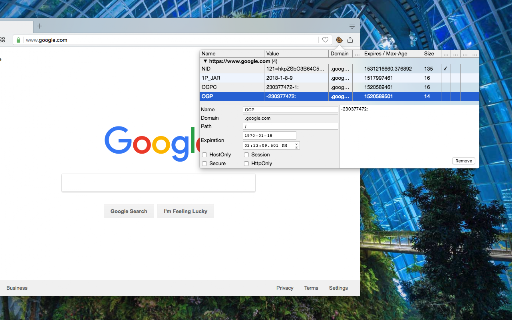
This open-source extension presents a toolbar interface allowing users to observe and modify all cookies associated with the current page. Additionally, it conveniently displays cookies accessed by cross-origin (CORS) subframes on the same page, categorizing them based on their origins. Users can directly edit various cookie properties from the interface and delete selected cookies. Features: 1. Import and export cookies to and from JSON and TXT file 2. View all cookies related to the current tab, including sub-frames 3. Access the cookie editor in a separate tab for enhanced visibility 4. Use the "Search Cookies by Domain" context menu option via the action button 5. Use the "Open Cookie Editor in new Tab" context menu option via the action button 6. Export cookies in TXT format, compatible with Wget and Curl command-line tools For bug reports, please visit: https://github.com/joue-qur…

Listing SEO keywords

Search intent keywords
Keyword signals for evaluating how users may discover, compare, or search for this extension category.

Core discovery

cookie editormanage cookiesexport cookies jsoncookie manager extension

Comparison

cookie editor vs cookie viewer

Problem

cannot edit cookiesimport cookie txt failscookie export tedious

Alternative

cookie managercookie inspectorweb developer tools

Similar extensions

Jump to related discovery paths:

FAQ

What is CookieManager mainly used for?
CookieManager is a browser extension designed for managing web cookies. It allows users to view, edit, and delete cookies for the active tab and its sub-frames, providing export capabilities for developer workflows.
What market signals stand out?
Visible niche traction with limited review base. Last known update: 12/31/2025.
What should builders compare before entering this space?
Compare install concentration, rating quality, update recency, screenshots, developer portfolio, listing claims, and review-backed friction signals.
Is this page review-backed?
Backed by review samples. This page combines store metadata with selected review signals, while raw store metrics remain visible for comparison.

Screenshots

CookieManager - Cookie Editor screenshot

Links

Recommended Chrome extensions

Related listings from the same category, trending peers, and the same publisher portfolio.

Browse developer