Streak Mail Merge for Gmail icon

Streak Mail Merge for Gmail Chrome Extension Analysis

Automation & Workflow Efficiency

Chrome extension ID: hhnhckmflikggaddmmcpgoehmnpnlglk

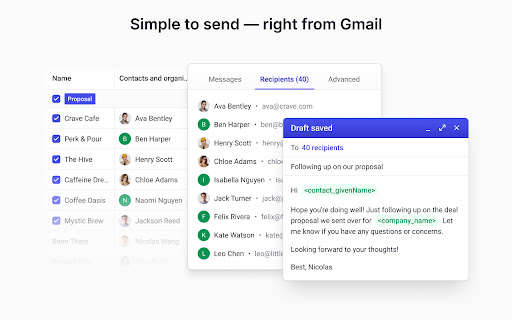
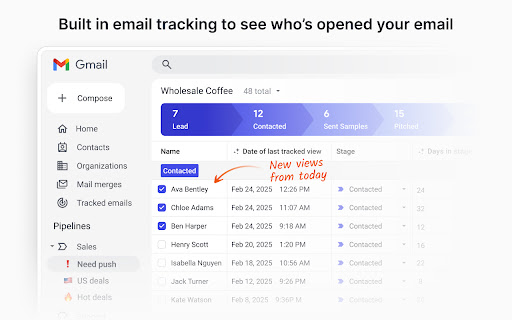
Streak Mail Merge is a Chrome extension designed to enhance Gmail's functionality by enabling users to send personalized mass emails and set up automated follow-up sequences. It offers features for tracking email opens, clicks, and replies, and integrates seamlessly within the Gmail interface.

Developer:Streak CRM
Version:7.82
Size:12.8MiB
Last updated:

Overview

Installs

10K+

Rating

4.8

4 reviews

Languages

43 locales

Includes Deutsch, English, English (United Kingdom), English (United States)...

Market analysis

Review-backed positioning, friction, and market signals for this Chrome extension.

Backed by review samples

Macro category

Automation & Workflow Efficiency

Pricing friction

Moderate review signal

Complaint intensity

Moderate review signal

Listing & review signals
Observed signals from store listing text and review samples.

Listing positioning

Streak Mail Merge is positioned as a tool to send personalized mass emails and automate follow-up sequences directly within Gmail. It emphasizes ease of use for sending to dozens or hundreds of contacts and tracking engagement.

Inferred product pattern

A freemium Gmail extension that offers core mail merge and tracking features with limitations, encouraging upgrades for advanced capabilities.

Review-backed pain points

Users experience occasional issues with the Streak menu or panes not appearing correctly, requiring reopening. There are also suggestions for improving ease of editing mailing lists after upload.

Observed feature gaps

Users desire more ease in editing mailing lists once uploaded within the extension. Occasional UI glitches related to pane visibility are noted.

Tags
Email MarketingMail MergeGmail ExtensionSales AutomationFollow-ups
Target users

- Sales teams

- Business development teams

- Founders

- Marketers

- Recruiters

- Fundraisers

- Customer success teams

Primary use cases

- Cold outreach

- Running email campaigns

- Automating follow-up sequences

- Personalized mass emailing

- Tracking email engagement

Positive themes

- Effective for outreach programs

- Integrates well into Gmail

- Works great over many years

- One of the best CRM extensions online

Negative themes

- Free version has limitations on emails and follow-ups

- Navigability could be improved

- Pane for finalizing email sending sometimes doesn't appear

Observed friction

- Free-tier complaints detected

- The free version has limitations on the number of emails per day and automation of follow-ups, which may lead to friction for users needing higher volumes or more advanced automation.

Evidence boundary: Extracted from Chrome Web Store listing details and user reviews, including specific feedback on functionality, limitations of the free tier, and user experience. Limited number of reviews available. Specific details on payment tiers and advanced features are not fully captured.
Complaint summaries
Review-backed complaint signals grouped by operational area.

Support

No specific complaints regarding support were found in the provided reviews.

Reliability

One review mentioned that the correct pane needed to finalize email sending sometimes does not appear, suggesting a minor reliability or UI issue.

Privacy

No privacy concerns were raised in the provided reviews.

Access & pricing

- Free entry with paid features

- No clear access signal

- Limited free usage observed

Store listing facts

Listing assets

- Screenshots: 4

- Videos: 0

- Languages: 43

Trust signals

- Privacy policy

- Developer contact

- Official website

Store metadata

- Version: 7.82

- Size: 12.8MiB

- Last updated:

Store description excerpt
Short excerpt from the public Chrome Web Store listing; full copy is available on the official store page.
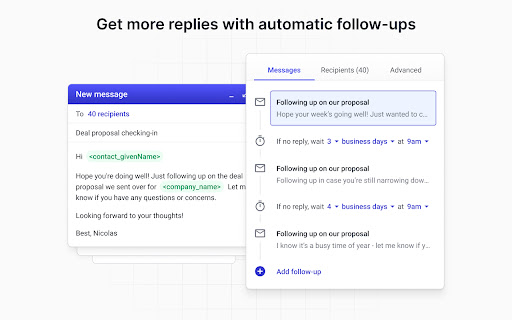
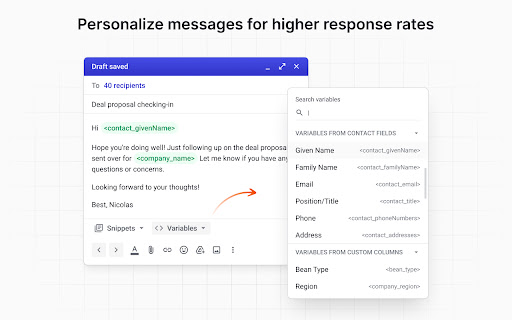
✉️ SEND PERSONALIZED EMAILS AT SCALE - Create and send mass emails that feel 1:1 - Insert dynamic fields like first name, company, or custom notes - Reach dozens or hundreds of contacts in just a few clicks 💫 AUTOMATE FOLLOW-UPS - Schedule automatic follow-ups for unopened or unreplied emails - Write your entire sequence up front and let Streak handle the rest - Customize timing and content to match your workflow 👋 TRACK ENGAGEMENT - See who opened, clicked, or replied to each email in the sequence - Monitor campaign performance in real time - Compare results across campaigns to see what’s working 🤝 WORKS DIRECTLY IN GMAIL - No switching tools or platforms—send from the inbox you already use - Use with Google Sheets to import recipients and data - Works seamlessly with Gmail labels and drafts 💁WHO IT’S FOR - Sales and business development teams doing cold outreach - Founders and mar…

Listing SEO keywords

Search intent keywords
Keyword signals for evaluating how users may discover, compare, or search for this extension category.

Core discovery

mail merge gmailemail automationfollow up emailsmass email sendergmail extension

Comparison

salesforce mail mergemixmaxboomryesware

Problem

sending mass emailstracking email opensautomating follow upspersonalized outreach

Alternative

gmail mail merge toolemail outreach softwaresales engagement platform

Similar extensions

Jump to related discovery paths:

FAQ

What is Streak Mail Merge for Gmail mainly used for?
Streak Mail Merge is a Chrome extension designed to enhance Gmail's functionality by enabling users to send personalized mass emails and set up automated follow-up sequences. It offers features for tracking email opens, clicks, and replies, and integrates seamlessly within the Gmail interface.
What market signals stand out?
Visible niche traction with limited review base. Last known update: 06/21/2026.
What should builders compare before entering this space?
Compare install concentration, rating quality, update recency, screenshots, developer portfolio, listing claims, and review-backed friction signals.
Is this page review-backed?
Backed by review samples. This page combines store metadata with selected review signals, while raw store metrics remain visible for comparison.

Screenshots

Streak Mail Merge for Gmail screenshot

Links

Recommended Chrome extensions

Related listings from the same category, trending peers, and the same publisher portfolio.

Browse workflow