Video Quality Settings for YouTube™ (HD/4K) icon

Video Quality Settings for YouTube™ (HD/4K) Chrome Extension Analysis

Automation & Workflow Efficiency

Chrome extension ID: hlbopkdbimgihmpcaohopplcbpanmjlb

This browser extension allows users to set a default video quality for YouTube that remains active across different sessions. It aims to eliminate the need for manual quality adjustments every time a video is played.

Developer:Armin Sebastian
Version:3.1.0
Size:333KiB
Last updated:

Overview

Installs

10K+

Rating

3.9

52 reviews

Languages

1 locales

Includes English

Market analysis

Review-backed positioning, friction, and market signals for this Chrome extension.

Backed by review samples

Macro category

Automation & Workflow Efficiency

Pricing friction

Low review signal

Complaint intensity

High review signal

Listing & review signals
Observed signals from store listing text and review samples.

Listing positioning

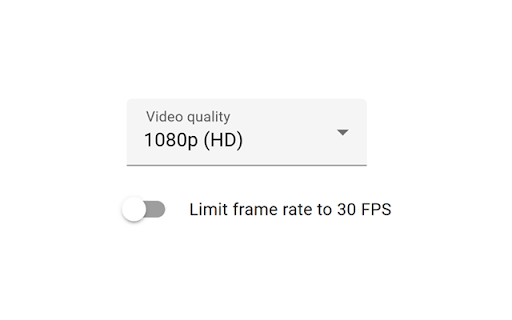
The product is positioned as a tool to automate and persist preferred YouTube video resolutions, such as 1080p or 4K. It also highlights the ability to limit frame rates to 30 FPS to manage playback settings consistently.

Inferred product pattern

A utility-based browser extension designed to automate video playback settings, currently facing significant reliability issues regarding setting persistence.

Review-backed pain points

Users report that settings frequently reset to 1080p or 'Auto' after only one or two videos. Additionally, the extension sometimes selects a higher resolution than requested if the preferred setting is unavailable, and the extension opens a new tab upon clicking rather than a compact popup.

Observed feature gaps

The extension lacks keyboard shortcuts and a compact popup menu for easier interaction; it also lacks a strict 'force lower quality' mode when the requested resolution is unavailable.

Tags
YouTube QualityVideo SettingsBrowser UtilityHD 4K
Target users

- YouTube viewers

- High-definition content consumers

- Users with specific bandwidth constraints

Primary use cases

- Forcing specific YouTube resolutions

- Persisting video quality settings across sessions

- Limiting video frame rates to 30 FPS

Positive themes

- Functionality is useful when the extension operates as intended

Negative themes

- Settings persistence failure

- Resolution selection errors

- Suboptimal UI experience

Observed friction

- Performance complaints detected

- No pricing friction observed; the developer accepts voluntary Patreon support.

Evidence boundary: Evidence is drawn from the product description and user reviews highlighting technical failures in setting persistence and resolution enforcement. The available review samples are predominantly low-rating, which may skew the sentiment toward technical instability.
Complaint summaries
Review-backed complaint signals grouped by operational area.

Support

No direct support complaints, though the listing notes that reviews are not monitored for bug reports.

Reliability

Significant complaints regarding the extension's failure to maintain selected settings and its tendency to reset to default resolutions.

Privacy

No privacy complaints observed.

Access & pricing

- Free entry with paid features

- No account requirement observed

- Free plan or free usage claimed

Store listing facts

Listing assets

- Screenshots: 1

- Videos: 0

- Languages: 1

Trust signals

- Privacy policy

- Developer contact

- Official website

- Support link

Store metadata

- Version: 3.1.0

- Size: 333KiB

- Last updated:

Store description excerpt
Short excerpt from the public Chrome Web Store listing; full copy is available on the official store page.
Video Quality Settings for YouTube™ is a browser extension that sets the preferred quality of YouTube™ videos, and remembers your video quality settings between sessions. Limiting the video frame rate to 30 FPS is also supported. Video Quality Settings for YouTube™ is an open source project made possible thanks to a community of awesome supporters. If you'd like to support the continued development of the extension, please check out https://armin.dev/go/patreon. The video quality is set to 1080p by default when the extension is installed, and the option can be updated from the player settings on YouTube™, or from the extension's options. Reload already opened videos for changes to take effect. The extension is also available for Edge and Firefox: https://github.com/dessant/youtube-video-quality#readme The developer does not collect any personal data from this extension, visit the extens…

Listing SEO keywords

Search intent keywords
Keyword signals for evaluating how users may discover, compare, or search for this extension category.

Core discovery

YouTube video qualityset YouTube resolutionforce 4K YouTubeYouTube HD settings

Comparison

YouTube quality controllerYouTube resolution fixer

Problem

YouTube video quality resetsYouTube auto resolution problem

Alternative

YouTube enhancement suitevideo player settings extension

Similar extensions

Jump to related discovery paths:

FAQ

What is Video Quality Settings for YouTube™ (HD/4K) mainly used for?
This browser extension allows users to set a default video quality for YouTube that remains active across different sessions. It aims to eliminate the need for manual quality adjustments every time a video is played.
What market signals stand out?
Visible niche traction with limited review base. Last known update: 06/27/2026.
What should builders compare before entering this space?
Compare install concentration, rating quality, update recency, screenshots, developer portfolio, listing claims, and review-backed friction signals.
Is this page review-backed?
Backed by review samples. This page combines store metadata with selected review signals, while raw store metrics remain visible for comparison.

Screenshots

Video Quality Settings for YouTube™ (HD/4K) screenshot

Links

Recommended Chrome extensions

Related listings from the same category, trending peers, and the same publisher portfolio.

Browse tools