Open in VLC™ media player icon

Open in VLC™ media player Chrome Extension Analysis

Automation & Workflow Efficiency

Chrome extension ID: ihpiinojhnfhpdmmacgmpoonphhimkaj

A utility that redirects online media streams from the Chrome browser to the local VLC media player application. It requires the installation of a separate native-client application to enable communication between the browser and the desktop software.

Developer:yokris.dev
Version:0.4.3
Size:102KiB
Last updated:

Overview

Installs

300K+

Rating

3.9

865 reviews

Languages

14 locales

Includes Deutsch, English, Nederlands, dansk...

Market analysis

Review-backed positioning, friction, and market signals for this Chrome extension.

Backed by review samples

Macro category

Automation & Workflow Efficiency

Pricing friction

Low review signal

Complaint intensity

High review signal

Listing & review signals
Observed signals from store listing text and review samples.

Listing positioning

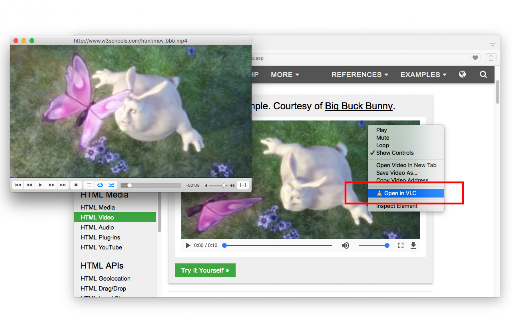
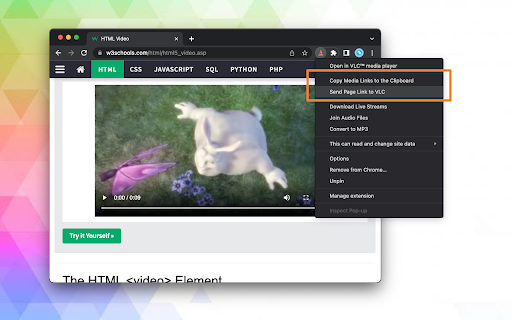
The extension positions itself as a one-click bridge that allows users to send web-based audio and video streams directly to the VLC media player. It emphasizes convenience via a context menu and the ability to handle multiple media links simultaneously.

Inferred product pattern

Browser-to-Desktop Bridge utilizing native messaging for external app control.

Review-backed pain points

Users report significant difficulty installing the required native-client, citing confusing instructions, ad-heavy pages, and broken links. There is a severe report of the installation site redirecting users to fraudulent pages that steal credit card information.

Observed feature gaps

Lack of a seamless, integrated installation process (requiring external Node.js/native client) and poor support for Chromebook devices.

Tags
Media PlayerVLC UtilityStream RedirectVideo Tool
Target users

- VLC media player enthusiasts

- Power users preferring desktop players over browser-based players

- Users streaming network media

Primary use cases

- Watching online streams in VLC

- Bypassing browser player limitations

- Joining multiple media files into a single WAV file

Positive themes

No positive theme data.

Negative themes

- Complex and confusing native client installation

- Compatibility issues with ChromeOS and ChromeOS Flex

- Regression in multi-stream playback capabilities

- Allegations of fraudulent charges on the installation site

Observed friction

- Performance complaints detected

- Privacy complaints detected

- The extension itself is claimed to be free, but a user reported being scammed for 49 euros on a site linked during the native-client installation process.

Evidence boundary: Data extracted from the store listing and 10 helpful/low-rating review samples. The provided review samples consist entirely of low-rating feedback, providing no visibility into positive user experiences despite the overall 3.8 score.
Complaint summaries
Review-backed complaint signals grouped by operational area.

Support

Users complain that the installation instructions are unclear and that the setup process is overly technical, requiring significant effort to function.

Reliability

Reports of the extension being unusable on ChromeOS and a regression where it now only opens one stream at a time instead of multiple.

Privacy

One highly critical review alleges that the external installation site is fraudulent and harvests credit card data for unauthorized subscriptions.

Access & pricing

- Free usage observed

- No account requirement observed

- Free plan or free usage claimed

Store listing facts

Listing assets

- Screenshots: 2

- Videos: 1

- Languages: 14

Trust signals

- Privacy policy

- Developer contact

- Official website

Store metadata

- Version: 0.4.3

- Size: 102KiB

- Last updated:

Store description excerpt
Short excerpt from the public Chrome Web Store listing; full copy is available on the official store page.
Open in VLC™ media player extension, sends video and audio links to the well-known VLC media player. This way you can directly watch online streams in the VLC media player with just one click. To send these links to the VLC media player, right-click over the video or audio link and use the context menu item or use the browser action button. If the extension only grabs a single link, the link is opened in the player. If multiple links are detected, you will get a prompt box to select media links to be sent to the player. Note: For this extension to work, you will need to install a minimal native-client application. Instruction on how to install the native client will be displayed once the extension is used. You can also watch installation instruction on the FAQs page How to use this extension: 1. The extension appends a context menu item to the browser context menu when the media element…

Listing SEO keywords

Search intent keywords
Keyword signals for evaluating how users may discover, compare, or search for this extension category.

Core discovery

open in vlcvlc chrome extensionsend stream to vlcvlc media player browser

Comparison

vlc vs browser playeropen in vlc chrome vs firefox

Problem

vlc extension not workingvlc native client installationhow to open web stream in vlc

Alternative

vlc browser alternativestream to vlc extension

Similar extensions

Jump to related discovery paths:

FAQ

What is Open in VLC™ media player mainly used for?
A utility that redirects online media streams from the Chrome browser to the local VLC media player application. It requires the installation of a separate native-client application to enable communication between the browser and the desktop software.
What market signals stand out?
Established adoption with moderate review base. Last known update: 01/17/2025.
What should builders compare before entering this space?
Compare install concentration, rating quality, update recency, screenshots, developer portfolio, listing claims, and review-backed friction signals.
Is this page review-backed?
Backed by review samples. This page combines store metadata with selected review signals, while raw store metrics remain visible for comparison.

Screenshots

Open in VLC™ media player screenshot

Links

Recommended Chrome extensions

Related listings from the same category, trending peers, and the same publisher portfolio.

Browse entertainment
Popup Blocker (strict) icon

Popup Blocker (strict)

yokris.dev

Strictly block all popup requests from any website

Installs

300K+

Rating

4.5

Flickcall: Netflix Party with Video Call icon

Flickcall: Netflix Party with Video Call

Flickcall

Create watch party on Netflix, Jiocinema, Hotstar, Amazon Prime Video, JioHotstar & more. Watch movies & TV show together in sync.

Installs

100K+

Rating

4.1

Online video downloader - download video icon

Online video downloader - download video

konimatoan

Free online tool to download videos from the Internet. Downloading videos is easy! Video downloader for every platform.

Installs

100K+

Rating

3.4

FastSave icon

FastSave

wilosadi

Repost Instagram stories, save video, photo and Reels. Browse Instagram site like a mobile app.

Installs

100K+

Rating

3.4

TwoSeven Extension icon

TwoSeven Extension

twoseven.xyz

Opens up exciting new possibilities of watching together on twoseven.xyz

Installs

100K+

Rating

3.3

Elevate for Strava icon

Elevate for Strava

Thomas Champagne

Elevate your strava experience and goals! Track your fitness and progressions over time. Analyse deeper your activities. And more...

Installs

100K+

Rating

4.9

Better Lyrics (Lyrics for Youtube Music) icon

Better Lyrics (Lyrics for Youtube Music)

Boidushya

Enhance YouTube Music with beautiful time-synced lyrics, multilingual support, real-time translations and more

Installs

80K+

Rating

4.9

YouTube LiveChat Flusher (Danmaku Chat) icon

YouTube LiveChat Flusher (Danmaku Chat)

_y_s

Provides bullet chatting (danmaku) on YouTube Live, like niconico or bilibili.

Installs

80K+

Rating

4.3

YouTube No Translation icon

YouTube No Translation

YouGo

Keep YouTube content in its original language: titles, descriptions, audio... No more unwanted translations.

Installs

80K+

Rating

4.9

600% Sound Volume Booster icon

600% Sound Volume Booster

Aliaksandr

Tab audio booster (up to 600%). Optional Turbo: EQ, toolbar boost & higher cap; checkout in the extension when you upgrade.

Installs

80K+

Rating

4.6