Amazon Quick icon

Amazon Quick Chrome Extension Analysis

AI & Writing Assistants

Chrome extension ID: innkphffipcmiflfibbeghfnkifiokgo

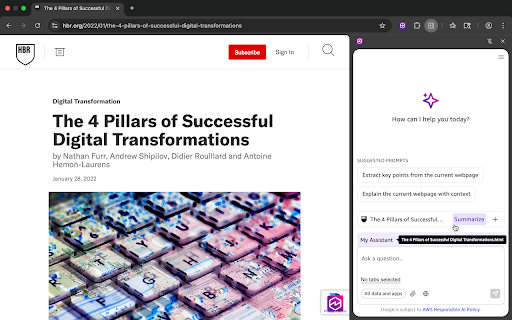
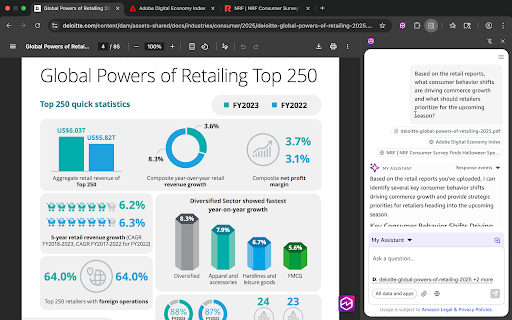
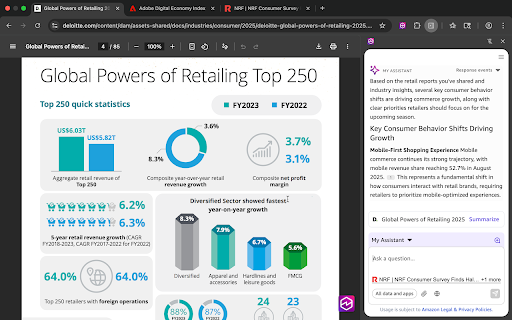
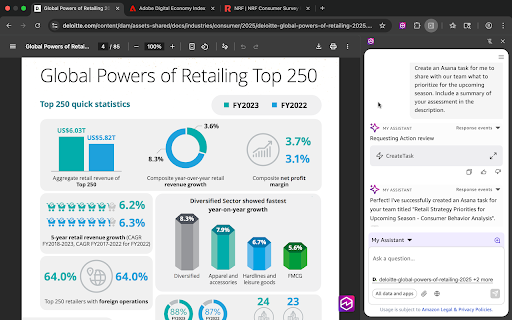
Amazon Quick is a browser extension designed to provide business users with AI-powered assistance for research, insights, and automation. It offers features like web page summarization, contextual chat about selected text, and the ability to trigger actions in external applications, all accessible directly from the browser.

Developer:Amazon Quick
Version:1.0.10839.0
Size:3.07MiB
Last updated:

Overview

Installs

600K+

Rating

4.0

11 reviews

Languages

1 locales

Includes English

Market analysis

Review-backed positioning, friction, and market signals for this Chrome extension.

Backed by review samples

Macro category

AI & Writing Assistants

Pricing friction

Low review signal

Complaint intensity

Low review signal

Listing & review signals
Observed signals from store listing text and review samples.

Listing positioning

This extension positions itself as an enterprise-grade AI assistant that unifies research, insights, and automation directly within the browser. It emphasizes instant access, web page analysis, and integration with organizational knowledge bases and workflows, aiming to make users' browsers smarter.

Inferred product pattern

AI-powered browser extension for business users, integrating with enterprise data and workflows.

Review-backed pain points

One user reported that the extension does not work on the Arc browser. Another user found that the setting to remove the 'Always on Sidebar Icon' does not stick and randomly reappears, causing annoyance.

Observed feature gaps

No observed feature gaps based on provided data.

Tags
AI AssistantProductivity ToolEnterprise AIWorkflow Automation
Target users

- Business users

- Enterprise employees

- Knowledge workers

Primary use cases

- Web page summarization

- Information extraction

- Contextual AI chat

- Workflow automation

- Enterprise knowledge access

Positive themes

- Invaluable part of workflow

- Powerful analysis of personal and company documents

- Streamlined collaboration and communication

- Efficient and straightforward work processes

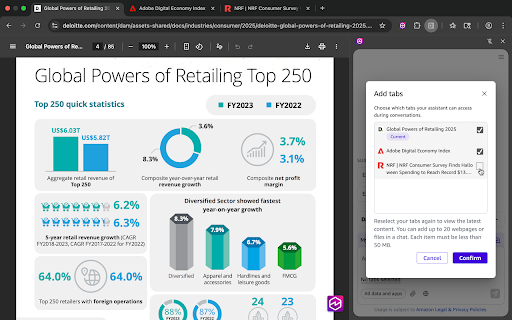
- Ability to ask questions about multiple web pages and data sources

- Seamless integration with external applications for task completion

Negative themes

- Functionality issues with specific browsers (Arc)

- UI toggle settings not persisting

Observed friction

- No specific pricing friction mentioned in reviews. The extension is presented as an enterprise solution, implying it might be part of a larger organizational offering.

Evidence boundary: Listing data and user reviews were used for analysis. A small number of reviews were available, with limited detail on technical aspects or broader user sentiment.
Complaint summaries
Review-backed complaint signals grouped by operational area.

Support

No specific support, account, or refund complaints found in the provided reviews.

Reliability

One user reported that the extension does not work on the Arc browser, and another noted a UI setting that does not persist.

Privacy

No privacy or security complaints were identified in the provided reviews.

Access & pricing

- No clear monetization signal

- No clear access signal

- No clear pricing signal

Store listing facts

Listing assets

- Screenshots: 5

- Videos: 0

- Languages: 1

Trust signals

- Privacy policy

- Developer contact

- Support link

Store metadata

- Version: 1.0.10839.0

- Size: 3.07MiB

- Last updated:

Store description excerpt
Short excerpt from the public Chrome Web Store listing; full copy is available on the official store page.
Amazon Quick helps business users make better decisions, faster and act on them, by unifying AI agents for research, business insights, and automation into a single experience. Your AI Assistant, Always Within Reach The Amazon Quick browser extension brings enterprise AI directly into your browser—no tab switching, no context loss. Get instant insights from web pages, uploaded files, and your organization's knowledge base, and trigger actions and workflows right where you work. Key Features Instant Access - Type @Quick in your address bar to ask questions instantly - Open the extension from your toolbar anytime you need assistance Web Page Insights - Summarize entire web pages with one click - Right-click any selection in your web page for to chat about with Quick or to get an explanation - Ask questions about multiple open tabs simultaneously Enterprise Knowledge at Your Fingertips - A…

Listing SEO keywords

Search intent keywords
Keyword signals for evaluating how users may discover, compare, or search for this extension category.

Core discovery

Amazon Quick extensionAI browser assistantEnterprise AI toolWeb page summarizerWorkflow automation Chrome

Comparison

AI writing toolsProductivity softwareBusiness intelligence tools

Problem

Information overloadInefficient researchManual data analysisContext switching

Alternative

AI chatbotsProductivity appsBrowser productivity tools

Similar extensions

Jump to related discovery paths:

FAQ

What is Amazon Quick mainly used for?
Amazon Quick is a browser extension designed to provide business users with AI-powered assistance for research, insights, and automation. It offers features like web page summarization, contextual chat about selected text, and the ability to trigger actions in external applications, all accessible directly from the browser.
What market signals stand out?
Established adoption with limited review base. Last known update: 06/10/2026.
What should builders compare before entering this space?
Compare install concentration, rating quality, update recency, screenshots, developer portfolio, listing claims, and review-backed friction signals.
Is this page review-backed?
Backed by review samples. This page combines store metadata with selected review signals, while raw store metrics remain visible for comparison.

Screenshots

Amazon Quick screenshot

Links

Recommended Chrome extensions

Related listings from the same category, trending peers, and the same publisher portfolio.

Browse tools
Chat with all AI models (Gemini, Claude, DeepSeek…) & AI Agents | AITOPIA icon

Chat with all AI models (Gemini, Claude, DeepSeek…) & AI Agents | AITOPIA

AITOPIA AI Sidebar

AI Agent Marketplace & AI Sidebar with all AI models (Gemini, Claude, DeepSeek & more) and hundreds of AI Agents

Installs

1.0M+

Rating

4.9

Codex icon

Codex

OpenAI

Control Chrome with Codex.

Installs

1.0M+

Rating

3.8

HID Credential Management Extension icon

HID Credential Management Extension

hid-global-chrome-web-store

Browser extension for HID credential management solution.

Installs

1.0M+

Rating

1.3

Keywords Everywhere - Keyword Tool icon

Keywords Everywhere - Keyword Tool

Axeman Technology Solutions LLP

Keyword search volume, cpc and competition for 15+ websites like Google™ Search Console, YouTube™, Amazon™ & more

Installs

1.0M+

Rating

4.5

WebChatGPT: Prompt library with web access icon

WebChatGPT: Prompt library with web access

WebChatGPT

Augment your ChatGPT prompts with relevant web search results through web browsing.

Installs

1.0M+

Rating

4.2

Ecosia - The search engine that plants trees icon

Ecosia - The search engine that plants trees

Ecosia GmbH

This extension sets your search engine to Ecosia and customizes your new tab page so you can plant trees with every search.

Installs

1.0M+

Rating

4.7

BlockSite Block Websites & Stay Focused icon

BlockSite Block Websites & Stay Focused

BlockSite

Stay focused and boost productivity: Custom blocklist, Scheduled site blocking, and Password protection.

Installs

1.0M+

Rating

4.5

YouTube Summary with ChatGPT & Claude icon

YouTube Summary with ChatGPT & Claude

Glasp

Summarize YouTube videos, web articles, and PDFs to save time, powered by ChatGPT, Claude, Mistral AI, and Gemini.

Installs

1.0M+

Rating

4.3

Screen Recorder & Screenshot App for Chrome | Scrnli icon

Screen Recorder & Screenshot App for Chrome | Scrnli

scrnli

Screen recorder for Chrome: capture, edit, share screenshots and videos instantly

Installs

1.0M+

Rating

4.7

Transpose ▲▼ pitch ▹ speed ▹ loop icon

Transpose ▲▼ pitch ▹ speed ▹ loop

Tune73

Change the pitch and speed of music and loop sections directly on YouTube, Spotify and many other streaming platforms.

Installs

1.0M+

Rating

4.5