Screen Recorder icon

Screen Recorder Chrome Extension Analysis

Automation & Workflow Efficiency

Chrome extension ID: jdopnakmnlnccgpfpmjmdjjohmcdgabp

A Chrome extension designed for screen and webcam recording. It supports recording microphone and system audio simultaneously and allows users to save captures to their local drive or Google Drive.

Version:3.0.0
Size:1.19MiB
Last updated:

Overview

Installs

400K+

Rating

3.7

1,057 reviews

Languages

40 locales

Includes Deutsch, English, Filipino, Indonesia...

Market analysis

Review-backed positioning, friction, and market signals for this Chrome extension.

Backed by review samples

Macro category

Automation & Workflow Efficiency

Pricing friction

Low review signal

Complaint intensity

High review signal

Listing & review signals
Observed signals from store listing text and review samples.

Listing positioning

The product is positioned as a free, simple, and high-quality tool for capturing browser tabs, specific page areas, or full screens. It emphasizes features like no watermarks, unlimited recording time, and the ability to record system audio and webcams.

Inferred product pattern

A utility-focused screen capture tool that provides core recording functionality but suffers from critical reliability issues regarding data persistence and user control.

Review-backed pain points

Users frequently report that recordings are not saved after completion, and they struggle with the lack of microphone selection and the limitations of the .webm format.

Observed feature gaps

Missing video preview before/during recording, lack of annotation tools, no volume control for mic/system audio, and no built-in format conversion.

Tags
Screen RecorderVideo CaptureWebcam RecorderChrome Extension
Target users

- Educators

- Gamers

- Meeting Participants

- Content Creators

Primary use cases

- Making educational videos

- Gameplay recording

- Recording online meetings

- Saving live streams

Positive themes

- Effective use of Chrome APIs for recording while browsing

- Ability to record both system and microphone audio

Negative themes

- Failure to save recordings

- Inability to select specific microphones

- UI and interface instability

Observed friction

- Performance complaints detected

- No pricing friction observed as the tool is claimed to be entirely free.

Evidence boundary: Analysis based on the Chrome Web Store description and various user reviews highlighting functional failures and feature limitations. The analysis is limited to the provided review samples and store listing text.
Complaint summaries
Review-backed complaint signals grouped by operational area.

Support

No specific complaints regarding customer support were found in the review samples.

Reliability

Significant reliability issues reported, specifically regarding the tool's failure to save video files and crashing during long recordings.

Privacy

No privacy or security complaints were identified in the provided data.

Access & pricing

- Free usage observed

- No account requirement observed

- Free plan or free usage claimed

Store listing facts

Listing assets

- Screenshots: 2

- Videos: 0

- Languages: 40

Trust signals

- Privacy policy

- Developer contact

- Official website

- Support link

Store metadata

- Version: 3.0.0

- Size: 1.19MiB

- Last updated:

Store description excerpt
Short excerpt from the public Chrome Web Store listing; full copy is available on the official store page.
Record screen, chrome tab, chriome tab area, webcam, voice and microphone Screen Recorder - A smart screen recorder capturing desktop, browser/webcam, as well as system sound, microphone, or both. No matter whether you want to make an educational video, show your gameplay, record a meeting, save live stream, or any other general use, Screen Recorder can help you with it! Please Read before installing Change Log Version 3.0.0 - Upgraded the software to be compliant with the upcoming Google Chrome changes for MV3. - Please note the video output video are in webm because thats the only video format which Google chrome supports. - We would suggest recording shorter videos and not a massive 1 hour long video because of the file size. Its safer to make 4 short 15 minute videos with a pause inbetween versus trying to make a entire 1 hour video due to the massive file size you get in the end. ★…

Listing SEO keywords

Search intent keywords
Keyword signals for evaluating how users may discover, compare, or search for this extension category.

Core discovery

screen recorderchrome tab recorderwebcam recordervideo capture extension

Comparison

LoomScreencastify

Problem

screen recorder not savingvideo recording errorwebm file size issue

Alternative

screen capture tooldesktop recorder

Similar extensions

Jump to related discovery paths:

FAQ

What is Screen Recorder mainly used for?
A Chrome extension designed for screen and webcam recording. It supports recording microphone and system audio simultaneously and allows users to save captures to their local drive or Google Drive.
What market signals stand out?
Established adoption with substantial review base. Last known update: 11/09/2023.
What should builders compare before entering this space?
Compare install concentration, rating quality, update recency, screenshots, developer portfolio, listing claims, and review-backed friction signals.
Is this page review-backed?
Backed by review samples. This page combines store metadata with selected review signals, while raw store metrics remain visible for comparison.

Screenshots

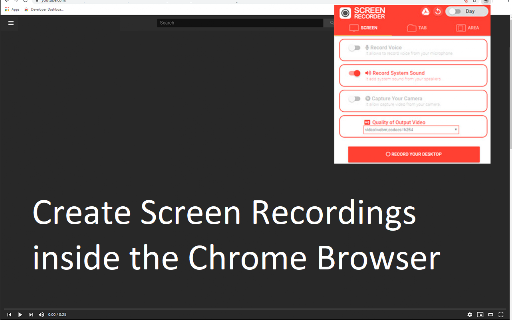
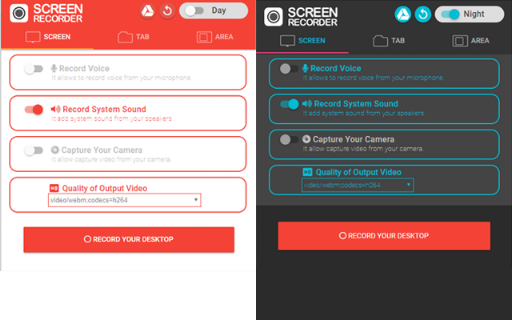
Screen Recorder screenshot

Links

Recommended Chrome extensions

Related listings from the same category, trending peers, and the same publisher portfolio.

Browse workflow