NotebookLM MindMap Exporter icon

NotebookLM MindMap Exporter Chrome Extension Analysis

Automation & Workflow Efficiency

Chrome extension ID: jeaclciaoglkeohcfeobijdojpclkmkb

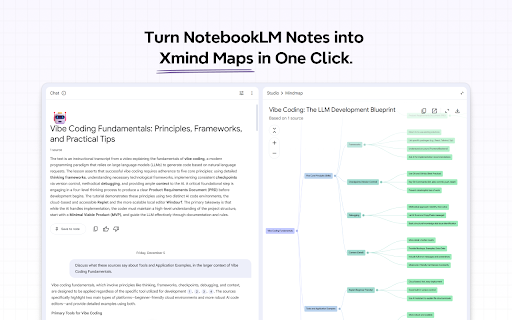
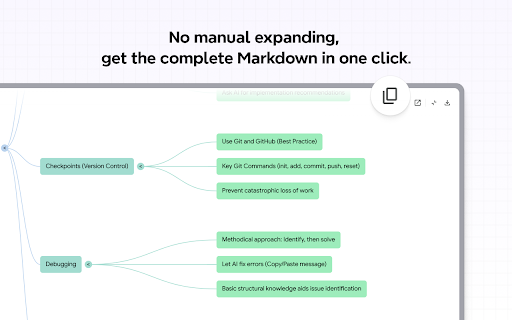
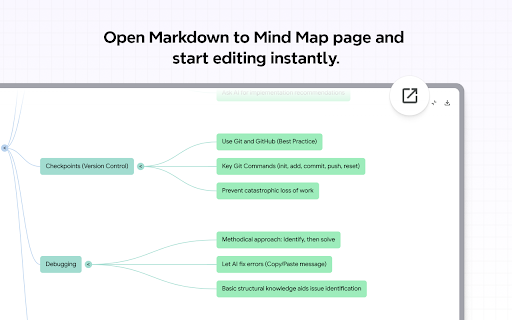
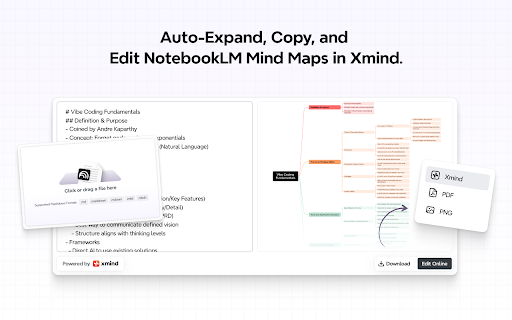
This productivity tool adds functional buttons to the NotebookLM interface to facilitate data extraction. Users can automatically expand and copy mind map content as Markdown or open an editor to convert that content into editable mind maps for Xmind.

Version:1.0.16
Size:41.9KiB
Last updated:

Overview

Installs

10K+

Rating

4.3

11 reviews

Languages

1 locales

Includes English

Market analysis

Review-backed positioning, friction, and market signals for this Chrome extension.

Backed by review samples

Macro category

Automation & Workflow Efficiency

Pricing friction

Low review signal

Complaint intensity

Moderate review signal

Listing & review signals
Observed signals from store listing text and review samples.

Listing positioning

The extension is positioned as a bridge for NotebookLM users to overcome the limitation of non-editable mind maps. It offers a one-click solution to export content into Xmind-compatible formats via Markdown.

Inferred product pattern

Workflow bridge utility for AI-driven note-taking tools.

Review-backed pain points

Some users report that the export functionality does not work or that the tool is a waste of time due to failure to perform tasks.

Observed feature gaps

Users indicate a desire for the ability to export and edit NotebookLM's native mind map previews.

Tags
Mind Map ExporterNotebookLM UtilityXmind IntegrationMarkdown Converter
Target users

- NotebookLM users

- Knowledge workers

- Students

- Mind mappers

Primary use cases

- Exporting NotebookLM mind maps to editable formats

- Converting NotebookLM summaries into Xmind documents

- Extracting complete Markdown content from NotebookLM

Positive themes

- Ease of use

- Effective Xmind integration

- Solving the non-editable mind map limitation

Negative themes

- Functional failure/non-working features

Observed friction

- Performance complaints detected

- No pricing information is available in the provided data.

Evidence boundary: Data extracted from the Chrome Web Store listing and a small sample of multi-language reviews. The sample size of reviews is very small (10 comments), which may not represent the full user experience.
Complaint summaries
Review-backed complaint signals grouped by operational area.

Support

No support-related complaints were observed.

Reliability

Multiple users reported that the extension fails to work or fails to export content as described.

Privacy

No privacy or security complaints were observed.

Access & pricing

- No clear monetization signal

- No clear access signal

- No clear pricing signal

Store listing facts

Listing assets

- Screenshots: 4

- Videos: 1

- Languages: 1

Trust signals

- Privacy policy

- Developer contact

- Support link

Store metadata

- Version: 1.0.16

- Size: 41.9KiB

- Last updated:

Store description excerpt
Short excerpt from the public Chrome Web Store listing; full copy is available on the official store page.
NotebookLM can generate a mind map preview from your documents, but the mind map isn’t editable, and getting the full content out can be tedious. This extension adds two buttons inside NotebookLM: Copy All automatically expands the mind map content and copies the complete Markdown for you, and Edit in Xmind opens a dedicated Markdown → Mind Map editor page with your content already loaded—so you can start editing right away.

Listing SEO keywords

Search intent keywords
Keyword signals for evaluating how users may discover, compare, or search for this extension category.

Core discovery

NotebookLM mind map exportNotebookLM to Xmindconvert NotebookLM to Markdowneditable NotebookLM mind maps

Comparison

XmindNotebookLM

Problem

non-editable NotebookLM mind mapscopying NotebookLM mind map content

Alternative

mind map editorMarkdown to mind map

Similar extensions

Jump to related discovery paths:

FAQ

What is NotebookLM MindMap Exporter mainly used for?
This productivity tool adds functional buttons to the NotebookLM interface to facilitate data extraction. Users can automatically expand and copy mind map content as Markdown or open an editor to convert that content into editable mind maps for Xmind.
What market signals stand out?
Visible niche traction with limited review base. Last known update: 05/08/2026.
What should builders compare before entering this space?
Compare install concentration, rating quality, update recency, screenshots, developer portfolio, listing claims, and review-backed friction signals.
Is this page review-backed?
Backed by review samples. This page combines store metadata with selected review signals, while raw store metrics remain visible for comparison.

Screenshots

NotebookLM MindMap Exporter screenshot

Links

Recommended Chrome extensions

Related listings from the same category, trending peers, and the same publisher portfolio.

Browse tools