NDIC - 누렁이 영어사전 (Noorung Dictionary) icon

NDIC Chrome Extension Analysis

AI & Writing Assistants

Store listing title: NDIC - 누렁이 영어사전 (Noorung Dictionary)

Chrome extension ID: jfibpeiddefellcfgnijpcpddoimbdij

NDIC is a Chrome extension designed for efficient English vocabulary lookup. It provides word definitions and examples through interface elements like popups or side panels while users browse the web.

Version:4.5.5
Size:2.2MiB
Last updated:

Overview

Installs

100K+

Rating

3.9

743 reviews

Languages

1 locales

Includes 한국어

Market analysis

Review-backed positioning, friction, and market signals for this Chrome extension.

Backed by review samples

Macro category

AI & Writing Assistants

Pricing friction

Low review signal

Complaint intensity

High review signal

Listing & review signals
Observed signals from store listing text and review samples.

Listing positioning

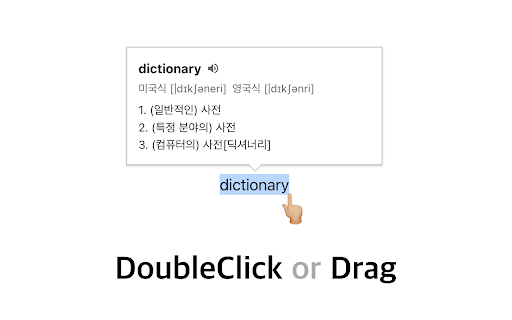
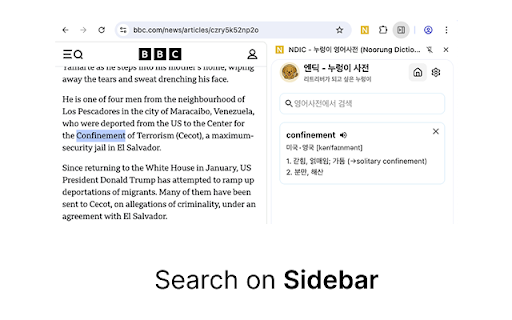
The product positions itself as a convenient tool for quickly finding English word meanings and examples via double-clicking or dragging text. It offers flexible viewing options through popups or a side panel to minimize user workflow disruption.

Inferred product pattern

A utility extension undergoing significant UI/UX transitions (popup to side panel) that has resulted in functional regressions and user dissatisfaction.

Review-backed pain points

Users report significant bugs including search failures for common words, interference with web forms and Excel uploads, and the extension breaking standard browser functions like right-click menus.

Observed feature gaps

Users have requested a hover-to-lookup feature, the restoration of the bilingual English-English/English-Korean mode, and higher quality native-sounding TTS audio.

Tags
English DictionaryLanguage LearningWord LookupTranslation Tool
Target users

- English language learners

- Students

- Non-native English speakers

Primary use cases

- Quick word definition lookup

- Vocabulary building while reading

- Pronunciation checking

Positive themes

- Convenience of word lookup through interaction

Negative themes

- Functional regressions in recent updates

- Degradation of audio quality

- UI changes causing user friction

- Interference with browser/website standard behaviors

Observed friction

- Performance complaints detected

- No pricing friction reported.

Evidence boundary: Data extracted from the Chrome Web Store listing and a collection of user reviews highlighting recent update issues and functional bugs. The review sample is heavily weighted toward negative feedback following recent version updates.
Complaint summaries
Review-backed complaint signals grouped by operational area.

Support

No specific support complaints, though users expressed frustration with unresolved bugs.

Reliability

High reports of unreliability, including search failures, broken dictionary links, and interference with other website functionalities (e.g., Excel uploads and right-click menus).

Privacy

No privacy complaints observed.

Access & pricing

- No clear monetization signal

- No account requirement observed

- No clear pricing signal

Store listing facts

Listing assets

- Screenshots: 3

- Videos: 0

- Languages: 1

Trust signals

- Developer contact

Store metadata

- Version: 4.5.5

- Size: 2.2MiB

- Last updated:

Store description excerpt
Short excerpt from the public Chrome Web Store listing; full copy is available on the official store page.
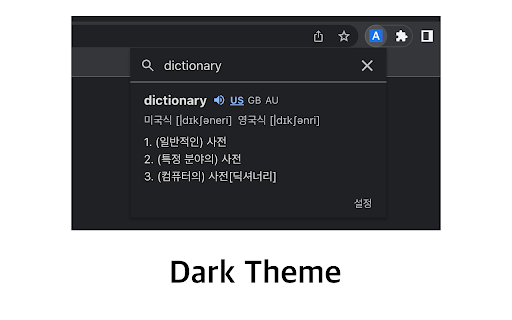
[4.5.5 업데이트: 2026.04.13] - 아이콘을 눌렀을때 팝업으로 열기 기능이 추가되었습니다. - 팝업으로 열기 혹은 사이드패널로 열기는 설정에서 선택 가능합니다. - 설정 페이지 스크롤 버그가 수정되었습니다. [4.5.4 업데이트: 2025.08.13] - Ctrl+Shift+E 로 사이드패널을 열 수 있음 (Mac : CMD+Shift+E) - 추후 지원 사항 - 사이드패널이 열릴때 인풋에 포커스 주는 기능은 아직 브라우저에서 지원되지 않습니다. - 브라우저 레벨에서 API가 추가되면 바로 업데이트 할 예정입니다. [4.5 업데이트: 2025.07.26] - 검색된 단어를 사이드패널에서 볼 수 있도록 변경 - 로고 및 익스텐션 이름 수정 - 피드백 남기러 가기 수정 - 버그 제보나 개선 의견은 아래 링크에서 해주세요! https://slashpage.com/ndic [4.4 업데이트: 2022.07.24] - 주요 버그 수정 - 변형된 단어 제안 기능 추가 [4.2 업데이트: 2022.05.08] - 사전 보조키 및 위치 설정 추가 - 다크 테마 지원 [이렇게 사용하세요] - 검색할 단어를 더블클릭하거나 드래그하면 단어 위에 사전이 나타납니다! - 주소창 옆의 익스텐션 버튼을 눌러서 검색하실 수도 있어요. - 사이드패널이 열려 있으면 더블클릭/드래그 시 사이드패널에 결과가 나타나요. - 설정 메뉴에서 가장 쓰기 편한 방법을 찾아보세요. 고맙습니다.

Listing SEO keywords

Search intent keywords
Keyword signals for evaluating how users may discover, compare, or search for this extension category.

Core discovery

English dictionary extensionword lookup toolEnglish meaning popuplearn English Chrome extension

Comparison

Naver DictionaryDaum DictionaryGoogle Translate extension

Problem

English dictionary bugsword lookup not workingextension interfering with website

Alternative

Language learning toolsTranslation extensions

Similar extensions

Jump to related discovery paths:

FAQ

What is NDIC mainly used for?
NDIC is a Chrome extension designed for efficient English vocabulary lookup. It provides word definitions and examples through interface elements like popups or side panels while users browse the web.
What market signals stand out?
Established adoption with moderate review base. Last known update: 04/14/2026.
What should builders compare before entering this space?
Compare install concentration, rating quality, update recency, screenshots, developer portfolio, listing claims, and review-backed friction signals.
Is this page review-backed?
Backed by review samples. This page combines store metadata with selected review signals, while raw store metrics remain visible for comparison.

Screenshots

NDIC - 누렁이 영어사전 (Noorung Dictionary) screenshot