Search the current site Chrome Extension Analysis
Automation & Workflow EfficiencyChrome extension ID: jliolpcnkmolaaecncdfeofombdekjcp
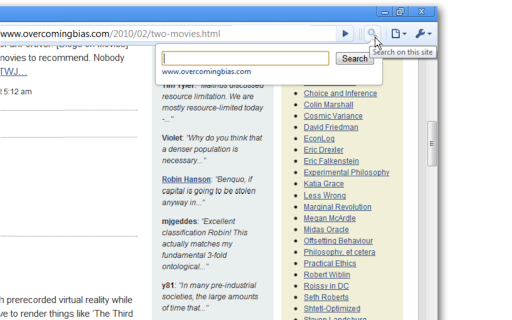
A Chrome extension that adds a toolbar button to quickly trigger a Google search restricted to the current domain. It allows users to find content across an entire site without manually typing search operators.
Overview
Installs
100K+
Rating
★ 4.5
329 reviews
Languages
51 locales
Includes Deutsch, English, Filipino, Indonesia...
Market analysis
Review-backed positioning, friction, and market signals for this Chrome extension.
Macro category
Automation & Workflow Efficiency
Pricing friction
Low review signal
Complaint intensity
Moderate review signal
Listing positioning
The product positions itself as a convenient alternative to the standard Ctrl+F function, allowing users to search across all pages of a website rather than just the active page. It emphasizes one-click simplicity by leveraging Google's 'site search' functionality.
Inferred product pattern
A lightweight utility wrapper for the Google 'site:' search operator.
Review-backed pain points
Users have reported the extension suddenly stopping work, options becoming greyed out, and search queries returning no results despite content being present.
Observed feature gaps
Lack of automatic 'www' omission to enable broader subdomain searching; lack of integration with internal site search engines.
- Power web users
- Researchers
- Frequent site visitors
- Searching an entire website for specific keywords
- Replacing manual 'site:' operator entry in Google
- Finding content on sites without a built-in search bar
- Long-term utility
- Convenience over manual typing
- Simple and effective functionality
- Intermittent breakage
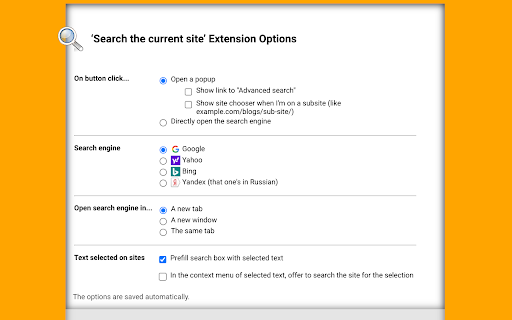
- Configuration options not saving
- Perceived redundancy for users familiar with search operators
- Confusion between external Google search and internal site search
- Performance complaints detected
- No pricing friction; the extension is free, with an optional Ko-fi tip link provided by the developer.
Support
No formal support complaints, though some users are resorting to manually modifying the extension's manifest file to fix permission errors.
Reliability
Several reports of the extension becoming unresponsive, failing to save user options, or ceasing to function after updates.
Privacy
No privacy or security complaints observed.
- Free usage observed
- No account requirement observed
- Free plan or free usage claimed
Store listing facts
- Screenshots: 2
- Videos: 0
- Languages: 51
- Developer contact
- Version: 10.7
- Size: 68.45KiB
- Last updated:
Listing SEO keywords
Core discovery
Comparison
Problem
Alternative
Similar extensions
Jump to related discovery paths:
FAQ
Screenshots