Exif Viewer icon

Exif Viewer Chrome Extension Analysis

Niche Lifestyle & Gaming Hacks

Chrome extension ID: kbnpbnmjmgabkfemdehelbgdppngihhg

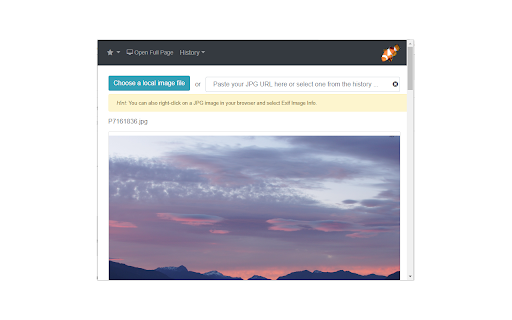
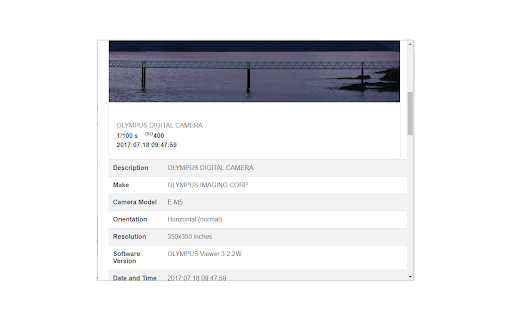
Exif Viewer is a browser-based utility designed to parse and display technical metadata (EXIF) embedded in image files. It provides a browser interface for users to inspect camera settings, GPS coordinates, and other stored metadata.

Developer:LinangData
Version:1.0.20
Size:1.46MiB
Last updated:

Overview

Installs

30K+

Rating

2.8

18 reviews

Languages

1 locales

Includes English (United States)

Market analysis

Review-backed positioning, friction, and market signals for this Chrome extension.

Backed by review samples

Macro category

Niche Lifestyle & Gaming Hacks

Pricing friction

Low review signal

Complaint intensity

High review signal

Listing & review signals
Observed signals from store listing text and review samples.

Listing positioning

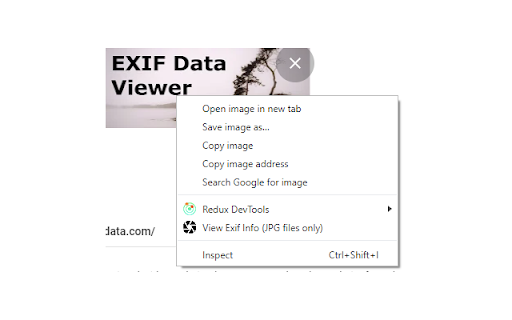
The store listing positions this extension as a dual-purpose tool for viewing image EXIF data from both local files and web-based URLs. It emphasizes the convenience of a right-click context menu and features like GPS location mapping and shutter count extraction.

Inferred product pattern

A simple redirect utility that pipes image URLs to a proprietary, ad-supported web tool rather than performing local computation.

Review-backed pain points

Users frequently report that the extension functions as a redirect to an ad-heavy external website rather than a standalone browser-based tool. There is significant frustration regarding its inability to consistently handle online image URLs versus local files.

Observed feature gaps

The extension lacks a robust, native, in-browser processing engine, relying instead on external redirects. It also fails to extract complete metadata fields, such as specific shutter counts, for many image types.

Tags
Exif ViewerImage MetadataPhoto Tools
Target users

- Photographers

- Digital content hobbyists

- General web users

Primary use cases

- Viewing GPS location of photos

- Checking camera shutter counts

- Inspecting metadata of local and web images

Positive themes

- Useful for viewing local file metadata

- Simple interface for specific technical tasks

- Helpful supplement to other online metadata viewers

Negative themes

- Over-reliance on external web-redirects instead of native processing

- Failure to process online images correctly

- Poor metadata comprehensiveness

Observed friction

- Performance complaints detected

- No direct pricing complaints; the tool is claimed to be free, but users are frustrated by the presence of ads on the redirected landing pages.

Evidence boundary: Review evidence shows a polarized user base; while some appreciate the local file handling, a significant portion of users identify the extension as a misleading redirect tool. Review data spans several years, suggesting inconsistent performance or updates that may have altered functionality over time.
Complaint summaries
Review-backed complaint signals grouped by operational area.

Support

No specific support complaints; negative sentiment is primarily focused on product design and perceived 'shell' functionality.

Reliability

Multiple users state the extension fails to parse online images correctly and inconsistently displays metadata fields.

Privacy

User concern noted regarding whether images uploaded to the external site are stored in a database, though no specific security breaches are cited.

Access & pricing

- Ad-supported model observed

- No account requirement observed

- Free plan or free usage claimed

Store listing facts

Listing assets

- Screenshots: 3

- Videos: 1

- Languages: 1

Trust signals

- Privacy policy

- Developer contact

- Official website

Store metadata

- Version: 1.0.20

- Size: 1.46MiB

- Last updated:

Store description excerpt
Short excerpt from the public Chrome Web Store listing; full copy is available on the official store page.
This free tool lets you open an image from your device, or from a URL, and view its Exif data. You can view the Exif data of a image on any web page by right-click the image and selecting View Exif Info. If the photo contains GPS data, you can view a Google map of the photo's location in a browser tab. There's lots of interesting information held in image files for you to explore. Some images have GPS data, so you can see exactly where it was taken. Some camera makes (like Nikon and FujiFilm) also record the camera's shutter count in the Exif data. A history of your last 10 image URLs is saved for faster selection. Explore other tools from LinangData from the More tools menu, including: Color Picker, Photo Editor; Sketch; the LinangData YouTube channel, etc. Release Notes: 1.0.20 - fixed css issue 1.0.19 - bug fixes

Listing SEO keywords

Search intent keywords
Keyword signals for evaluating how users may discover, compare, or search for this extension category.

Core discovery

exif data viewerview photo metadatacheck image gpsshutter count viewer

Comparison

exif viewer vs exiftoolonline exif viewer

Problem

extension not workingexif viewer not showing data

Alternative

exiftoolbrowser exif bookmarklet

Similar extensions

Jump to related discovery paths:

FAQ

What is Exif Viewer mainly used for?
Exif Viewer is a browser-based utility designed to parse and display technical metadata (EXIF) embedded in image files. It provides a browser interface for users to inspect camera settings, GPS coordinates, and other stored metadata.
What market signals stand out?
Visible niche traction with limited review base. Last known update: 08/29/2023.
What should builders compare before entering this space?
Compare install concentration, rating quality, update recency, screenshots, developer portfolio, listing claims, and review-backed friction signals.
Is this page review-backed?
Backed by review samples. This page combines store metadata with selected review signals, while raw store metrics remain visible for comparison.

Screenshots

Exif Viewer screenshot

Links

Recommended Chrome extensions

Related listings from the same category, trending peers, and the same publisher portfolio.

Browse art
Calculator icon

Calculator

LinangData

A simple calculator that remembers your last calculation. You can close it at any time, and reopen it without losing your work.

Installs

50K+

Rating

4.1

Grammar Checker icon

Grammar Checker

LinangData

Grammar, spelling and style checker. Get suggestions on writing improvements

Installs

40K+

Rating

4.3

Galaxy Wallpaper icon

Galaxy Wallpaper

Galaxy Wallpaper

Replace your basic new tab with galaxy space backgrounds. Designed especially for galaxy space fans.

Installs

20K+

Rating

4.7

Cartoon Yourself icon

Cartoon Yourself

airallineed

With our service you can quickly create Avatars or a Cartoon of Yourself directly online without any software installs and for free!

Installs

20K+

Rating

3.3

imgur Uploader icon

imgur Uploader

graeme phillips

Right-click uploading of images and screenshots anonymously or to your imgur account.

Installs

20K+

Rating

3.7

Backgrounds for Chrome-Chan icon

Backgrounds for Chrome-Chan

browserkun

Sets a random anime wallpaper for your new tabs.

Installs

20K+

Rating

3.9

ColorPickster – One-Click Color Picker & Eyedropper Tool icon

ColorPickster – One-Click Color Picker & Eyedropper Tool

John Conklin

ColorPickster lets you quickly pick colors from any site or image. Simple color picker and eyedropper tool – no extra setup.

Installs

10K+

Rating

4.3

Popify - Youtube Themes & Customizers icon

Popify - Youtube Themes & Customizers

Software - Moxo

Improves boring youtube thumbnails with popify, benify, dogify & more!

Installs

10K+

Rating

4.7

Instant Save for Instagram and Flickr icon

Instant Save for Instagram and Flickr

dangardiner

This extension allows saving of any Instagram or Flickr image via a single click on the context menu.

Installs

10K+

Rating

3.7

View Image Button icon

View Image Button

Muyor

Bring back the view image button for Google image search results.

Installs

10K+

Rating

3.8