
Fast Image Blocker Chrome Extension Analysis
Automation & Workflow EfficiencyChrome extension ID: khgnndhdnkpmlflndgobodbhgheaegon
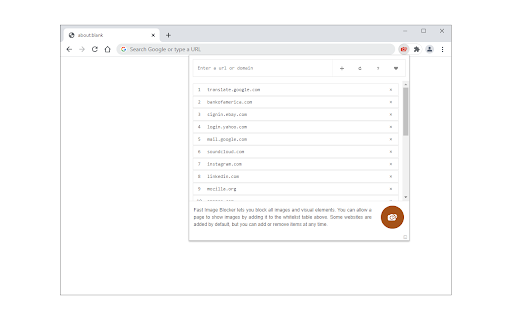
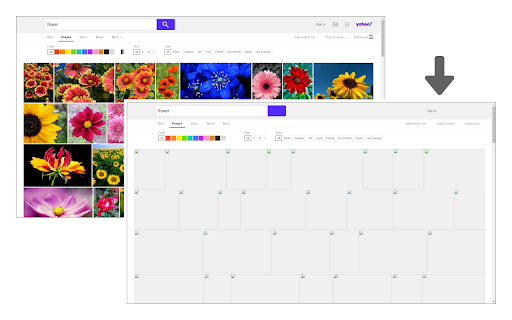
Fast Image Blocker is a Chrome extension designed to block images and visual elements on webpages. Users can maintain a whitelist to permit images on specific sites. The extension can be toggled on and off from the toolbar popup, and websites can be added to or removed from the whitelist through the same interface.
Overview
Installs
10K+
Rating
★ 3.7
35 reviews
Languages
1 locales
Includes English
Market analysis
Review-backed positioning, friction, and market signals for this Chrome extension.
Macro category
Automation & Workflow Efficiency
Pricing friction
Low review signal
Complaint intensity
Moderate review signal
Listing positioning
This extension positions itself as a straightforward tool to block all images and visual content on desired websites. It highlights the ability to easily toggle the extension on/off and manage a whitelist of sites that should be allowed to display images.
Inferred product pattern
A utility extension designed for content blocking with a focus on images, featuring basic whitelisting capabilities. It aims to provide a simple solution for users wanting to control visual content on websites.
Review-backed pain points
Users report that the extension is inconsistent, with whitelisting not always functioning as expected, leading to images remaining unblocked on designated sites. Additionally, there is a desire for the extension to block auto-starting videos.
Observed feature gaps
The extension does not appear to block videos. There is also a lack of functionality for exporting or importing the whitelist, which becomes a problem when Chrome profiles are reset.
- Users seeking to reduce bandwidth usage
- Users who want to minimize distractions on websites
- Users looking to speed up page load times
- Blocking all images on a website
- Allowing images only on specific trusted websites
- Quickly toggling image blocking on or off
- Provides a basic image blocking functionality
- Includes a whitelist feature for selective image display
- Offers a simple on/off toggle for the extension
- Inconsistent performance with whitelisting not always working
- Lack of functionality for blocking videos
- Difficulty in managing or exporting the whitelist
- Performance complaints detected
- The extension is free to use and does not appear to have any paid tiers or subscription models mentioned.
Support
No direct complaints about support were found, but users are directed to a bug report form on the addon's homepage for issues.
Reliability
Multiple reviews indicate inconsistent performance, particularly with the whitelisting feature, leading to frustration when sites are not unblocked as intended.
Privacy
No privacy-related complaints were observed in the provided reviews.
- Free usage observed
- No clear access signal
- Free plan or free usage claimed
Store listing facts
- Screenshots: 2
- Videos: 0
- Languages: 1
- Developer contact
- Official website
- Version: 0.2.6
- Size: 55.72KiB
- Last updated:
Listing SEO keywords
Core discovery
Comparison
Problem
Alternative
Similar extensions
Jump to related discovery paths:
FAQ
Screenshots
Links
Website: mybrowseraddon.com