Screenshot & Screen Recorder – Full Page Capture by SnapScreen icon

Screenshot & Screen Recorder Chrome Extension Analysis

Video & Image Downloaders

Store listing title: Screenshot & Screen Recorder – Full Page Capture by SnapScreen

Chrome extension ID: lgkhmlnjgpipgfpkilbchpmagmjoeemk

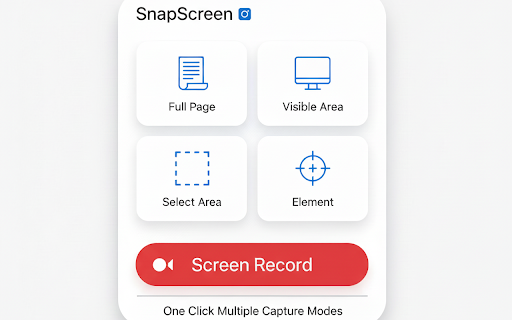
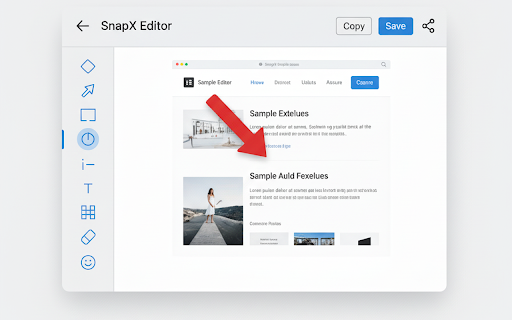
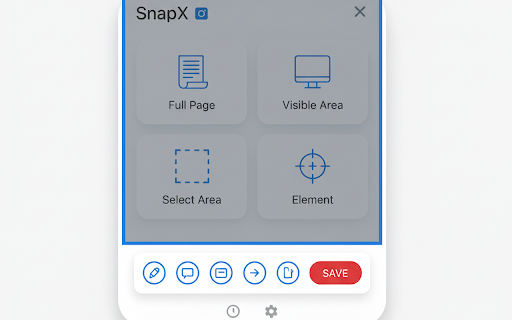
This Chrome extension provides tools for capturing full-page, area-based, or visible-screen screenshots alongside video recording capabilities. It includes built-in annotation tools like text, arrows, and blur, operating entirely within the browser without requiring external uploads or accounts.

Developer:WA Plus Team
Version:1.0.3
Size:75.16KiB
Last updated:

Overview

Installs

17

Rating

0 reviews

Languages

10 locales

Includes English, Indonesia, Tiếng Việt, español...

Market analysis

Review-backed positioning, friction, and market signals for this Chrome extension.

No review samples found

Macro category

Video & Image Downloaders

Pricing friction

Low review signal

Complaint intensity

Low review signal

Listing & review signals
Observed signals from store listing text and review samples.

Listing positioning

SnapScreen positions itself as a privacy-focused, all-in-one productivity tool for screen capturing and recording. It emphasizes a no-signup, 100% local processing workflow to appeal to users concerned about data privacy and speed.

Inferred product pattern

Local-first browser utility with integrated capture and editing features.

Review-backed pain points

Review-backed data is not available.

Observed feature gaps

Review-backed data is not available.

Tags
ScreenshotScreen RecorderAnnotationFull Page Capture
Target users

- Content Creators

- Remote Workers

- Students

- QA Testers

Primary use cases

- Documenting web pages

- Creating tutorials

- Providing visual feedback

- Sensitive information redaction

Positive themes

No positive theme data.

Negative themes

No negative theme data.

Observed friction

- No pricing friction observed; listing claims the product is free.

Evidence boundary: Data extracted from the public Chrome Web Store listing; developer claims of local-only processing and no-account usage are documented in the long description. The extension currently has no public reviews, preventing analysis of real-world user experience, performance, or reliability.
Complaint summaries
Review-backed complaint signals grouped by operational area.

Support

Review-backed data is not available.

Reliability

Review-backed data is not available.

Privacy

Review-backed data is not available.

Access & pricing

- Free usage observed

- No account requirement observed

- Free plan or free usage claimed

Store listing facts

Listing assets

- Screenshots: 5

- Videos: 0

- Languages: 10

Trust signals

- Privacy policy

- Developer contact

Store metadata

- Version: 1.0.3

- Size: 75.16KiB

- Last updated:

Store description excerpt
Short excerpt from the public Chrome Web Store listing; full copy is available on the official store page.
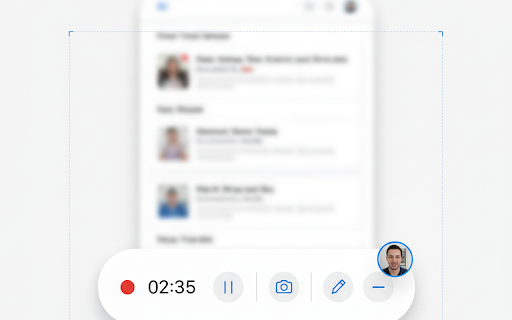
SnapScreen is your all-in-one Chrome tool for capturing, recording, and editing everything on your screen. Whether you need a full page screenshot, a visible area capture, or a custom selected region, SnapScreen makes it fast, simple, and fully local — no internet upload, no signup required. Key Features: - Full Page Screenshot – Capture the entire webpage, even content that is off-screen. - Area Capture – Select any portion of the page to screenshot instantly. - Visible Area Capture – Quickly capture only what’s currently visible on your screen. - Screen Recording – Record your browser screen with audio in high quality. - Annotate & Edit – Add text, arrows, highlights, and blur sensitive info directly in the browser. - 100% Local & Secure – All screenshots and recordings stay on your device. - Fast & Free – Lightweight, intuitive, and no account needed. Why SnapScreen? SnapScreen is pe…

Listing SEO keywords

Search intent keywords
Keyword signals for evaluating how users may discover, compare, or search for this extension category.

Core discovery

Chrome screenshot toolfull page capture extensionscreen recorder for Chromelocal screen capture

Comparison

SnapScreen vs GoFullPagebest free screenshot extension

Problem

capture full webpageblur sensitive info on screenshot

Alternative

Chrome screen recording alternatives

Similar extensions

Jump to related discovery paths:

FAQ

What is Screenshot & Screen Recorder mainly used for?
This Chrome extension provides tools for capturing full-page, area-based, or visible-screen screenshots alongside video recording capabilities. It includes built-in annotation tools like text, arrows, and blur, operating entirely within the browser without requiring external uploads or accounts.
What market signals stand out?
Early or small audience with limited review base. Last known update: 04/18/2026.
What should builders compare before entering this space?
Compare install concentration, rating quality, update recency, screenshots, developer portfolio, listing claims, and review-backed friction signals.
Is this page review-backed?
No review samples found. This page combines store metadata with selected review signals, while raw store metrics remain visible for comparison.

Screenshots

Screenshot & Screen Recorder – Full Page Capture by SnapScreen screenshot

Links

Recommended Chrome extensions

Related listings from the same category, trending peers, and the same publisher portfolio.

Browse tools
WA Web Plus – WhatsApp Web Tools for Privacy & Deleted Messages icon

WA Web Plus – WhatsApp Web Tools for Privacy & Deleted Messages

WA Plus Team

Blur chats & media for privacy, view deleted messages, download status, track online activity on WhatsApp Web.

Installs

10K+

Rating

4.8

Sider: Chat with all AI: GPT-5, Claude, DeepSeek, Gemini, Grok icon

Sider: Chat with all AI: GPT-5, Claude, DeepSeek, Gemini, Grok

ChatGPT Sidebar

ChatGPT, DeepSeek, Gemini, Claude, Grok all in one AI sidebar, for AI search, read, and write.

Installs

5.0M+

Rating

4.9

Norton Safe Search icon

Norton Safe Search

NortonLifeLock Inc

Search safely online by enabling Norton Safe Search as your default search provider for maximum protection on Chrome.

Installs

5.0M+

Rating

2.4

Shazam: Find song names from your browser icon

Shazam: Find song names from your browser

Shazam

Identify music, search lyrics & more

Installs

5.0M+

Rating

4.7

IE Tab icon

IE Tab

Blackfish Software

Display web pages using IE within Chrome. Use Java, Silverlight, ActiveX, Sharepoint, and more.

Installs

4.0M+

Rating

4.3

Microsoft Bing Homepage & Search for Chrome icon

Microsoft Bing Homepage & Search for Chrome

Microsoft Corporation

Set Microsoft Bing as your default homepage and default search engine

Installs

4.0M+

Rating

3.8

Immersive Translate: AI Web, PDF & Video Translator icon

Immersive Translate: AI Web, PDF & Video Translator

Immersive Translate

Free Translate Website, Translate PDF & Epub eBook, Translate Video Subtitles in Bilingual

Installs

3.0M+

Rating

4.0

BetterTTV icon

BetterTTV

NightDev, LLC

BetterTTV enhances Twitch and YouTube with new features, emotes, and more.

Installs

3.0M+

Rating

4.6

Monica: All-In-One AI Assist & Smartest  AI Agent icon

Monica: All-In-One AI Assist & Smartest AI Agent

Monica Team

One stop AI Assistant with GPT, Claude, Gemini: Chat, Write, Translate, Search, Summarize, image generator, video generation

Installs

3.0M+

Rating

4.9

Ad Blocker: Stands AdBlocker icon

Ad Blocker: Stands AdBlocker

Stands

Stands AdBlocker – it's a free ad blocker for YouTube, Twitch, Pop-Ups, Video Ads, and websites. Block ads everywhere with Stands!

Installs

3.0M+

Rating

4.8