Shortkeys (Custom Keyboard Shortcuts) icon

Shortkeys (Custom Keyboard Shortcuts) Chrome Extension Analysis

Automation & Workflow Efficiency

Chrome extension ID: logpjaacgmcbpdkdchjiaagddngobkck

Shortkeys is an open-source Chrome extension that enables the creation of custom hotkeys to control browser functions, tabs, and page elements. It includes a command palette, cloud synchronization via Chrome Sync, and the ability to run custom scripts.

Developer:Mike Crittenden
Version:5.0.1
Size:443KiB
Last updated:

Overview

Installs

100K+

Rating

3.4

811 reviews

Languages

1 locales

Includes English

Market analysis

Review-backed positioning, friction, and market signals for this Chrome extension.

Backed by review samples

Macro category

Automation & Workflow Efficiency

Pricing friction

Low review signal

Complaint intensity

High review signal

Listing & review signals
Observed signals from store listing text and review samples.

Listing positioning

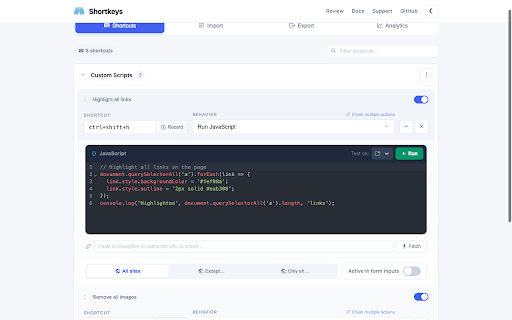
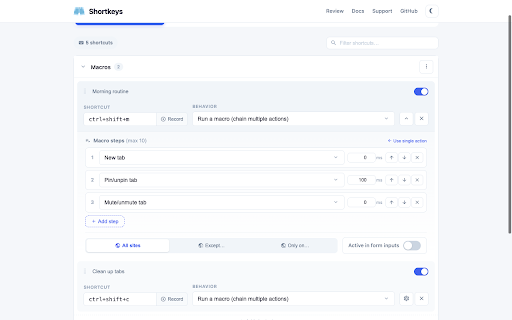
The product is positioned as a comprehensive browser customization tool that allows users to map custom keyboard shortcuts to over 125 built-in actions. It emphasizes power-user features like multi-action macros, custom JavaScript execution, and specialized shortcut packs for Vim and Emacs users.

Inferred product pattern

Open-source utility for browser-level hotkey mapping and macro automation.

Review-backed pain points

Users report significant instability following a 'full rewrite' (Version 5.00), claiming that existing shortcuts were deleted and the extension stopped responding entirely. Specific complaints mention the inability to map function keys (e.g., F10) or access browser bookmarks.

Observed feature gaps

Users have requested the ability to assign shortcuts to specific translation actions and reported that the 'Run JS' option is non-functional for some.

Tags
Keyboard ShortcutsCustom MacrosProductivity ToolOpen SourceBrowser Automation
Target users

- Power Users

- Software Developers

- Vim/Emacs enthusiasts

- Productivity Optimizers

Primary use cases

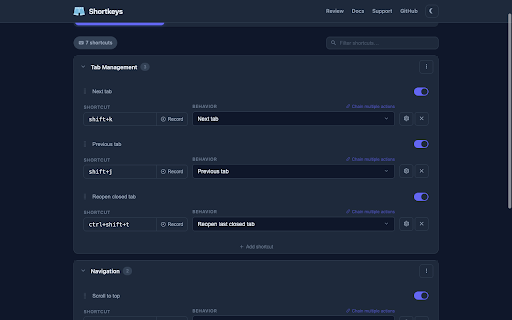
- Automating tab management

- Creating custom navigation shortcuts

- Executing custom JavaScript via hotkeys

- Implementing Vim-style browsing movements

Positive themes

- Review-backed positive themes are not available in the provided samples.

Negative themes

- Functional breakage after version updates

- Failure to trigger assigned shortcuts

- Loss of saved configurations

- Lack of support for function keys

Observed friction

- Performance complaints detected

- No pricing friction observed as the product is explicitly claimed to be free and open source.

Evidence boundary: Data extracted from store listing and 13 provided review samples. Provided review samples consist exclusively of low-to-mid ratings, meaning positive sentiment signals are missing.
Complaint summaries
Review-backed complaint signals grouped by operational area.

Support

Users express extreme frustration over the product becoming unusable after updates, with some advising others not to waste their time.

Reliability

Severe reliability issues reported after a major version update, including total failure to execute shortcuts and deletion of user data.

Privacy

No privacy or security complaints observed in the provided samples.

Access & pricing

- Free usage observed

- No account requirement observed

- Free plan or free usage claimed

Store listing facts

Listing assets

- Screenshots: 3

- Videos: 0

- Languages: 1

Trust signals

- Developer contact

- Support link

Store metadata

- Version: 5.0.1

- Size: 443KiB

- Last updated:

Store description excerpt
Short excerpt from the public Chrome Web Store listing; full copy is available on the official store page.
Shortkeys lets you create custom keyboard shortcuts for anything your browser can do. Choose from 125+ built-in actions, chain them into macros, or write your own JavaScript — all with a clean, modern interface. WHAT CAN IT DO? Shortkeys ships with 125+ built-in actions across 11 categories: - Scrolling: scroll up/down/left/right, jump to top or bottom - Tabs: open, close, pin, mute, move, sort, duplicate, suspend, group, and switch tabs - Navigation: back, forward, reload, copy URL, open from clipboard - Windows: new window, new private window, close window, fullscreen - Bookmarks: open any bookmark or bookmarklet with a shortcut - Zooming: zoom in, zoom out, reset - Video controls: play/pause, speed up/down, skip, mute, fullscreen - Search: search Google, YouTube, Wikipedia, or GitHub for selected text - Page tools: cheat sheet overlay, toggle dark mode on any page - Page scripts: 25…

Listing SEO keywords

Search intent keywords
Keyword signals for evaluating how users may discover, compare, or search for this extension category.

Core discovery

custom keyboard shortcuts chromebrowser macros extensionvim shortcuts for chromebrowser hotkey manager

Comparison

Vimium alternativecustom hotkeys vs browser defaults

Problem

chrome shortcut not workinghow to create browser shortcutsremap chrome keys

Alternative

Shortkeys alternativesbest browser shortcut extension

Similar extensions

Jump to related discovery paths:

FAQ

What is Shortkeys (Custom Keyboard Shortcuts) mainly used for?
Shortkeys is an open-source Chrome extension that enables the creation of custom hotkeys to control browser functions, tabs, and page elements. It includes a command palette, cloud synchronization via Chrome Sync, and the ability to run custom scripts.
What market signals stand out?
Established adoption with moderate review base. Last known update: 03/19/2026.
What should builders compare before entering this space?
Compare install concentration, rating quality, update recency, screenshots, developer portfolio, listing claims, and review-backed friction signals.
Is this page review-backed?
Backed by review samples. This page combines store metadata with selected review signals, while raw store metrics remain visible for comparison.

Screenshots

Shortkeys (Custom Keyboard Shortcuts) screenshot

Links

Recommended Chrome extensions

Related listings from the same category, trending peers, and the same publisher portfolio.

Browse workflow