Copy URLs icon

Copy URLs Chrome Extension Analysis

Tab & Bookmark Productivity

Chrome extension ID: mpfphembnfodfcjbfckadekeenldcdco

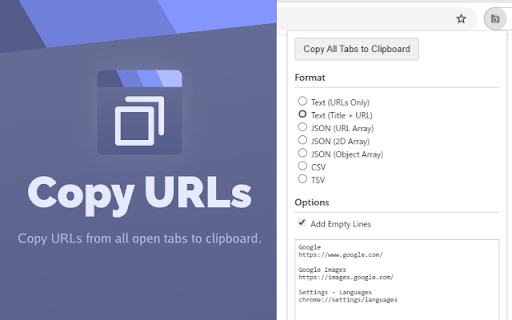
Copy URLs is a Chrome extension that allows users to capture the URLs of all open tabs in a single click. It supports various output formats such as plain text, CSV, and several JSON structures.

Developer:oov
Version:1.1
Size:14.0KiB
Last updated:

Overview

Installs

7

Rating

0 reviews

Languages

1 locales

Includes English

Market analysis

Review-backed positioning, friction, and market signals for this Chrome extension.

No review samples found

Macro category

Tab & Bookmark Productivity

Pricing friction

Low review signal

Complaint intensity

Low review signal

Listing & review signals
Observed signals from store listing text and review samples.

Listing positioning

The product is positioned as a utility for quickly exporting URLs from all open tabs. It emphasizes versatility by offering multiple export formats including JSON, CSV, and TSV.

Inferred product pattern

Single-purpose open-source utility for browser state data extraction.

Review-backed pain points

Review-backed data is not available.

Observed feature gaps

No review data available to identify gaps; listing provides basic export functionality.

Tags
Tab ManagerURL ExporterProductivity ToolOpen Source
Target users

- Researchers

- Developers

- Digital Archivists

- Power Users

Primary use cases

- Exporting research links for documentation

- Saving current session URLs to a file

- Converting open tabs into data arrays for development

Positive themes

No positive theme data.

Negative themes

No negative theme data.

Observed friction

- No pricing friction observed; product appears to be free/open-source.

Evidence boundary: Analysis based on the Chrome Web Store listing and developer-provided GitHub links. Lack of user reviews prevents validation of real-world reliability and user satisfaction.
Complaint summaries
Review-backed complaint signals grouped by operational area.

Support

Review-backed data is not available.

Reliability

Review-backed data is not available.

Privacy

Review-backed data is not available.

Access & pricing

- Free usage observed

- No account requirement observed

- Free plan or free usage claimed

Store listing facts

Listing assets

- Screenshots: 1

- Videos: 0

- Languages: 1

Trust signals

- Developer contact

- Official website

Store metadata

- Version: 1.1

- Size: 14.0KiB

- Last updated:

Store description excerpt
Short excerpt from the public Chrome Web Store listing; full copy is available on the official store page.
Copy URLs is a Chrome extension that makes it easy to copy URLs from tabs. With just one click, you can copy the URL of all open tabs to your clipboard in various formats. Export Formats: - URLs only - Title + URL pairs - JSON URL Array - JSON 2D Array with titles - JSON Object Array with title/URL properties - CSV - TSV Changelog: https://github.com/oov/CopyURLs/blob/main/CHANGELOG.md Sourcecode: https://github.com/oov/CopyURLs

Listing SEO keywords

Search intent keywords
Keyword signals for evaluating how users may discover, compare, or search for this extension category.

Core discovery

copy all tab urlsexport open tabs to csvchrome extension url listcopy tabs to json

Comparison

copy urls vs tab session managerbest url exporter extension

Problem

how to copy all open tabsexport browser tabs to textsave open urls list

Alternative

tab list exporteropen tab copierurl list generator

Similar extensions

Jump to related discovery paths:

FAQ

What is Copy URLs mainly used for?
Copy URLs is a Chrome extension that allows users to capture the URLs of all open tabs in a single click. It supports various output formats such as plain text, CSV, and several JSON structures.
What market signals stand out?
Early or small audience with limited review base. Last known update: 04/06/2026.
What should builders compare before entering this space?
Compare install concentration, rating quality, update recency, screenshots, developer portfolio, listing claims, and review-backed friction signals.
Is this page review-backed?
No review samples found. This page combines store metadata with selected review signals, while raw store metrics remain visible for comparison.

Screenshots

Copy URLs screenshot

Links

Website: oov.ch

Recommended Chrome extensions

Related listings from the same category, trending peers, and the same publisher portfolio.

Browse tools