PiP (Picture in picture) icon

PiP (Picture in picture) Chrome Extension Analysis

Automation & Workflow Efficiency

Chrome extension ID: nalkmonnmldhpfcpdlbdpljlaajlaphh

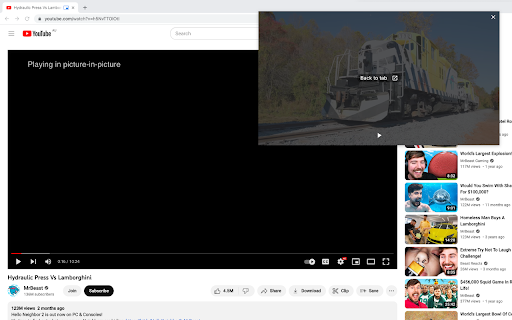
A productivity utility that pops video content into a resizable and moveable floating window. It is designed to facilitate multitasking by allowing continuous video viewing while working in other browser tabs or desktop apps.

Version:1.6.6
Size:10.0KiB
Last updated:

Overview

Installs

200K+

Rating

4.2

355 reviews

Languages

1 locales

Includes English

Market analysis

Review-backed positioning, friction, and market signals for this Chrome extension.

Backed by review samples

Macro category

Automation & Workflow Efficiency

Pricing friction

Low review signal

Complaint intensity

High review signal

Listing & review signals
Observed signals from store listing text and review samples.

Listing positioning

The extension is positioned as a multitasking tool that allows users to watch videos in a floating window. It claims to enable users to keep videos on top of other tabs and applications to enhance productivity.

Inferred product pattern

A productivity utility that users claim has been compromised to perform malicious URL hijacking and redirects.

Review-backed pain points

Users report severe security and privacy issues, specifically alleging the extension hijacks URLs and redirects users to Amazon, eBay, and the domain amitab.com.

Observed feature gaps

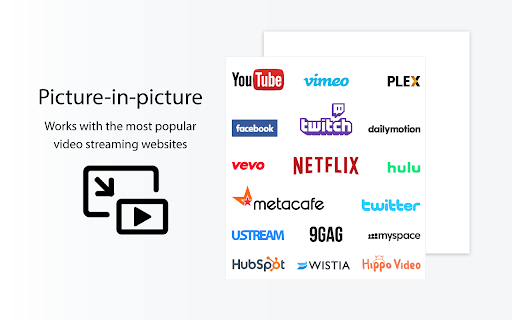
Users report the extension lacks promised functionality such as dual PIP mode and opacity controls, and has inconsistent site compatibility.

Tags
Picture in PictureVideo PlayerMultitasking ToolFloating Window
Target users

- Multitaskers

- Video watchers

- Remote workers

Primary use cases

- Watching videos while working in other tabs

- Multitasking during web browsing

- Floating video playback over applications

Positive themes

- Review-backed data is not available

Negative themes

- Malicious URL redirection

- Inaccurate feature claims

- Ad blocker interference

Observed friction

- Performance complaints detected

- Privacy complaints detected

- No pricing friction observed in the provided data.

Evidence boundary: Extracted from store listing descriptions and multiple highly critical user reviews alleging security breaches. The analysis is based on a limited sample of low-rating reviews.
Complaint summaries
Review-backed complaint signals grouped by operational area.

Support

No support or account-related complaints observed in the provided data.

Reliability

Users report that the extension interferes with ad blockers and does not function on all video-hosting websites.

Privacy

Extensive user reports of malware-like behavior, including hijacking search URLs and redirecting users to third-party commercial domains.

Access & pricing

- No clear monetization signal

- No account requirement observed

- No clear pricing signal

Store listing facts

Listing assets

- Screenshots: 2

- Videos: 1

- Languages: 1

Trust signals

- Privacy policy

- Developer contact

Store metadata

- Version: 1.6.6

- Size: 10.0KiB

- Last updated:

Store description excerpt
Short excerpt from the public Chrome Web Store listing; full copy is available on the official store page.
Enhance your video viewing experience with Picture in Picture Have you ever wanted to keep watching your favorite videos while doing something else? With Picture in Picture for Chrome, you can. This simple extension lets you keep your video in a small floating window that stays on top of other tabs and apps. You can move it anywhere on your screen and resize it the way you like. No more pausing to check emails or switching between tabs. Just click the Picture in Picture icon, and your video will pop out so you can continue watching while you work, browse, or chat. It only takes a few seconds to install. Go to the Chrome Web Store, search for Picture in Picture, and click Add to Chrome. Once installed, you will see the icon in your toolbar for quick access. Picture in Picture makes multitasking simple. Watch your videos without interruptions and stay productive at the same time.

Listing SEO keywords

Search intent keywords
Keyword signals for evaluating how users may discover, compare, or search for this extension category.

Core discovery

Picture in PictureFloating Video PlayerPIP ExtensionVideo Multitasking

Comparison

Google Picture in PictureOpen Source PIP

Problem

Malware extensionURL redirectChrome hijackingAmitab

Alternative

Floating playerVideo pop out

Similar extensions

Jump to related discovery paths:

FAQ

What is PiP (Picture in picture) mainly used for?
A productivity utility that pops video content into a resizable and moveable floating window. It is designed to facilitate multitasking by allowing continuous video viewing while working in other browser tabs or desktop apps.
What market signals stand out?
Established adoption with moderate review base. Last known update: 04/21/2026.
What should builders compare before entering this space?
Compare install concentration, rating quality, update recency, screenshots, developer portfolio, listing claims, and review-backed friction signals.
Is this page review-backed?
Backed by review samples. This page combines store metadata with selected review signals, while raw store metrics remain visible for comparison.

Screenshots

PiP (Picture in picture) screenshot

Links

Recommended Chrome extensions

Related listings from the same category, trending peers, and the same publisher portfolio.

Browse tools
WPS PDF - Read, Edit, Fill, Convert, and AI Chat PDF with Ease icon

WPS PDF - Read, Edit, Fill, Convert, and AI Chat PDF with Ease

www.wps.com

Easy-to-use PDF tools to view, edit, convert, fill, e-sign PDF files, and more in your browser.

Installs

7.0M+

Rating

4.5

AnyDoc Translator - Translate Web and PDF icon

AnyDoc Translator - Translate Web and PDF

www.wps.com

The ultimate AI translator for web, files, ebooks, academic papers, images, and text

Installs

6.0M+

Rating

4.6

Video DownloadHelper icon

Video DownloadHelper

Aclap

Download Videos from the Web.

Installs

5.0M+

Rating

4.5

Sider: Chat with all AI: GPT-5, Claude, DeepSeek, Gemini, Grok icon

Sider: Chat with all AI: GPT-5, Claude, DeepSeek, Gemini, Grok

ChatGPT Sidebar

ChatGPT, DeepSeek, Gemini, Claude, Grok all in one AI sidebar, for AI search, read, and write.

Installs

5.0M+

Rating

4.9

Norton Safe Search icon

Norton Safe Search

NortonLifeLock Inc

Search safely online by enabling Norton Safe Search as your default search provider for maximum protection on Chrome.

Installs

5.0M+

Rating

2.4

Shazam: Find song names from your browser icon

Shazam: Find song names from your browser

Shazam

Identify music, search lyrics & more

Installs

5.0M+

Rating

4.7

IE Tab icon

IE Tab

Blackfish Software

Display web pages using IE within Chrome. Use Java, Silverlight, ActiveX, Sharepoint, and more.

Installs

4.0M+

Rating

4.3

Microsoft Bing Homepage & Search for Chrome icon

Microsoft Bing Homepage & Search for Chrome

Microsoft Corporation

Set Microsoft Bing as your default homepage and default search engine

Installs

4.0M+

Rating

3.8

Monica: All-In-One AI Assist & Smartest  AI Agent icon

Monica: All-In-One AI Assist & Smartest AI Agent

Monica Team

One stop AI Assistant with GPT, Claude, Gemini: Chat, Write, Translate, Search, Summarize, image generator, video generation

Installs

3.0M+

Rating

4.9

Immersive Translate: AI Web, PDF & Video Translator icon

Immersive Translate: AI Web, PDF & Video Translator

Immersive Translate

Free Translate Website, Translate PDF & Epub eBook, Translate Video Subtitles in Bilingual

Installs

3.0M+

Rating

4.0