Draw on Page icon

Draw on Page Chrome Extension Analysis

Developer & Designer Tools

Chrome extension ID: ngmfehckdahhmlbabjemcepfhgnoddlo

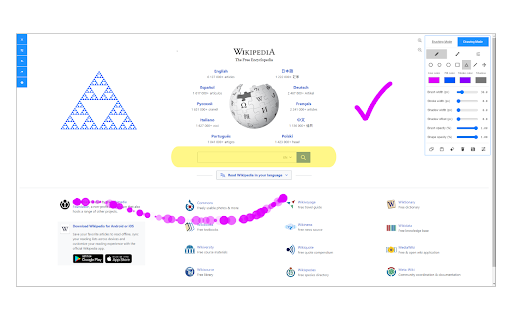
Draw on Page provides a browser-based canvas overlay that allows users to draw using pencils, circles, or spray brushes, and insert primitive shapes. Users can resize, rotate, and move these objects before saving or printing the page.

Developer:leocompson
Version:0.1.7
Size:329KiB
Last updated:

Overview

Installs

100K+

Rating

3.5

55 reviews

Languages

1 locales

Includes English

Market analysis

Review-backed positioning, friction, and market signals for this Chrome extension.

Backed by review samples

Macro category

Developer & Designer Tools

Pricing friction

Low review signal

Complaint intensity

Moderate review signal

Listing & review signals
Observed signals from store listing text and review samples.

Listing positioning

The extension is positioned as a simple utility for drawing and annotating any website. It emphasizes the ability to use various brushing and shape tools to mark up a page and then print or save the result.

Inferred product pattern

Simple overlay canvas tool for web annotation and markup.

Review-backed pain points

Users frequently report that drawings follow the scroll instead of staying anchored to the page content. Multiple users experience the webpage turning blank immediately upon activating the extension, and the undo function is reported to erase all work rather than the last action.

Observed feature gaps

Missing text annotation tools, lack of keyboard shortcuts for tool switching, and inability to interact with the underlying webpage while the drawing interface is open.

Tags
Web AnnotationPage MarkupDrawing ToolVisual Feedback
Target users

- Students

- Web Designers

- QA Testers

- Educators

Primary use cases

- Highlighting content on a webpage

- Annotating websites for feedback

- Completing online schoolwork

- Creating visual guides

Positive themes

- Comprehensive tool selection

Negative themes

- Canvas stability during scrolling

- Critical launch failures

- Broken undo/redo functionality

- Lack of text input

Observed friction

- Performance complaints detected

- No pricing friction observed; no payment requirements mentioned.

Evidence boundary: Analysis based on the Chrome Web Store listing and a sample of 10 user reviews. The review sample represents a small fraction of the total comment count.
Complaint summaries
Review-backed complaint signals grouped by operational area.

Support

No specific support complaints observed, though the developer provides a bug report form on their website.

Reliability

Significant reliability issues reported, including the extension causing pages to go blank and failures in basic functions like 'undo' and 'redo'.

Privacy

No privacy complaints observed.

Access & pricing

- Free usage observed

- No account requirement observed

- Free plan or free usage claimed

Store listing facts

Listing assets

- Screenshots: 1

- Videos: 1

- Languages: 1

Trust signals

- Developer contact

- Official website

Store metadata

- Version: 0.1.7

- Size: 329KiB

- Last updated:

Store description excerpt
Short excerpt from the public Chrome Web Store listing; full copy is available on the official store page.
Draw on Page is a browser extension that lets you draw on any website. Please first navigate to a website, then press on the toolbar button to activate the add-on. Once the interface appears on the page, please choose the desired mode. Currently, there are two modes available, Drawing Mode and Brushing Mode. Brushing mode is for drawing with mouse or pen (touch-enabled devices) on the page. You can choose a pencil, circle, or spray brush in this mode. There is also an option to change the color and width of the brushing tool from the UI. The other mode is for drawing shapes (Drawing Mode). When you select this mode, five different primitive shapes are available to choose from the UI. Once you click on a shape, it will be added to the screen. You can drag and drop, remove, resize, or rotate and zoom objects on the screen. To print the page with your drawings on it, please press on the pr…

Listing SEO keywords

Search intent keywords
Keyword signals for evaluating how users may discover, compare, or search for this extension category.

Core discovery

draw on websiteweb page annotationbrowser drawing toolmarkup web page

Comparison

Draw on Page vs Page Markerbest web annotation extension

Problem

how to draw on a websitehighlight website for printannotate web page

Alternative

Draw on Page alternativesweb markup tools

Similar extensions

Jump to related discovery paths:

FAQ

What is Draw on Page mainly used for?
Draw on Page provides a browser-based canvas overlay that allows users to draw using pencils, circles, or spray brushes, and insert primitive shapes. Users can resize, rotate, and move these objects before saving or printing the page.
What market signals stand out?
Established adoption with limited review base. Last known update: 09/02/2025.
What should builders compare before entering this space?
Compare install concentration, rating quality, update recency, screenshots, developer portfolio, listing claims, and review-backed friction signals.
Is this page review-backed?
Backed by review samples. This page combines store metadata with selected review signals, while raw store metrics remain visible for comparison.

Screenshots

Draw on Page screenshot

Links

Website: mybrowseraddon.com

Videos: Watch

Recommended Chrome extensions

Related listings from the same category, trending peers, and the same publisher portfolio.

Browse tools