New Tab Changer icon

New Tab Changer Chrome Extension Analysis

Tab & Bookmark Productivity

Chrome extension ID: occbjkhimchkolibngmcefpjlbknggfh

New Tab Changer allows users to override the default Chrome new tab page with a URL of their choice. It offers simple configuration for users wanting to start browsing from a specific web destination every time they open a new tab.

Developer:ksoft
Version:2.4
Size:105KiB
Last updated:

Overview

Installs

10K+

Rating

4.3

69 reviews

Languages

1 locales

Includes English

Market analysis

Review-backed positioning, friction, and market signals for this Chrome extension.

Backed by review samples

Macro category

Tab & Bookmark Productivity

Pricing friction

Moderate review signal

Complaint intensity

High review signal

Listing & review signals
Observed signals from store listing text and review samples.

Listing positioning

The product positions itself as a lightweight and fast utility for redirecting new Chrome tabs to a custom URL or local file. It highlights features such as automatic URL bar focus, incognito mode support, and basic usage statistics.

Inferred product pattern

Utility extension transitioned from free/simple to a subscription-based model, causing significant negative feedback.

Review-backed pain points

Users are frustrated by a transition to a paid subscription model for a simple utility, concerns over excessive permission requests, and ongoing technical issues with omnibox focus/selection.

Observed feature gaps

Lack of reliable omnibox autofocus functionality and inconsistent performance across different OS versions and incognito modes.

Tags
New TabRedirectCustom UrlBrowser Productivity
Target users

- Power users

- Web developers

- Customization enthusiasts

Primary use cases

- Redirecting new tabs to Gmail or Bing

- Opening local file URLs

- Customizing browser startup workflows

Positive themes

- Speed and simplicity compared to competitors

- Effective for basic URL redirection

Negative themes

- Aggressive monetization/subscription model

- Privacy concerns regarding required website access

- Performance regressions with omnibox autofocus

- Failure to override default new tab page

Observed friction

- Payment required for meaningful usage

- Performance complaints detected

- Privacy complaints detected

- Significant user backlash regarding the introduction of a $35/year subscription for a utility perceived as trivial, with users requesting a one-time purchase model.

Evidence boundary: Evidence based on a mix of legacy positive reviews praising simplicity and recent negative reviews focusing on monetization, privacy, and functional reliability. Reviews span a significant timeline (2014-2025), meaning some technical feedback regarding performance may pertain to older versions of the browser or extension.
Complaint summaries
Review-backed complaint signals grouped by operational area.

Support

No specific support channel complaints, but high frustration with the monetization shift.

Reliability

Consistent complaints about the extension failing to override the default new tab page and losing focus functionality in the address bar.

Privacy

Users expressed suspicion regarding the extension's requirement to access the developer's website.

Access & pricing

- Subscription model observed

- Account required for core usage

- Paid-only usage observed

Store listing facts

Listing assets

- Screenshots: 3

- Videos: 0

- Languages: 1

Trust signals

- Privacy policy

- Developer contact

- Official website

Store metadata

- Version: 2.4

- Size: 105KiB

- Last updated:

Store description excerpt
Short excerpt from the public Chrome Web Store listing; full copy is available on the official store page.
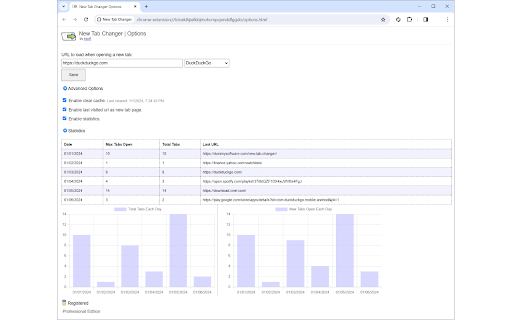
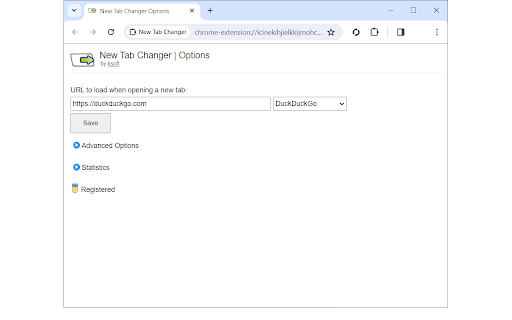
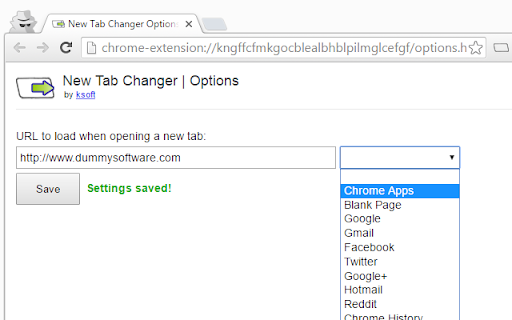
* Load a custom web page or url in a new tab. * Make new tabs automatically load Gmail, Bing, or any web site. * Easily setup a new tab redirect to a local file url. * Automatically sets focus to url bar. * Supports Incognito mode. * Fast, light, and easy to use. * Clear cache when loading new tabs. * Redirect to last visited url. * Advanced statistics to display a history of max and total tabs open per day. Automatically set a custom url to load in new tabs. Setup a new tab redirect to Gmail, Yahoo, Bing, or any web page you desire! Simply enter the desired web site url and click Save. Any time a new tab is opened, the web site you selected will automatically display. New Tab Changer supports web site urls and local file urls. New Tab Changer lets you automatically setup a new tab redirect to a custom url.

Listing SEO keywords

Search intent keywords
Keyword signals for evaluating how users may discover, compare, or search for this extension category.

Core discovery

New Tab RedirectChrome custom new tabRedirect new tab to URLBrowser customization extension

Comparison

New Tab Redirect alternativebest new tab extension

Problem

extension not workingnew tab redirect brokensubscription price too high

Alternative

New Tab RedirectCustom New Tab URL

Similar extensions

Jump to related discovery paths:

FAQ

What is New Tab Changer mainly used for?
New Tab Changer allows users to override the default Chrome new tab page with a URL of their choice. It offers simple configuration for users wanting to start browsing from a specific web destination every time they open a new tab.
What market signals stand out?
Visible niche traction with limited review base. Last known update: 01/11/2026.
What should builders compare before entering this space?
Compare install concentration, rating quality, update recency, screenshots, developer portfolio, listing claims, and review-backed friction signals.
Is this page review-backed?
Backed by review samples. This page combines store metadata with selected review signals, while raw store metrics remain visible for comparison.

Screenshots

New Tab Changer screenshot

Links

Recommended Chrome extensions

Related listings from the same category, trending peers, and the same publisher portfolio.

Browse workflow