PikPak Browser Extension icon

PikPak Browser Extension Chrome Extension Analysis

Automation & Workflow Efficiency

Chrome extension ID: ohpgjiplhigpfcioaeakjfjnkbgjpgbl

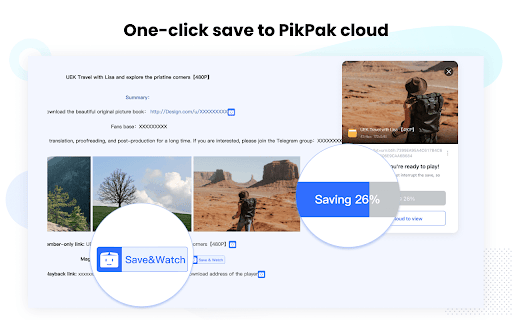
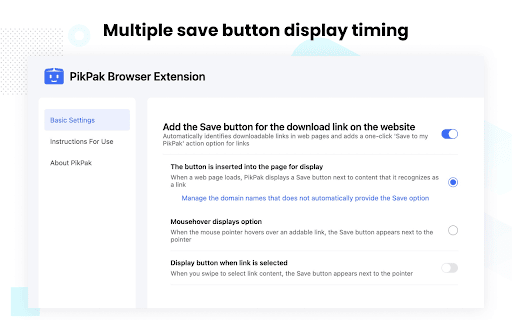
A browser utility designed to detect and facilitate the one-click transfer of web-based files and videos to PikPak cloud storage. It features customizable UI settings to control how the PikPak icon appears during browsing.

Version:1.8.6.601
Size:1.68MiB
Last updated:

Overview

Installs

100K+

Rating

3.0

167 reviews

Languages

6 locales

Includes English (United States), Indonesia, Melayu, 中文(中国)...

Market analysis

Review-backed positioning, friction, and market signals for this Chrome extension.

Backed by review samples

Macro category

Automation & Workflow Efficiency

Pricing friction

Moderate review signal

Complaint intensity

High review signal

Listing & review signals
Observed signals from store listing text and review samples.

Listing positioning

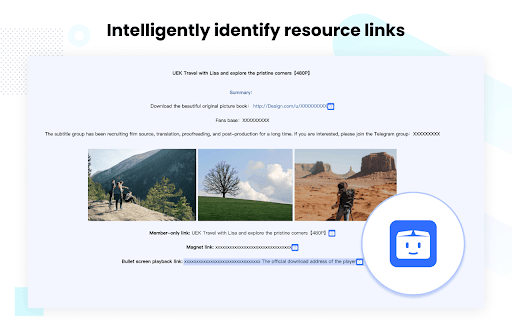
The extension positions itself as a convenient assistant that intelligently identifies resource links on web pages. It aims to allow users to save content to their PikPak cloud drive with a single click.

Inferred product pattern

A utility-driven extension focused on cloud-based file management that currently suffers from significant trust and reliability issues.

Review-backed pain points

Users report frequent download errors, failed parsing, broken synchronization, and feeling misled by the removal of free trials and complex pricing structures.

Observed feature gaps

Lack of accessible customer support or FAQ within the extension and inconsistent behavior of UI customization settings.

Tags
Cloud StorageFile DownloaderResource SaverProductivity Tool
Target users

- Cloud storage users

- Media collectors

- Content savers

Primary use cases

- Saving web videos to cloud storage

- Automating file transfers from websites to PikPak

Positive themes

- Fast link grabbing/recognition speed

Negative themes

- Unreliable download/parsing functionality

- Deceptive pricing and trial offers

- Poor user interface and settings persistence

Observed friction

- Free-tier complaints detected

- Performance complaints detected

- Complaints regarding deceptive minimum purchase requirements and non-refreshing data quotas despite paid memberships.

Evidence boundary: Analysis based on user reviews in English, Chinese, and Korean highlighting functional failures and monetization disputes. The dataset consists primarily of low-rating reviews, which may over-represent negative sentiment and specific technical bugs.
Complaint summaries
Review-backed complaint signals grouped by operational area.

Support

Users express frustration over the lack of visible support links, FAQs, or effective customer service.

Reliability

Significant reports of downloads getting stuck, parsing failures, and synchronization bugs.

Privacy

No specific privacy complaints were identified in the provided reviews.

Access & pricing

- Free entry with paid features

- Login needed for core features

- Limited free usage observed

Store listing facts

Listing assets

- Screenshots: 4

- Videos: 0

- Languages: 6

Trust signals

- Privacy policy

- Developer contact

- Support link

Store metadata

- Version: 1.8.6.601

- Size: 1.68MiB

- Last updated:

Store description excerpt
Short excerpt from the public Chrome Web Store listing; full copy is available on the official store page.
[ Description ] This extension intelligently identifies resource links in web pages, making it easy for users to add them to PikPak in one click for saving and viewing. [ Kind reminder ] 1. After installing this extension, the "PikPak icon" button will be displayed next to the resource link in the webpage by default. Click it to add it to PikPak. 2. If you think that this mode affects the web browsing experience, you can enter the "Basic Settings" interface of this extension and change the display time of the PikPak icon button to "hover the mouse" or "select the link"; 3. If you have any problems during the use of PikPak, please join the official communication group feedback https://t.me/pikpak_userservice_en

Listing SEO keywords

Search intent keywords
Keyword signals for evaluating how users may discover, compare, or search for this extension category.

Core discovery

cloud storage extensionsave videos to cloudPikPak link saverweb resource downloader

Comparison

Terabox

Problem

download errorparsing failurefake trialpricing deception

Alternative

cloud drivefile downloader

Similar extensions

Jump to related discovery paths:

FAQ

What is PikPak Browser Extension mainly used for?
A browser utility designed to detect and facilitate the one-click transfer of web-based files and videos to PikPak cloud storage. It features customizable UI settings to control how the PikPak icon appears during browsing.
What market signals stand out?
Established adoption with moderate review base. Last known update: 05/21/2026.
What should builders compare before entering this space?
Compare install concentration, rating quality, update recency, screenshots, developer portfolio, listing claims, and review-backed friction signals.
Is this page review-backed?
Backed by review samples. This page combines store metadata with selected review signals, while raw store metrics remain visible for comparison.

Screenshots

PikPak Browser Extension screenshot

Links

Recommended Chrome extensions

Related listings from the same category, trending peers, and the same publisher portfolio.

Browse tools
Browsec VPN - Free VPN for Chrome icon

Browsec VPN - Free VPN for Chrome

Browsec

Browsec VPN is a Chrome VPN extension that protects your IP from Internet threats and lets you browse privately for free.

Installs

8.0M+

Rating

4.5

Zotero Connector icon

Zotero Connector

Zotero

Save references to Zotero from your web browser

Installs

8.0M+

Rating

4.0

WPS PDF - Read, Edit, Fill, Convert, and AI Chat PDF with Ease icon

WPS PDF - Read, Edit, Fill, Convert, and AI Chat PDF with Ease

www.wps.com

Easy-to-use PDF tools to view, edit, convert, fill, e-sign PDF files, and more in your browser.

Installs

7.0M+

Rating

4.5

AnyDoc Translator - Translate Web and PDF icon

AnyDoc Translator - Translate Web and PDF

www.wps.com

The ultimate AI translator for web, files, ebooks, academic papers, images, and text

Installs

6.0M+

Rating

4.6

Video DownloadHelper icon

Video DownloadHelper

Aclap

Download Videos from the Web.

Installs

5.0M+

Rating

4.5

Sider: Chat with all AI: GPT-5, Claude, DeepSeek, Gemini, Grok icon

Sider: Chat with all AI: GPT-5, Claude, DeepSeek, Gemini, Grok

ChatGPT Sidebar

ChatGPT, DeepSeek, Gemini, Claude, Grok all in one AI sidebar, for AI search, read, and write.

Installs

5.0M+

Rating

4.9

Norton Safe Search icon

Norton Safe Search

NortonLifeLock Inc

Search safely online by enabling Norton Safe Search as your default search provider for maximum protection on Chrome.

Installs

5.0M+

Rating

2.4

Shazam: Find song names from your browser icon

Shazam: Find song names from your browser

Shazam

Identify music, search lyrics & more

Installs

5.0M+

Rating

4.7

IE Tab icon

IE Tab

Blackfish Software

Display web pages using IE within Chrome. Use Java, Silverlight, ActiveX, Sharepoint, and more.

Installs

4.0M+

Rating

4.3

Microsoft Bing Homepage & Search for Chrome icon

Microsoft Bing Homepage & Search for Chrome

Microsoft Corporation

Set Microsoft Bing as your default homepage and default search engine

Installs

4.0M+

Rating

3.8