WebP / Avif image converter icon

WebP / Avif image converter Chrome Extension Analysis

Developer & Designer Tools

Chrome extension ID: pbcfbdlbkdfobidmdoondbgdfpjolhci

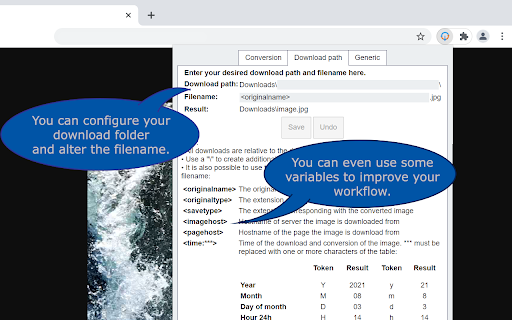
A Chrome extension that allows users to right-click images on the web and save them as JPG, PNG, or WebP. It features advanced configuration options for file naming and directory organization relative to the default downloads folder.

Developer:Nullbrains
Version:1.3.2
Size:42.75KiB
Last updated:

Overview

Installs

100K+

Rating

3.8

225 reviews

Languages

1 locales

Includes English

Market analysis

Review-backed positioning, friction, and market signals for this Chrome extension.

Backed by review samples

Macro category

Developer & Designer Tools

Pricing friction

Low review signal

Complaint intensity

Moderate review signal

Listing & review signals
Observed signals from store listing text and review samples.

Listing positioning

The product is positioned as a productivity utility that integrates into the browser's context menu to convert images like WebP and AVIF before saving. It emphasizes user control over conversion types and the ability to automate download locations and naming conventions.

Inferred product pattern

Context-menu based asset conversion utility with custom file-system routing.

Review-backed pain points

Users report that the extension has suddenly stopped working or becomes inconsistent following browser updates, with some experiencing browser crashes and others finding that images remain in their original format despite settings.

Observed feature gaps

Lack of compatibility updates for Manifest V3 and failure to remember the last used save path.

Tags
Image ConverterWebP to JPGAVIF ConverterBrowser Utility
Target users

- Web Designers

- Content Creators

- Digital Marketers

- General Web Users

Primary use cases

- Converting WebP/AVIF images to standard formats

- Organizing web image downloads via custom paths

- Saving images without manual external conversion

Positive themes

- Previously highly valued as an invaluable tool

- Historical reliability and utility

Negative themes

- Complete loss of functionality

- Browser crashes

- Incorrect file extensions (saving as .htm)

- Lack of developer updates

Observed friction

- Performance complaints detected

- No pricing friction observed; the tool appears to be free.

Evidence boundary: Analysis based on the official store listing and 17 sampled user reviews focusing on functionality and stability. The provided review sample is heavily weighted toward recent reports of failure, which may overrepresent current instability compared to the total user base.
Complaint summaries
Review-backed complaint signals grouped by operational area.

Support

Users express frustration over a lack of developer response and maintenance, specifically regarding recent breakages.

Reliability

Severe reliability issues reported recently, including intermittent failures, total loss of function, and browser crashes.

Privacy

No privacy or security complaints observed.

Access & pricing

- Free usage observed

- No account requirement observed

- Free plan or free usage claimed

Store listing facts

Listing assets

- Screenshots: 4

- Videos: 0

- Languages: 1

Trust signals

- Developer contact

Store metadata

- Version: 1.3.2

- Size: 42.75KiB

- Last updated:

Store description excerpt
Short excerpt from the public Chrome Web Store listing; full copy is available on the official store page.
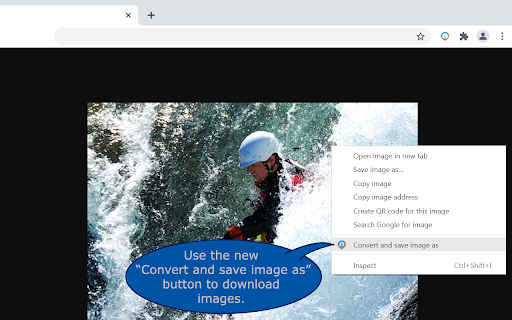
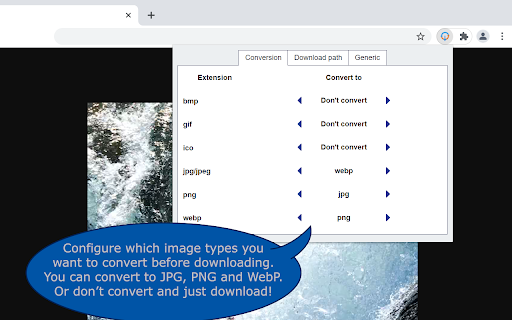
WebP / Avif image Converter: convert, download and store images from the web just the way you want. How does it work? After downloading the extension you get a new button *Convert and Save image as* in the image context menu (When you right click on an image). Now the image is being processed and downloaded based on your preferences. Conversion to JPG, PNG and WebP are supported. These preferences can be set in the option menu that you can reach by clicking on the extensions’ browser button located on the top right of your browser next to the address bar. Note that the "browser button" may be hidden. If you want to quickly change the settings pin it to your extension bar. This can be done by clicking on the "extension" (looks like a puzzle piece) next to the hamburger menu / user login. Find the button and click on "pin". What can you configure? * Image conversion types For each image t…

Listing SEO keywords

Search intent keywords
Keyword signals for evaluating how users may discover, compare, or search for this extension category.

Core discovery

WebP converterAVIF to JPGSave image as PNGChrome image converter

Comparison

Save image as Type alternativeWebP to JPG extension

Problem

cannot save WebP as JPGhow to convert AVIF imagesWebP images saving as htm

Alternative

WebP converter extensionAVIF converter chrome

Similar extensions

Jump to related discovery paths:

FAQ

What is WebP / Avif image converter mainly used for?
A Chrome extension that allows users to right-click images on the web and save them as JPG, PNG, or WebP. It features advanced configuration options for file naming and directory organization relative to the default downloads folder.
What market signals stand out?
Established adoption with moderate review base. Last known update: 03/27/2026.
What should builders compare before entering this space?
Compare install concentration, rating quality, update recency, screenshots, developer portfolio, listing claims, and review-backed friction signals.
Is this page review-backed?
Backed by review samples. This page combines store metadata with selected review signals, while raw store metrics remain visible for comparison.

Screenshots

WebP / Avif image converter screenshot

Recommended Chrome extensions

Related listings from the same category, trending peers, and the same publisher portfolio.

Browse workflow