Liner Scholar: Full Papers via Library icon

Liner Scholar Chrome Extension Analysis

Automation & Workflow Efficiency

Store listing title: Liner Scholar: Full Papers via Library

Chrome extension ID: pfbbgdacaanipbeaceppbaojacefeiea

Liner Scholar is a Chrome extension designed to automate and simplify access to academic papers. It integrates with a user's registered university or library proxy to instantly retrieve full-text PDFs of paywalled research papers, allowing users to view or save them directly to a project for an integrated research workflow.

Developer:Liner
Version:1.0.1
Size:86.95KiB
Last updated:

Overview

Installs

3K+

Rating

5.0

3 reviews

Languages

4 locales

Includes English, 中文(中国), 日本語, 한국어

Market analysis

Review-backed positioning, friction, and market signals for this Chrome extension.

Backed by review samples

Macro category

Automation & Workflow Efficiency

Pricing friction

Low review signal

Complaint intensity

Low review signal

Listing & review signals
Observed signals from store listing text and review samples.

Listing positioning

The store listing positions Liner Scholar as an essential tool for academic researchers, enabling instant access to paywalled research papers through existing institutional library subscriptions. It emphasizes streamlining the workflow by eliminating manual logins and directly providing full-text PDFs for viewing or saving.

Inferred product pattern

An academic workflow automation tool that integrates with institutional library subscriptions and proxies to provide one-click access to full-text research paper PDFs, enhancing research productivity by bypassing paywalls and streamlining document management within a project context.

Review-backed pain points

Review-backed data is not available.

Observed feature gaps

Review-backed data is not available.

Tags
Academic ResearchPaper AccessLibrary IntegrationPDF DownloaderWorkflow Productivity
Target users

- Academic Researchers

- University Students

- Academics

- Professionals requiring scholarly articles

Primary use cases

- Accessing paywalled academic papers instantly

- Streamlining research paper retrieval

- Integrating institutional library access into browser workflow

- Saving full-text PDFs to a research project

Positive themes

- Easy and quick PDF access for most papers

- Significant streamlining of research tasks

Negative themes

No negative theme data.

Observed friction

- Review-backed data is not available.

Evidence boundary: Analyzed store listing title, short and long descriptions, developer information, and one positive user review. Limited review data (one review) constrains insights into user sentiment, pain points, and potential feature gaps.
Complaint summaries
Review-backed complaint signals grouped by operational area.

Support

Review-backed data is not available.

Reliability

Review-backed data is not available.

Privacy

Review-backed data is not available.

Access & pricing

- Free usage observed

- Account required for core usage

- Free plan or free usage claimed

Store listing facts

Listing assets

- Screenshots: 1

- Videos: 0

- Languages: 4

Trust signals

- Privacy policy

- Developer contact

- Official website

- Support link

Store metadata

- Version: 1.0.1

- Size: 86.95KiB

- Last updated:

Store description excerpt
Short excerpt from the public Chrome Web Store listing; full copy is available on the official store page.
This extension unlocks full-text access to academic papers through your institution's library subscription — directly within your research workflow. 📄 Access Paywalled Papers Through Your Institution Hitting a paywall mid-research? Register your university or library proxy once, and Liner Scholar automatically retrieves the full-text PDF for any paper you're entitled to access — no more switching tabs or logging into library portals manually. Access full papers with just one click and add them to your Project for a connected workflow. ⚙️ How to Get Started 1. Install the Liner Scholar extension. 2. Register your institution or enter your proxy in Settings. 3. Click "View PDF" or "Add to Project" on any paper — the extension fetches the full text automatically. Note: PDF availability depends on your institution's journal subscription agreements. If authentication is required, you'll be…

Listing SEO keywords

Search intent keywords
Keyword signals for evaluating how users may discover, compare, or search for this extension category.

Core discovery

academic papersresearch paperslibrary subscription accesspaywalled papersfull-text PDF accessinstitutional proxyscholar access

Comparison

Mendeley vs Liner ScholarZotero vs Liner Scholarresearch paper access tools comparison

Problem

paywalled research papers access problemdifficulty accessing academic journalslibrary login hassle for papersfull-text PDF retrieval issues

Alternative

Liner Scholar alternativeacademic paper downloader alternativeinstitutional access bypass toolsresearch workflow extensions

Similar extensions

Jump to related discovery paths:

FAQ

What is Liner Scholar mainly used for?
Liner Scholar is a Chrome extension designed to automate and simplify access to academic papers. It integrates with a user's registered university or library proxy to instantly retrieve full-text PDFs of paywalled research papers, allowing users to view or save them directly to a project for an integrated research workflow.
What market signals stand out?
Early or small audience with limited review base. Last known update: 04/30/2026.
What should builders compare before entering this space?
Compare install concentration, rating quality, update recency, screenshots, developer portfolio, listing claims, and review-backed friction signals.
Is this page review-backed?
Backed by review samples. This page combines store metadata with selected review signals, while raw store metrics remain visible for comparison.

Screenshots

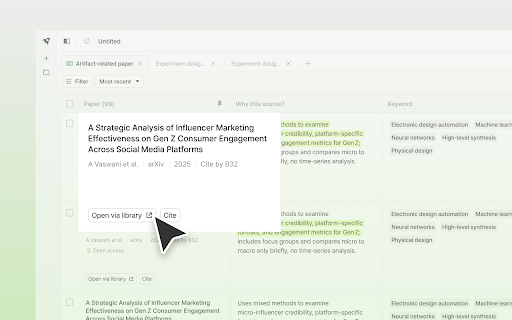
Liner Scholar: Full Papers via Library screenshot

Links

Recommended Chrome extensions

Related listings from the same category, trending peers, and the same publisher portfolio.

Browse tools