Color Picker - Eyedropper Tool icon

Color Picker Chrome Extension Analysis

Developer & Designer Tools

Store listing title: Color Picker - Eyedropper Tool

Chrome extension ID: phillbeieoddghchonmfebjhclflpoaj

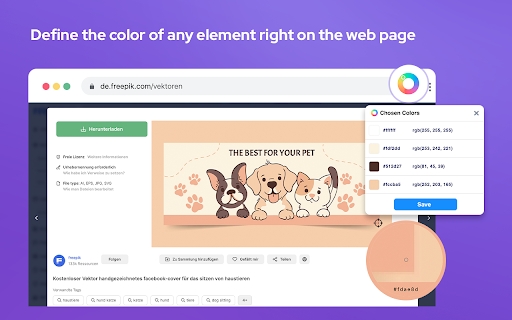
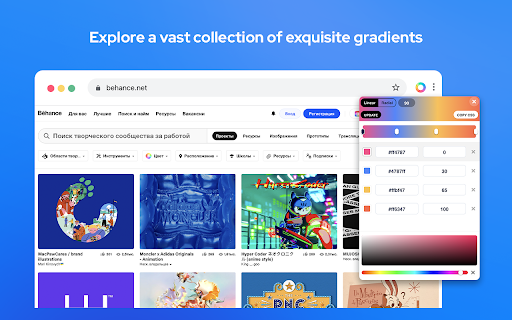
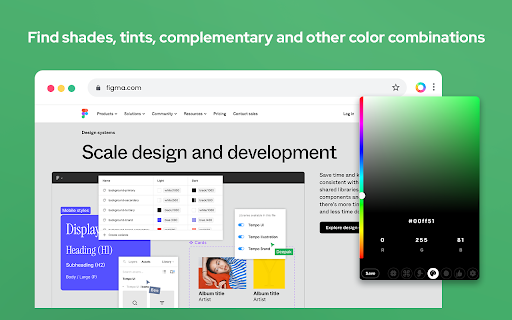
This browser extension allows users to capture and identify specific colors from any webpage element. It supports multiple color formats including HEX, RGBA, HSVA, HSLA, and CMYK, while also offering palette and gradient management.

Developer:ColorPickerr
Version:1.0.7
Size:2.08MiB
Last updated:

Overview

Installs

100K+

Rating

4.6

1,020 reviews

Languages

26 locales

Includes Deutsch, English, English (United States), Nederlands...

Market analysis

Review-backed positioning, friction, and market signals for this Chrome extension.

Backed by review samples

Macro category

Developer & Designer Tools

Pricing friction

Low review signal

Complaint intensity

High review signal

Listing & review signals
Observed signals from store listing text and review samples.

Listing positioning

The store listing positions this tool as an essential, open-source utility for web developers and designers to extract color data from web pages. It emphasizes features like zoom technology, palette extraction, gradient generation, and multi-format color representation.

Inferred product pattern

Free, open-source browser utility focused on single-task design productivity.

Review-backed pain points

Users frequently report that the eyedropper tool fails to activate on various websites, resulting in error messages, or prevents color selection on local file URLs, leading to claims that the tool is non-functional.

Observed feature gaps

Lack of efficient bulk-saving or project-based storage for selected colors; users must copy/paste manually for each instance.

Tags
Color PickerDesign ToolWeb DevelopmentEyedropper
Target users

- Web Developers

- UI/UX Designers

- Graphic Designers

- Digital Creatives

Primary use cases

- Extracting HEX/RGB/CMYK codes from website elements

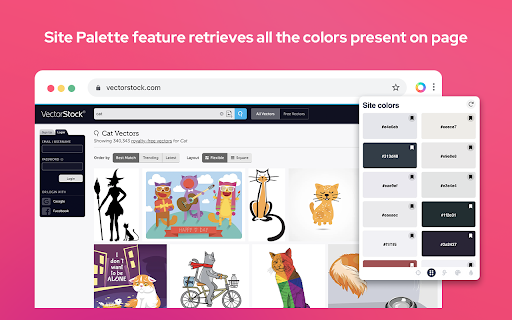
- Generating color palettes from live websites

- Copying color data to clipboard for design projects

Positive themes

- Capable of reading website colors accurately

- Helpful utility for design workflows

Negative themes

- Frequent 404/access disallowed errors on websites

- Difficulty accessing colors on local files

- General perception of broken functionality in recent versions

- Tedious workflow for saving multiple colors

Observed friction

- Performance complaints detected

- None; the product claims to be free and open-source.

Evidence boundary: Evidence is derived from a mix of high-rating design-focused utility claims and recent low-rating reviews citing critical functional breakage on web pages. The review sample includes a notable cluster of recent negative reports regarding core functionality, which may indicate recent browser compatibility issues.
Complaint summaries
Review-backed complaint signals grouped by operational area.

Support

No specific complaints regarding support staff, but significant frustration regarding the broken state of the core eyedropper feature.

Reliability

High; multiple users report the core eyedropper function consistently returns errors on websites and local files, with some users stating it has stopped working compared to older versions.

Privacy

None identified.

Access & pricing

- Free usage observed

- No account requirement observed

- Free plan or free usage claimed

Store listing facts

Listing assets

- Screenshots: 4

- Videos: 0

- Languages: 26

Trust signals

- Privacy policy

- Developer contact

- Official website

Store metadata

- Version: 1.0.7

- Size: 2.08MiB

- Last updated:

Store description excerpt
Short excerpt from the public Chrome Web Store listing; full copy is available on the official store page.
Color Picker and Eyedropper Tool is a must-have browser extension for web developers, designers, and anyone who needs to choose colors from a webpage or extract a website's palette. Whether you're creating a website, designing graphics, or working on a digital project, extension will make the process of color selection easier and faster. Features: - Employ zoom technology to select and store multiple from any - Archive your preferred gradients; a single click on any stores its HEX value in your clipboard; - The site palette feature retrieves all the colors present on any webpage; - Personalize the type for automatic copying. Great for any designer, Chrome extension that easily allows you to identify the Hex colour code of any UI element you hover your mouse over. It's great for quick access to colours you gain inspiration from when browsing online. This extension stores the last six sel…

Listing SEO keywords

Search intent keywords
Keyword signals for evaluating how users may discover, compare, or search for this extension category.

Core discovery

chrome color pickereyedropper toolget hex code from imageweb design tools

Comparison

best color picker extensioncolorzilla alternative

Problem

eyedropper not workingcolor picker 404 errorchrome extension permission issues

Alternative

color picker chromehex color finder

Similar extensions

Jump to related discovery paths:

FAQ

What is Color Picker mainly used for?
This browser extension allows users to capture and identify specific colors from any webpage element. It supports multiple color formats including HEX, RGBA, HSVA, HSLA, and CMYK, while also offering palette and gradient management.
What market signals stand out?
Established adoption with substantial review base. Last known update: 05/28/2026.
What should builders compare before entering this space?
Compare install concentration, rating quality, update recency, screenshots, developer portfolio, listing claims, and review-backed friction signals.
Is this page review-backed?
Backed by review samples. This page combines store metadata with selected review signals, while raw store metrics remain visible for comparison.

Screenshots

Color Picker - Eyedropper Tool screenshot

Links