G-calize icon

G-calize Chrome Extension Analysis

Tab & Bookmark Productivity

Chrome extension ID: piiljfhidimfponnkjlkecnpjhdijfde

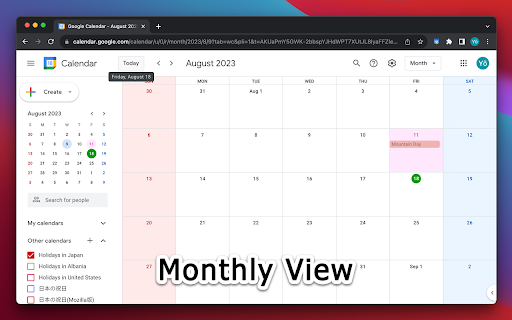
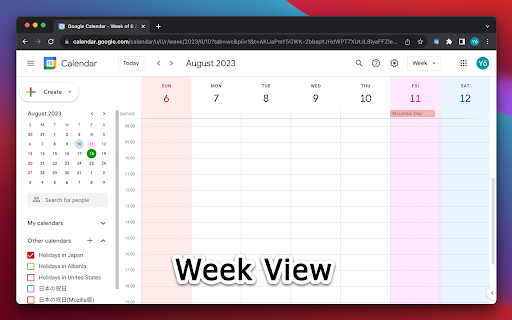
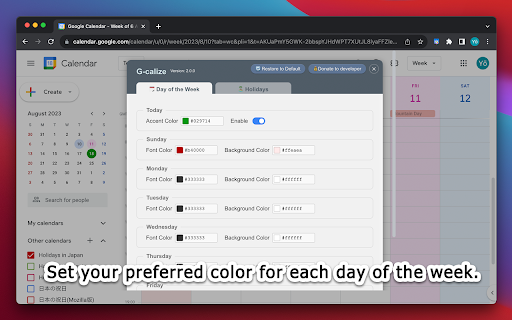
This browser extension provides a settings interface that allows users to change background and text colors for different days of the week and holidays within Google Calendar. It requires a page reload after installation and supports specific layout views.

Developer:piayo
Version:2.3.2
Size:80.53KiB
Last updated:

Overview

Installs

200K+

Rating

4.2

217 reviews

Languages

37 locales

Includes Deutsch, English, English (United Kingdom), English (United States)...

Market analysis

Review-backed positioning, friction, and market signals for this Chrome extension.

Backed by review samples

Macro category

Tab & Bookmark Productivity

Pricing friction

Low review signal

Complaint intensity

Moderate review signal

Listing & review signals
Observed signals from store listing text and review samples.

Listing positioning

G-calize positions itself as a visual customization tool for Google Calendar users. It enables users to apply specific colors to weekdays, weekends, and holidays to improve schedule visibility and organization.

Inferred product pattern

Single-purpose utility extension for visual DOM modification of a third-party web app.

Review-backed pain points

Users frequently report that major updates to the extension or Google Calendar itself lead to lost settings or total loss of functionality. Many users struggle to navigate the current settings interface or find that color changes do not persist after closing the browser.

Observed feature gaps

Lack of support for specific, non-repeating calendar events (e.g., cycle syncing), inability to set custom transparency/RGBA values, and difficulties in identifying localized holiday calendars.

Tags
Google CalendarCalendar CustomizationProductivityUI Customization
Target users

- Google Calendar power users

- Individuals needing visual schedule organization

Primary use cases

- Color-coding weekends

- Highlighting specific days or holidays

- Improving calendar interface legibility

Positive themes

- Greatly improves visibility of schedules

- Historically reliable and useful for long-term users

- Helpful for distinguishing days at a glance

Negative themes

- Frequent breakages following Google Calendar UI updates

- Difficulty accessing the settings menu

- Inconsistent application of colors to holidays and specific views

- UI/UX confusion regarding how to access settings

Observed friction

- Performance complaints detected

- None; the product is free.

Evidence boundary: Analysis is based on user feedback spanning from 2018 to late 2025, highlighting long-term utility alongside recurring maintenance issues. Review samples include older reports and non-English feedback, which may refer to legacy versions of the extension or specific UI states.
Complaint summaries
Review-backed complaint signals grouped by operational area.

Support

Users report confusion navigating the settings menu and frustration when core features stop working after developer updates.

Reliability

High frequency of reports regarding the extension failing to apply colors, losing user settings, or failing to load the settings interface correctly.

Privacy

No privacy complaints observed.

Access & pricing

- Free usage observed

- No account requirement observed

- Free plan or free usage claimed

Store listing facts

Listing assets

- Screenshots: 5

- Videos: 0

- Languages: 37

Trust signals

- Developer contact

- Official website

Store metadata

- Version: 2.3.2

- Size: 80.53KiB

- Last updated:

Store description excerpt
Short excerpt from the public Chrome Web Store listing; full copy is available on the official store page.
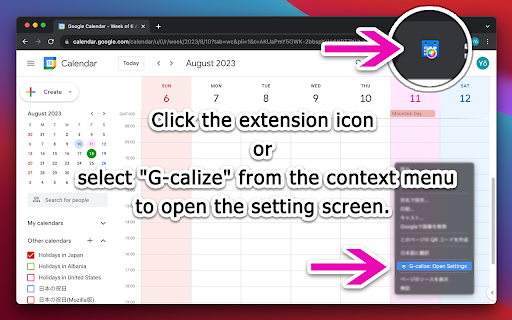
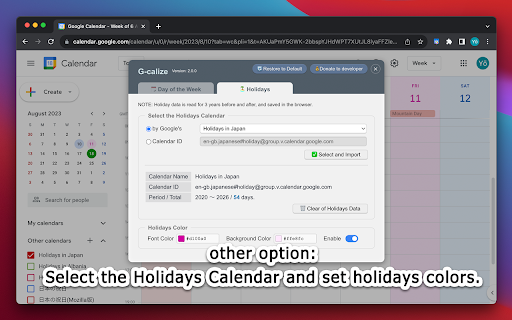
1. Click the extension icon or select "G-calize" from the context menu to open the settings screen. 2. Set your preferred colors for each day of the week. 3. Optional: Select a holiday calendar and set holiday colors. * You must reload the calendar page once after installation. * Works with the URL calendar.google.com/calendar. Does not work if you use a Google Workspace custom address. -------------------------------------------------- ### 🆕 2024.12.05 Version 2.3.0 - Supports schedule display. - Added a function to display the settings screen in a smaller size only in month view. - Other fine-tuning. ### 2024.11.06 Version 2.2.0 - Supports dark mode display. Other fine-tuning. ### 2023.11.27 Version 2.1.0 - Added background color and border color to today's color. - Fixed an issue where colors were misaligned in week view. ### 2023.08.20 Version 2.0.0 - Changed the way to open the se…

Listing SEO keywords

Search intent keywords
Keyword signals for evaluating how users may discover, compare, or search for this extension category.

Core discovery

Google Calendar color extensioncustomize Google Calendar colorsG-calizeGoogle Calendar dark mode extension

Comparison

G-calize vs G-CAL Highlighter

Problem

Google Calendar not coloringG-calize not workingfix Google Calendar colors

Alternative

G-CAL HighlighterGoogle Calendar aesthetic

Similar extensions

Jump to related discovery paths:

FAQ

What is G-calize mainly used for?
This browser extension provides a settings interface that allows users to change background and text colors for different days of the week and holidays within Google Calendar. It requires a page reload after installation and supports specific layout views.
What market signals stand out?
Established adoption with moderate review base. Last known update: 05/06/2025.
What should builders compare before entering this space?
Compare install concentration, rating quality, update recency, screenshots, developer portfolio, listing claims, and review-backed friction signals.
Is this page review-backed?
Backed by review samples. This page combines store metadata with selected review signals, while raw store metrics remain visible for comparison.

Screenshots

G-calize screenshot
G-calize screenshot
G-calize screenshot
G-calize screenshot
G-calize screenshot

Links

Website: piayo.com