Clockify Time Tracker icon

Clockify Time Tracker Chrome Extension Analysis

Automation & Workflow Efficiency

Chrome extension ID: pmjeegjhjdlccodhacdgbgfagbpmccpe

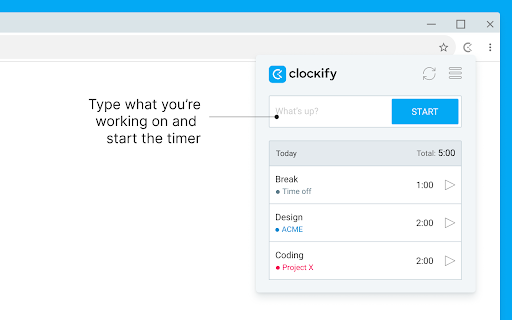
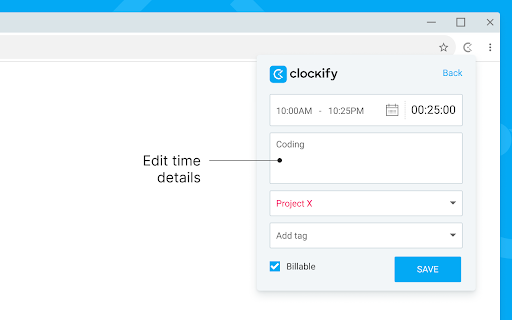
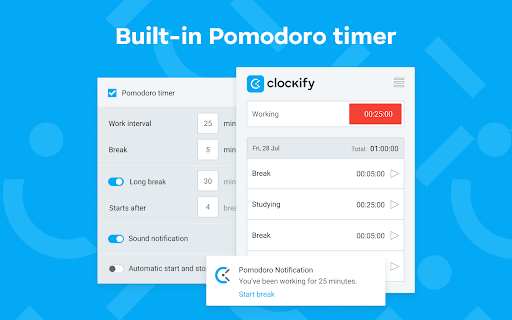
A productivity-focused browser extension designed to track time spent on web-based tasks. It features idle detection, Pomodoro timers, and automatic task description integration to streamline time logging.

Developer:CAKE.com
Version:2.12.2
Size:1.44MiB
Last updated:

Overview

Installs

300K+

Rating

3.6

223 reviews

Languages

4 locales

Includes Deutsch, English, español, français

Market analysis

Review-backed positioning, friction, and market signals for this Chrome extension.

Backed by review samples

Macro category

Automation & Workflow Efficiency

Pricing friction

Low review signal

Complaint intensity

High review signal

Listing & review signals
Observed signals from store listing text and review samples.

Listing positioning

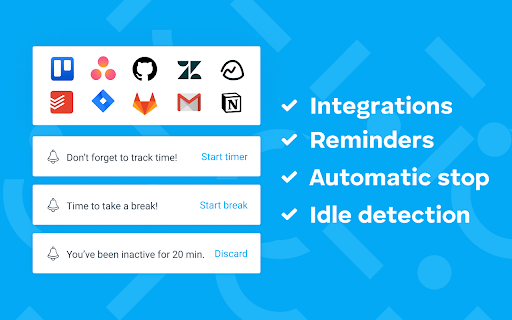
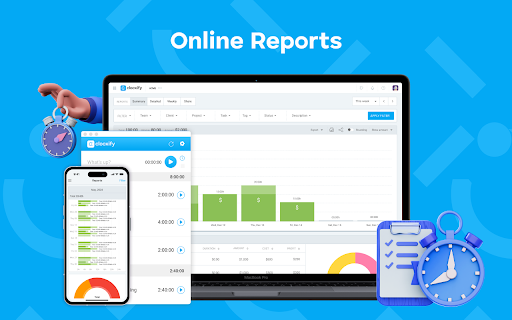
Clockify positions itself as a universal time tracker that integrates seamlessly with over 50 web applications. It emphasizes the ability to track time from anywhere on the web, sync data across devices, and analyze productivity through detailed reports.

Inferred product pattern

A cross-platform productivity utility that relies heavily on web authentication and external software integrations.

Review-backed pain points

Users frequently report being unable to log in via OAuth or password reset, the extension getting stuck in infinite loading loops, and the UI becoming unresponsive (blank dropdowns).

Observed feature gaps

Users noted a lack of automatic timer stopping when required task information is missing, requiring manual intervention.

Tags
Time TrackingProductivity ToolWorkflow AutomationProject Management
Target users

- Freelancers

- Remote Workers

- Project Managers

- Agencies

Primary use cases

- Logging billable hours

- Monitoring project progress

- Analyzing personal productivity

Positive themes

- Valuable free tier for exporting billing data

- Ability to sync time across multiple devices

Negative themes

- Severe authentication and login failures

- Infinite loading loops

- Broken third-party integrations

Observed friction

- Account blocking complaints detected

- Performance complaints detected

- Users generally find the free tier sufficient for basic tracking and exporting needs.

Evidence boundary: Data extracted from the official Chrome Web Store listing and user reviews highlighting both core value propositions and recurring technical failures. The review sample size is relatively small compared to the total user base and may reflect specific technical regressions rather than overall product quality.
Complaint summaries
Review-backed complaint signals grouped by operational area.

Support

Users expressed frustration regarding the delay in fixing broken integrations (e.g., Asana) following extension updates.

Reliability

Significant reliability issues reported, including the extension requiring frequent uninstalls/reinstalls or being unable to load after computer reboots.

Privacy

No privacy complaints observed; the listing provides a proactive explanation for data access permissions.

Access & pricing

- Free entry with paid features

- Login needed for core features

- Limited free usage observed

Store listing facts

Listing assets

- Screenshots: 5

- Videos: 1

- Languages: 4

Trust signals

- Privacy policy

- Developer contact

- Official website

- Support link

Store metadata

- Version: 2.12.2

- Size: 1.44MiB

- Last updated:

Store description excerpt
Short excerpt from the public Chrome Web Store listing; full copy is available on the official store page.
Track time from anywhere on the web with one click. Later, analyze and export time at https://clockify.me/reports/summary FEATURES • Integrates with 50+ web apps • Idle detection • Reminders • Pomodoro timer • Automatically start/stop timer • Start a timer from selected text • Start/stop timer shortcut (Ctrl+Shift+U) • Default project for new time entries Q: Why does the extension need access to "read and change all your data on the websites you visit"? A: We use the "Read and change all your data on the websites you visit" permission only for putting a timer button on other websites and taking the task's names as a description for the timer. If you don't wish to see the button on other websites, you can disable it in extension's Settings>Integrations. The code for this extension is open source. Feel free to examine it and contribute on Github: https://github.com/clockify/browser-extens…

Listing SEO keywords

Search intent keywords
Keyword signals for evaluating how users may discover, compare, or search for this extension category.

Core discovery

Time tracker extensionTrack billable hoursProductivity timer

Comparison

Clockify vs TogglClockify vs Harvest

Problem

Clockify login errorClockify loading loopTime tracker broken

Alternative

Toggl TrackHarvestRescueTime

Similar extensions

Jump to related discovery paths:

FAQ

What is Clockify Time Tracker mainly used for?
A productivity-focused browser extension designed to track time spent on web-based tasks. It features idle detection, Pomodoro timers, and automatic task description integration to streamline time logging.
What market signals stand out?
Established adoption with moderate review base. Last known update: 06/22/2026.
What should builders compare before entering this space?
Compare install concentration, rating quality, update recency, screenshots, developer portfolio, listing claims, and review-backed friction signals.
Is this page review-backed?
Backed by review samples. This page combines store metadata with selected review signals, while raw store metrics remain visible for comparison.

Screenshots

Clockify Time Tracker screenshot

Links