Plan To Eat Recipe Clipper icon

Plan To Eat Recipe Clipper Chrome Extension Analysis

Niche Lifestyle & Gaming Hacks

Chrome extension ID: pnlpbkniadcljbhebdjokkkeobenpefj

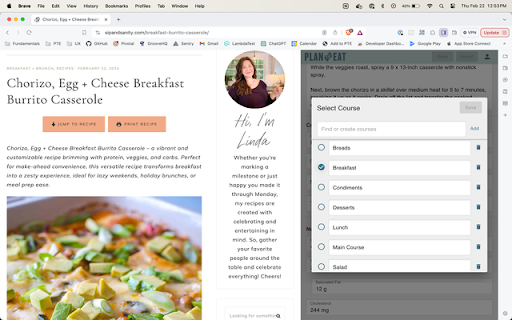
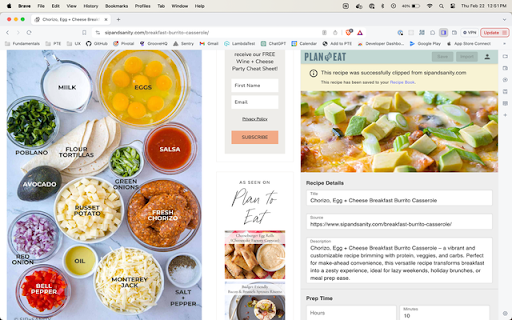
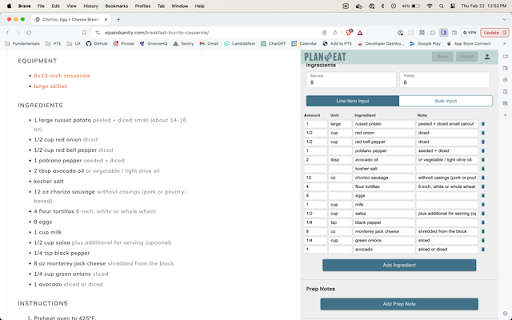
This extension allows users to capture recipes from across the internet and save them directly to their Plan to Eat account. Users can edit ingredients, directions, prep notes, and nutrition facts in real-time within a browser side panel. It also detects duplicates to keep the user's recipe library clean and organized.

Developer:Plan to Eat
Version:1.1.3
Size:622KiB
Last updated:

Overview

Installs

7K+

Rating

5.0

6 reviews

Languages

1 locales

Includes English

Market analysis

Review-backed positioning, friction, and market signals for this Chrome extension.

Backed by review samples

Macro category

Niche Lifestyle & Gaming Hacks

Pricing friction

Moderate review signal

Complaint intensity

Low review signal

Listing & review signals
Observed signals from store listing text and review samples.

Listing positioning

The Plan to Eat Recipe Clipper positions itself as an essential companion tool for the Plan to Eat web and mobile apps. It focuses on making meal planning effortless by enabling direct recipe imports from websites, blogs, and social media without leaving the browser. The listing highlights seamless recipe editing features within an unobtrusive side panel that preserves the user's browsing flow.

Inferred product pattern

A companion browser extension designed to funnel web content into a paid parent SaaS ecosystem.

Review-backed pain points

No review-backed pain points are available, as all provided reviews are highly positive.

Observed feature gaps

No feature gaps were identified from the available reviews or listing data.

Tags
Recipe ClipperMeal PlanningRecipe Organizer
Target users

- Plan to Eat subscribers

- Home cooks

- Meal planners

Primary use cases

- Importing recipes from cooking blogs and social media

- Editing ingredient lists and prep steps on the fly

- Preventing duplicate recipe entries in a meal plan database

Positive themes

- High ease of use for capturing recipes

- Seamless transfer of recipe data to the main app

- Greatly assists in reducing meal planning effort

Negative themes

No negative theme data.

Observed friction

- Payment required for meaningful usage

- No pricing friction or subscription complaints were reported in the provided review samples.

Evidence boundary: The analysis is based on the official store listing and 6 positive 5-star user reviews highlighting the extension's usability and helpfulness. The dataset lacks low-rating reviews, meaning potential user friction points, bugs, or pricing complaints could not be evaluated.
Complaint summaries
Review-backed complaint signals grouped by operational area.

Support

No support, account-blocking, or refund complaints were found in the reviews.

Reliability

No reliability or performance complaints were observed; reviews indicate the tool works reliably.

Privacy

No privacy or security concerns were raised in the user feedback.

Access & pricing

- Subscription model observed

- Account required for core usage

- No clear pricing signal

Store listing facts

Listing assets

- Screenshots: 3

- Videos: 0

- Languages: 1

Trust signals

- Privacy policy

- Developer contact

- Official website

Store metadata

- Version: 1.1.3

- Size: 622KiB

- Last updated:

Store description excerpt
Short excerpt from the public Chrome Web Store listing; full copy is available on the official store page.
The Plan to Eat Recipe Clipper makes meal planning more painless than ever with easy import and editor features. With the Plan to Eat extension, you can: - Import recipes from thousands of websites, blogs, and social media into your Recipe Book — without ever leaving the browser - Tweak imported recipes in the integrated Recipe Editor with support for ingredients, directions, prep notes, categories, nutrition facts, and more - Rate recipes and upload your own photos - Get notified if you've already imported a recipe to avoid duplicates - View the Recipe Editor in a side panel that doesn't cover up content on the current page - Continue scrolling and navigating in your browser without disturbing or losing changes to the current recipe Sign in with your email, Google, or Facebook account to get started.

Listing SEO keywords

Search intent keywords
Keyword signals for evaluating how users may discover, compare, or search for this extension category.

Core discovery

recipe clipper extensionplan to eat chrome extensionimport recipes to plan to eat

Comparison

plan to eat vs paprikabest recipe clipper chrome

Problem

how to save recipes from blogsimport recipe from website

Alternative

copy me thatpaprika recipe managerrecipe keeper

Similar extensions

Jump to related discovery paths:

FAQ

What is Plan To Eat Recipe Clipper mainly used for?
This extension allows users to capture recipes from across the internet and save them directly to their Plan to Eat account. Users can edit ingredients, directions, prep notes, and nutrition facts in real-time within a browser side panel. It also detects duplicates to keep the user's recipe library clean and organized.
What market signals stand out?
Early or small audience with limited review base. Last known update: 04/16/2026.
What should builders compare before entering this space?
Compare install concentration, rating quality, update recency, screenshots, developer portfolio, listing claims, and review-backed friction signals.
Is this page review-backed?
Backed by review samples. This page combines store metadata with selected review signals, while raw store metrics remain visible for comparison.

Screenshots

Plan To Eat Recipe Clipper screenshot

Links

Recommended Chrome extensions

Related listings from the same category, trending peers, and the same publisher portfolio.

Browse household
Eat This Much Recipe Clipper icon

Eat This Much Recipe Clipper

Eat This Much

This extension allows you to quickly import recipes to use in your Eat This Much meal plans.

Installs

3K+

Rating

3.7

Shutterfly Address Book Exporter icon

Shutterfly Address Book Exporter

rgarcia2009

Export your Shutterfly address book to a CSV file.

Installs

3K+

Rating

3.4

Mini Mealie icon

Mini Mealie

Adam Shappy

Scrape recipes and save them to a Mealie instance.

Installs

2K+

Rating

4.3

Image Size Info icon

Image Size Info

Chrom Ex

Inserts option in the browser's image context menu to view image width, height and file size.

Installs

2K+

Rating

3.5

Blooket Hacker icon

Blooket Hacker

Great Extensions

Get instant correct answers in Blooket games with just one click!

Installs

2K+

Rating

2.3

Recipe Cart | View & Save Recipes icon

Recipe Cart | View & Save Recipes

Recipe Cart

View simplified recipes, save or print them, and order ingredients directly from Instacart.

Installs

2K+

Rating

4.7

Porn / Adult Blocker, Block Sites - XShield icon

Porn / Adult Blocker, Block Sites - XShield

Yadux

Powerful extension designed to safeguard your browsing experience by blocking access to explicit or inappropriate content.

Installs

2K+

Rating

5.0

Currency Exchange Rate icon

Currency Exchange Rate

developmentbycores

Install Currency Exchange Rate to easily see rates for 170+ countries. Use it as your currency conversion calculator.

Installs

2K+

Rating

5.0

Recipe Reader & Grocery Finder | Ceres Cart icon

Recipe Reader & Grocery Finder | Ceres Cart

Maddie Drake

View recipes ad-free and automatically find ingredients nearby — fast and simple.

Installs

1K+

Rating

5.0

Google Sheets Dark Mode icon

Google Sheets Dark Mode

MyExtHub

Activate Google Sheets Dark Mode for improved viewing. Enjoy sheets darkmode and comfort with the spreadsheets dark mode feature.

Installs

1K+

Rating

3.7