WeVideo Screen & Webcam Recorder icon

WeVideo Screen & Webcam Recorder Chrome Extension Analysis

Automation & Workflow Efficiency

Chrome extension ID: pohmgobdeajemcifpoldnnhffjnnkhgf

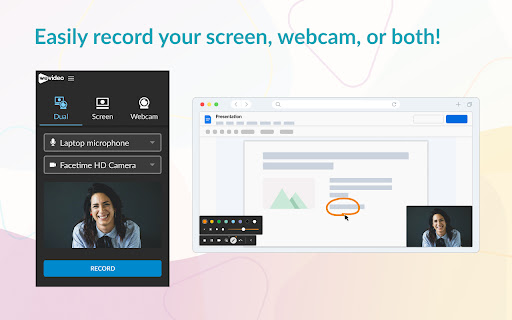
A Chrome extension that allows users to record their screen and webcam for quick video content creation. It integrates with a cloud-based video editor for adding music, subtitles, and visual effects.

Developer:WeVideo Inc.
Version:4.0.2_b8bdd66
Size:15.32MiB
Last updated:

Overview

Installs

300K+

Rating

4.0

22 reviews

Languages

1 locales

Includes English (United States)

Market analysis

Review-backed positioning, friction, and market signals for this Chrome extension.

Backed by review samples

Macro category

Automation & Workflow Efficiency

Pricing friction

Moderate review signal

Complaint intensity

Moderate review signal

Listing & review signals
Observed signals from store listing text and review samples.

Listing positioning

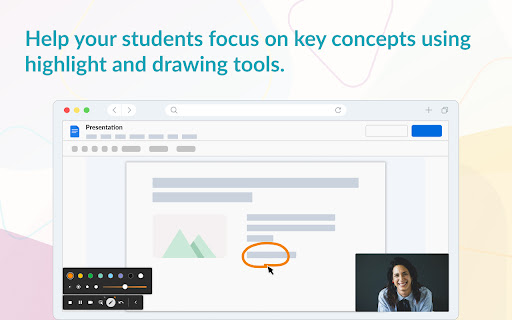
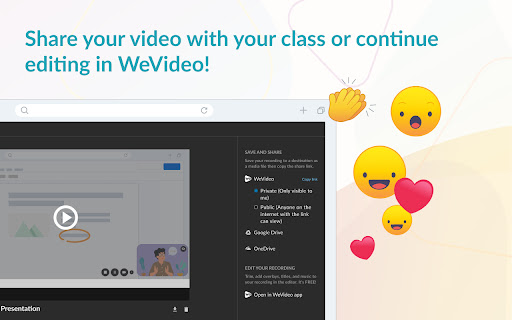
The product is positioned as a simple, no-experience-needed tool for capturing screens and webcams to create demos, tutorials, and internal communications. It emphasizes a seamless transition from quick recording to a professional video editing suite via the WeVideo dashboard.

Inferred product pattern

Capture-to-Edit funnel designed to drive users toward a comprehensive cloud video editing platform.

Review-backed pain points

Free users face a strict 5-minute recording limit, which has led to reports of losing work when attempting to finish longer videos.

Observed feature gaps

Lack of a recording countdown timer; reported synchronization lag with solid colored backgrounds.

Tags
Screen RecorderWebcam CaptureVideo CreationInstructional VideosEducation Tool
Target users

- Educators

- Students

- Corporate employees

- Tutorial creators

Primary use cases

- Creating instructional videos

- Recording product demos

- Internal company communications

- Educational assignments

Positive themes

- Ease of use

- Intuitive interface

- Versatility for educational settings

Negative themes

- Stability issues and crashing

- Strict recording limits for free users

- Loss of recorded data

Observed friction

- Free-tier complaints detected

- Performance complaints detected

- Significant friction regarding the 5-minute limit for free accounts, which users find restrictive for standard presentations.

Evidence boundary: Analyzed store listing and 10 user review samples. Review sample size is very small compared to the total user base.
Complaint summaries
Review-backed complaint signals grouped by operational area.

Support

No specific support interactions reported, but high frustration regarding product failure.

Reliability

Reports of the extension crashing or failing to initiate recording entirely.

Privacy

No privacy or security complaints observed in provided samples.

Access & pricing

- Free entry with paid features

- Account required for core usage

- Limited free usage observed

Store listing facts

Listing assets

- Screenshots: 3

- Videos: 0

- Languages: 1

Trust signals

- Privacy policy

- Developer contact

- Official website

Store metadata

- Version: 4.0.2_b8bdd66

- Size: 15.32MiB

- Last updated:

Store description excerpt
Short excerpt from the public Chrome Web Store listing; full copy is available on the official store page.
Turn your device into a multimedia studio with WeVideo’s Quick Recorder. Whether you want to demo what’s happening on your screen or share what’s going on around you with your device’s camera, this tool makes it simple – no experience needed. Download the extension to easily record videos like: ✔ Presentations ✔ Podcasts ✔ Demos and tutorials ✔ Internal comms ✔ And many other media applications The best part? When you’re ready to go deeper into video editing and add interactive elements, you can save your recordings directly to your WeVideo dashboard. From WeVideo’s video learning platform you can: ✔ Add music ✔ Crop ✔ Use green screen ✔ Add subtitles ✔ Insert text and visual effects ✔ Embed quiz/discussion questions ✔ Access data to assess video performance Take the first step toward creating professional-grade content and see how easy it can be with WeVideo.

Listing SEO keywords

Search intent keywords
Keyword signals for evaluating how users may discover, compare, or search for this extension category.

Core discovery

screen recorder chrome extensionwebcam recordervideo capture for chromeinstructional video tool

Comparison

WeVideo vs Loombest free screen recorder chrome

Problem

how to record screen in chromeeasy way to make tutorialsrecord webcam and screen

Alternative

WeVideo alternativesscreen recording extension free

Similar extensions

Jump to related discovery paths:

FAQ

What is WeVideo Screen & Webcam Recorder mainly used for?
A Chrome extension that allows users to record their screen and webcam for quick video content creation. It integrates with a cloud-based video editor for adding music, subtitles, and visual effects.
What market signals stand out?
Established adoption with limited review base. Last known update: 06/18/2026.
What should builders compare before entering this space?
Compare install concentration, rating quality, update recency, screenshots, developer portfolio, listing claims, and review-backed friction signals.
Is this page review-backed?
Backed by review samples. This page combines store metadata with selected review signals, while raw store metrics remain visible for comparison.

Screenshots

WeVideo Screen & Webcam Recorder screenshot

Links