Auto High Quality for YouTube™ icon

Auto High Quality for YouTube™ Chrome Extension Analysis

Video & Image Downloaders

Chrome extension ID: alageihdeogmjlkgifaeefodfbdbljjf

This extension is designed to automatically select and maintain a user-defined video quality setting on YouTube. It includes optional features to handle high frame rates and manage quality settings for background or hidden player instances.

Developer:balvin.perrie
Version:0.5.2
Size:65.91KiB
Last updated:

Overview

Installs

30K+

Rating

3.5

71 reviews

Languages

1 locales

Includes English

Market analysis

Review-backed positioning, friction, and market signals for this Chrome extension.

Backed by review samples

Macro category

Video & Image Downloaders

Pricing friction

Low review signal

Complaint intensity

High review signal

Listing & review signals
Observed signals from store listing text and review samples.

Listing positioning

The extension positions itself as an automated tool to force YouTube players to maintain high-quality video resolutions. It targets users looking to override YouTube's adaptive bitrate switching and manage frame rate performance.

Inferred product pattern

Single-purpose utility extension for YouTube playback adjustment.

Review-backed pain points

Users report that the extension has become largely non-functional, frequently failing to trigger or reverting to default SD quality. When it does trigger, users describe persistent buffering, player reloading, and performance degradation.

Observed feature gaps

Users note a misunderstanding of 'enhancing' quality; the extension cannot increase source quality beyond what is available, leading to negative feedback regarding false expectations of resolution upscaling.

Tags
YouTubeVideo QualityResolution4KBrowser Extension
Target users

- YouTube power users

- Users with high-speed internet

- Users with bandwidth-limited connections

- Users with underpowered hardware

Primary use cases

- Forcing consistent 4K or 1080p playback

- Preventing YouTube's automatic quality reduction

- Limiting frame rates for browser stability

Positive themes

- None provided in recent sample data.

Negative themes

- Broken functionality post-update

- Sporadic or non-existent behavior

- Player loop/buffering issues caused by setting overrides

- Inability to upscale video quality

Observed friction

- Performance complaints detected

- None; the extension is free and there are no reports of paywall friction.

Evidence boundary: Review data shows consistent reports of product decay and failure over time, particularly throughout 2024 and 2025. Review sample size is small relative to the user base, and data suggests the extension is currently unmaintained.
Complaint summaries
Review-backed complaint signals grouped by operational area.

Support

Users express frustration that the developer appears to have abandoned the project and no longer provides updates or bug fixes.

Reliability

High; users report the extension is buggy, fails to trigger on new videos, causes excessive buffering/reloading, and frequently resets quality to low resolutions.

Privacy

No privacy complaints observed.

Access & pricing

- Free usage observed

- No account requirement observed

- Free plan or free usage claimed

Store listing facts

Listing assets

- Screenshots: 3

- Videos: 0

- Languages: 1

Trust signals

- Privacy policy

- Developer contact

- Official website

Store metadata

- Version: 0.5.2

- Size: 65.91KiB

- Last updated:

Store description excerpt
Short excerpt from the public Chrome Web Store listing; full copy is available on the official store page.
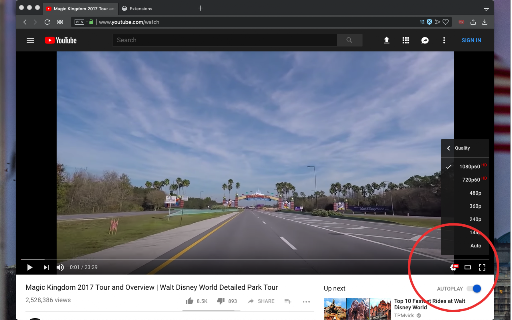
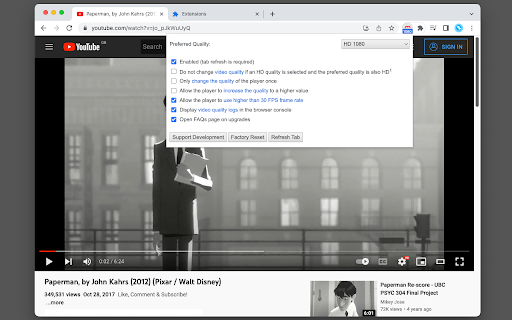
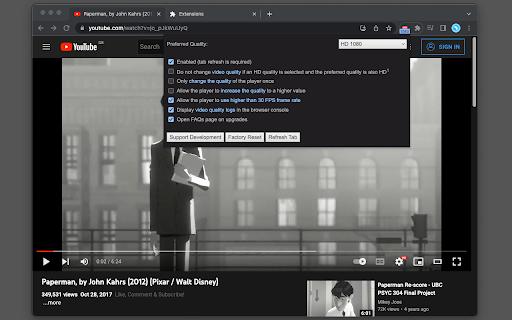
This extension automatically changes the YouTube video quality to a user-selected high-quality resolution. Features: 1. Select the highest quality by default 2. Do not change the quality if high resolution is already selected (optional feature) 3. Allows the user to select almost all available qualities. 4. It is possible to disable more than 30 FPS frame rates (optional feature). Use it if you don't have a bandwidth problem, but your browser cannot handle high-frame-rate playing. 5. Use different qualities for visible and hidden YouTube players (optional feature) Some Use Cases: 1. YouTube starts at low quality, but I want to watch at high resolution. 2. YouTube automatically increases quality which causes the loader to appear once per while. I don't want the player to alter the resolution. 3. YouTube switches to 60 frame rate mode, but my browser drops frames.

Listing SEO keywords

Search intent keywords
Keyword signals for evaluating how users may discover, compare, or search for this extension category.

Core discovery

YouTube quality auto switcherForce HD YouTubeYouTube auto resolutionYouTube 4K autoImprove YouTube video quality

Comparison

YouTube quality extension alternativeAuto High Quality vs manualbest youtube resolution manager

Problem

YouTube video quality keeps resettingYouTube low quality bugYouTube force 1080p not working

Alternative

best YouTube auto quality extensionYouTube player settings plugin

Similar extensions

Jump to related discovery paths:

FAQ

What is Auto High Quality for YouTube™ mainly used for?
This extension is designed to automatically select and maintain a user-defined video quality setting on YouTube. It includes optional features to handle high frame rates and manage quality settings for background or hidden player instances.
What market signals stand out?
Visible niche traction with limited review base. Last known update: 06/23/2026.
What should builders compare before entering this space?
Compare install concentration, rating quality, update recency, screenshots, developer portfolio, listing claims, and review-backed friction signals.
Is this page review-backed?
Backed by review samples. This page combines store metadata with selected review signals, while raw store metrics remain visible for comparison.

Screenshots

Auto High Quality for YouTube™ screenshot

Links

Recommended Chrome extensions

Related listings from the same category, trending peers, and the same publisher portfolio.

Browse tools