R20Exporter icon

R20Exporter Chrome Extension Analysis

Niche Lifestyle & Gaming Hacks

Chrome extension ID: apbhfinbjilbkljgcnjjagecnciphnoi

This extension provides a browser-based export function for Roll20 tabletop RPG campaigns. It automates the extraction of campaign data and assets, primarily to assist users in migrating to other platforms like Foundry VTT or creating local backups.

Developer:KaKaRoTo
Version:0.11.0
Size:1.32MiB
Last updated:

Overview

Installs

10K+

Rating

4.4

16 reviews

Languages

1 locales

Includes English

Market analysis

Review-backed positioning, friction, and market signals for this Chrome extension.

Backed by review samples

Macro category

Niche Lifestyle & Gaming Hacks

Pricing friction

Low review signal

Complaint intensity

Moderate review signal

Listing & review signals
Observed signals from store listing text and review samples.

Listing positioning

R20Exporter is positioned as a utility for Roll20 users to backup or archive their campaigns by exporting assets into a ZIP file. The developer emphasizes the necessity of keeping the browser tab focused during the process to ensure performance.

Inferred product pattern

Free utility extension for browser-based data extraction.

Review-backed pain points

Users report the tool freezing during long export processes and hitting browser storage limits, often resulting in unresponsive page errors.

Observed feature gaps

No built-in retry mechanism for stalled downloads and occasional compatibility issues with other Roll20-enhancing extensions.

Tags
Roll20Data ExportGame ArchivingVTTBackup
Target users

- Roll20 Users

- Foundry VTT Migrators

- Tabletop RPG Game Masters

Primary use cases

- Campaign archival

- Migration to self-hosted VTTs

- Local data backup of campaign tokens and handouts

Positive themes

- Saves significant time

- Helpful developer responsiveness

- Effective for campaign migration

Negative themes

- Process hangs/freezes during ZIP creation

- Browser storage quota errors

- Compatibility conflicts with other VTT extensions

Observed friction

- Performance complaints detected

- None; the tool appears to be free.

Evidence boundary: Based on 10 user reviews, the product is highly valued for its utility in game migration despite occasional technical performance issues. Review sample size is small and reflects experiences spanning multiple years, which may include deprecated versions of the extension.
Complaint summaries
Review-backed complaint signals grouped by operational area.

Support

No specific support complaints; users noted the developer is responsive to issues.

Reliability

Some users experience browser unresponsiveness and hanging during large data exports.

Privacy

None observed.

Access & pricing

- Free usage observed

- No account requirement observed

- Free plan or free usage claimed

Store listing facts

Listing assets

- Screenshots: 3

- Videos: 0

- Languages: 1

Trust signals

- Developer contact

- Support link

Store metadata

- Version: 0.11.0

- Size: 1.32MiB

- Last updated:

Store description excerpt
Short excerpt from the public Chrome Web Store listing; full copy is available on the official store page.
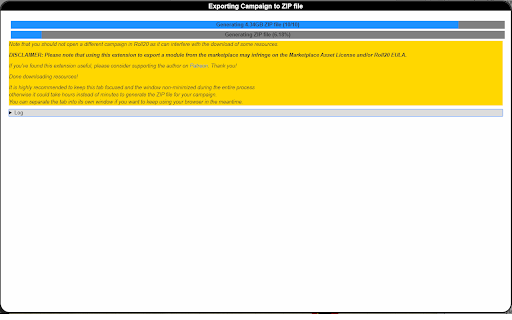
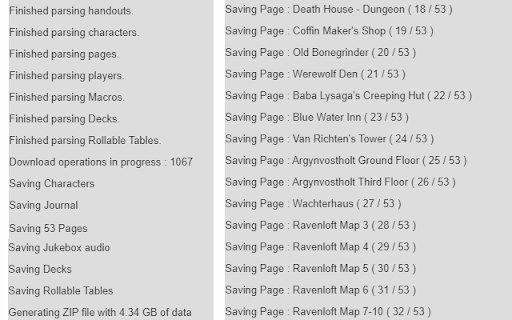
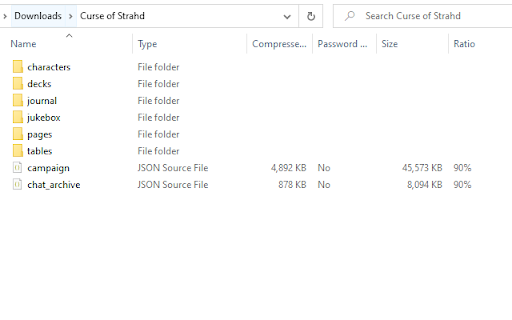
R20Exporter allows you to export a Roll 20 campaign and all of its assets into a ZIP file for backup/archiving purposes. To export your campaign go to the settings tab in the Roll20 page (the gear icon on the far right of the sidebar) and at the top you should see a button "Export Campaign to ZIP". Simply click on it, then wait until the ZIP file is generated and downloaded. While generating the ZIP file, do make sure you have the campaign tab focused in chrome (separate it in its own window if needed), otherwise the download speed of the zip will drop to very very slow transfer speeds since the javascript that generates the zip on the fly will be running as a low priority background process. The dialog that opens will show you the various steps the script is undertaking and you can click the Log button to see a more detailed log of what is happening. That dialog window will also preven…

Listing SEO keywords

Search intent keywords
Keyword signals for evaluating how users may discover, compare, or search for this extension category.

Core discovery

Roll20 export toolRoll20 to Foundry migrationRoll20 backup extensionarchive Roll20 campaign

Comparison

Roll20 vs Foundry exporter

Problem

Roll20 exporter not workingRoll20 export freeze

Alternative

Roll20 save campaign

Similar extensions

Jump to related discovery paths:

FAQ

What is R20Exporter mainly used for?
This extension provides a browser-based export function for Roll20 tabletop RPG campaigns. It automates the extraction of campaign data and assets, primarily to assist users in migrating to other platforms like Foundry VTT or creating local backups.
What market signals stand out?
Visible niche traction with limited review base. Last known update: 10/23/2025.
What should builders compare before entering this space?
Compare install concentration, rating quality, update recency, screenshots, developer portfolio, listing claims, and review-backed friction signals.
Is this page review-backed?
Backed by review samples. This page combines store metadata with selected review signals, while raw store metrics remain visible for comparison.

Screenshots

R20Exporter screenshot

Links

Recommended Chrome extensions

Related listings from the same category, trending peers, and the same publisher portfolio.

Browse tools