Audio Equalizer icon

Audio Equalizer Chrome Extension Analysis

Automation & Workflow Efficiency

Chrome extension ID: bcfdmgpkfecdchldcobegpkmmohobgid

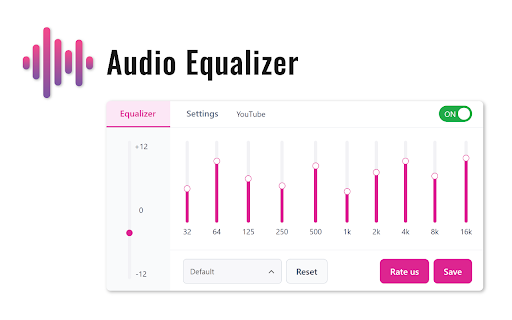
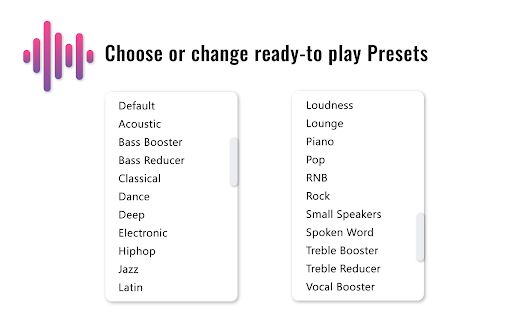
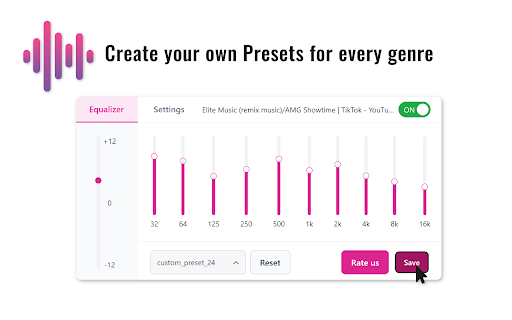
Audio Equalizer provides users with the ability to adjust sound profiles, including treble and bass, directly within the browser. It includes preset genre configurations and allows users to save custom settings for different audio environments.

Developer:VcCom
Version:3.5.2
Size:230KiB
Last updated:

Overview

Installs

10K+

Rating

4.2

169 reviews

Languages

51 locales

Includes Deutsch, English, English (United Kingdom), English (United States)...

Market analysis

Review-backed positioning, friction, and market signals for this Chrome extension.

Backed by review samples

Macro category

Automation & Workflow Efficiency

Pricing friction

Low review signal

Complaint intensity

Moderate review signal

Listing & review signals
Observed signals from store listing text and review samples.

Listing positioning

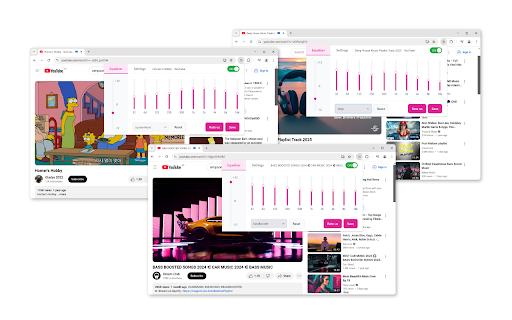
The extension positions itself as a universal browser-based audio control panel for real-time sound optimization. It highlights features like bass boosting, frequency adjustments, and custom preset management across major streaming platforms.

Inferred product pattern

Browser-based media utility that modifies DOM/audio context; prone to stability issues due to browser update cycles.

Review-backed pain points

Users frequently report that the extension fails to remember settings, requires constant manual reactivation when switching tabs, and causes playback lag on certain media platforms.

Observed feature gaps

Lack of persistent state across browsing sessions, missing numerical labeling for frequency adjustments, and inconsistent performance on non-standard browser configurations.

Tags
Audio EqualizerSound BoosterBrowser Audio ControlMedia Enhancer
Target users

- Music listeners

- Movie watchers

- Podcast listeners

- Casual gamers

Primary use cases

- Adjusting bass and treble on YouTube/Netflix

- Creating custom audio presets

- Boosting volume for low-output speakers

Positive themes

- Appreciation for custom preset saving

- Effective for specific use cases like podcast tuning

- Simple and intuitive visual design

Negative themes

- Failure to persist settings across tabs or browser restarts

- Performance lag and stuttering during playback

- Inaccurate audio frequency control

- Difficulty managing the extension interface

Observed friction

- Performance complaints detected

- No specific pricing friction reported; appears to be a free utility.

Evidence boundary: Analysis is based on user feedback regarding functional regressions, UI usability, and playback performance issues. The sample data reflects a mix of language and feature-specific complaints, which may not capture the total current user experience.
Complaint summaries
Review-backed complaint signals grouped by operational area.

Support

Users express frustration regarding unresolved functional bugs rather than lack of support response.

Reliability

Significant reports of audio instability, settings not saving, and playback stuttering.

Privacy

No privacy or security-related complaints identified in the samples.

Access & pricing

- Free usage observed

- No account requirement observed

- Free plan or free usage claimed

Store listing facts

Listing assets

- Screenshots: 5

- Videos: 0

- Languages: 51

Trust signals

- Privacy policy

- Developer contact

- Official website

- Support link

Store metadata

- Version: 3.5.2

- Size: 230KiB

- Last updated:

Store description excerpt
Short excerpt from the public Chrome Web Store listing; full copy is available on the official store page.
Experience every note with Audio Equalizer! Our extension gives you complete control over the audio on any website. Instantly boost bass, adjust treble, and fine-tune the sound on YouTube, Spotify, Netflix, and other platforms for the perfect listening experience. Whether you're watching a movie, listening to music, or playing a game, our equalizer lets you adjust the sound in real time. Choose from ready-made presets for various genres-from rock and jazz to electronic music-or create and save your own unique settings. Get deep bass and crystal-clear vocals with a single click. Key Benefits: - Universal Compatibility: Works with all major audio and video platforms, including YouTube, Spotify, SoundCloud, and Netflix. - Bass Boost: Instantly add depth and power to your favorite music. - Flexible Adjustments: Easily control the lows, mids, and highs to achieve the perfect sound. - Custom…

Listing SEO keywords

Search intent keywords
Keyword signals for evaluating how users may discover, compare, or search for this extension category.

Core discovery

browser audio equalizerchrome sound boosterequalizer for youtubeadjust browser volume

Comparison

best chrome audio extensionalternative to ears eq

Problem

audio lag chromeequalizer settings not savingsound distortion browser

Alternative

audio equalizer extensionsound controller

Similar extensions

Jump to related discovery paths:

FAQ

What is Audio Equalizer mainly used for?
Audio Equalizer provides users with the ability to adjust sound profiles, including treble and bass, directly within the browser. It includes preset genre configurations and allows users to save custom settings for different audio environments.
What market signals stand out?
Visible niche traction with moderate review base. Last known update: 06/26/2026.
What should builders compare before entering this space?
Compare install concentration, rating quality, update recency, screenshots, developer portfolio, listing claims, and review-backed friction signals.
Is this page review-backed?
Backed by review samples. This page combines store metadata with selected review signals, while raw store metrics remain visible for comparison.

Screenshots

Audio Equalizer screenshot

Links

Recommended Chrome extensions

Related listings from the same category, trending peers, and the same publisher portfolio.

Browse tools
Volume Control icon

Volume Control

VcCom

Audio volume control for Chrome™. Set sound level for each tab separately with audio control and sound booster.

Installs

100K+

Rating

4.3

WPS PDF - Read, Edit, Fill, Convert, and AI Chat PDF with Ease icon

WPS PDF - Read, Edit, Fill, Convert, and AI Chat PDF with Ease

www.wps.com

Easy-to-use PDF tools to view, edit, convert, fill, e-sign PDF files, and more in your browser.

Installs

7.0M+

Rating

4.5

Video DownloadHelper icon

Video DownloadHelper

Aclap

Download Videos from the Web.

Installs

5.0M+

Rating

4.5

Sider: Chat with all AI: GPT-5, Claude, DeepSeek, Gemini, Grok icon

Sider: Chat with all AI: GPT-5, Claude, DeepSeek, Gemini, Grok

ChatGPT Sidebar

ChatGPT, DeepSeek, Gemini, Claude, Grok all in one AI sidebar, for AI search, read, and write.

Installs

5.0M+

Rating

4.9

Norton Safe Search icon

Norton Safe Search

NortonLifeLock Inc

Search safely online by enabling Norton Safe Search as your default search provider for maximum protection on Chrome.

Installs

5.0M+

Rating

2.4

Shazam: Find song names from your browser icon

Shazam: Find song names from your browser

Shazam

Identify music, search lyrics & more

Installs

5.0M+

Rating

4.7

IE Tab icon

IE Tab

Blackfish Software

Display web pages using IE within Chrome. Use Java, Silverlight, ActiveX, Sharepoint, and more.

Installs

4.0M+

Rating

4.3

Microsoft Bing Homepage & Search for Chrome icon

Microsoft Bing Homepage & Search for Chrome

Microsoft Corporation

Set Microsoft Bing as your default homepage and default search engine

Installs

4.0M+

Rating

3.8

Immersive Translate: AI Web, PDF & Video Translator icon

Immersive Translate: AI Web, PDF & Video Translator

Immersive Translate

Free Translate Website, Translate PDF & Epub eBook, Translate Video Subtitles in Bilingual

Installs

3.0M+

Rating

4.0

BetterTTV icon

BetterTTV

NightDev, LLC

BetterTTV enhances Twitch and YouTube with new features, emotes, and more.

Installs

3.0M+

Rating

4.6