ExtManager icon

ExtManager Chrome Extension Analysis

Automation & Workflow Efficiency

Chrome extension ID: bgejgfcdaicmfbfphchgcdgnpnbcondb

ExtManager is a productivity utility designed to help users manage their Chrome extensions, themes, and applications. It provides a simplified interface for toggling extensions and organizing them into custom groups.

Developer:extfun
Version:0.3.4
Size:344KiB
Last updated:

Overview

Installs

10K+

Rating

4.0

58 reviews

Languages

2 locales

Includes English, 中文(中国)

Market analysis

Review-backed positioning, friction, and market signals for this Chrome extension.

Backed by review samples

Macro category

Automation & Workflow Efficiency

Pricing friction

Low review signal

Complaint intensity

Moderate review signal

Listing & review signals
Observed signals from store listing text and review samples.

Listing positioning

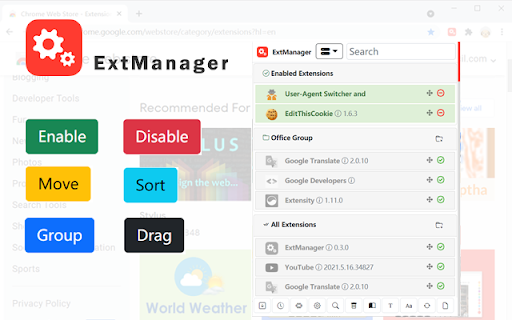
ExtManager positions itself as a streamlined alternative to the native Chrome extensions page. It focuses on efficiency through one-click enabling/disabling and organized grouping via drag-and-drop.

Inferred product pattern

A lightweight browser utility tool focused on reducing friction for users managing large numbers of extensions.

Review-backed pain points

Users report significant difficulty with drag-and-drop mechanics, specifically noting that scrolling does not work when trying to add extensions to folders and that grouping in the popup is difficult.

Observed feature gaps

Missing features include alphabetical sorting, dark mode, right-click context menus for folder management, extension pinning, and an export function for extension lists.

Tags
Extension ManagerBrowser ProductivityTool Organizer
Target users

- Chrome power users

- Developers

- Users with high extension counts

Primary use cases

- Quickly enabling or disabling extensions

- Organizing extensions into functional groups

- Cleaning up the browser extension interface

Positive themes

- Clean and simple design

- Fast toggling capability

- Convenient extension grouping

Negative themes

- Poor drag-and-drop usability

- UI bugs with scrolling and window constraints

- Lack of advanced management options

Observed friction

- Performance complaints detected

- No pricing friction observed; one user mentioned a potential donation option.

Evidence boundary: Extracted from store listing features and user reviews highlighting UX friction and requested organizational features. The review sample is relatively small and contains various languages.
Complaint summaries
Review-backed complaint signals grouped by operational area.

Support

No support complaints observed.

Reliability

Users experienced reliability issues with the UI, specifically regarding drag-and-drop functionality and compatibility with other Chromium-based browsers like Vivaldi.

Privacy

No privacy complaints observed.

Access & pricing

- No clear monetization signal

- No account requirement observed

- No clear pricing signal

Store listing facts

Listing assets

- Screenshots: 5

- Videos: 0

- Languages: 2

Trust signals

- Privacy policy

- Developer contact

Store metadata

- Version: 0.3.4

- Size: 344KiB

- Last updated:

Store description excerpt
Short excerpt from the public Chrome Web Store listing; full copy is available on the official store page.
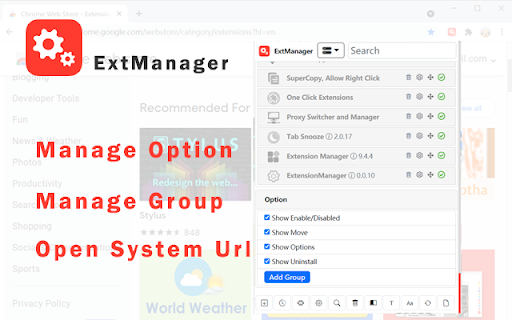
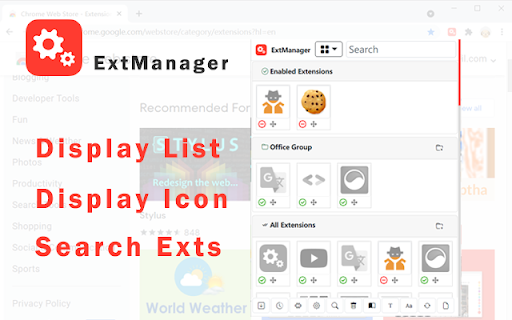
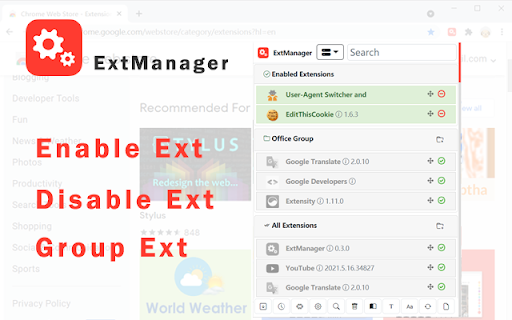
You can easily enable, disable, and uninstall your extensions,applications and themes by "ExtManager". No need to enter the chrome own extensions page every time. Features: 1. Display enabled extensions on top. 2. Display enabled/group/all extensions simply. 3. Enable/disable extension by one click. 4. Group extensions and drag it into the group. 5. Sort extensions by drag it. 6. Uninstall extension simply when you confirm. Support text list, large icon list and small icon list of a variety of permutations, suitable for different expansion of the number of people. You can easily open the system pages, such as the download page, history page, page extensions, plug-ins page, chrome settings page, the search engine settings page, clear the browser cache pages, page content settings, font and encoding settings, language settings, reset the browser settings page and so on.

Listing SEO keywords

Search intent keywords
Keyword signals for evaluating how users may discover, compare, or search for this extension category.

Core discovery

chrome extension managerenable disable extensionsorganize extensionsextension grouper

Comparison

Extensity

Problem

manage many extensionsextension organization tooltoggle extensions quickly

Alternative

ExtensityExtension Manager

Similar extensions

Jump to related discovery paths:

FAQ

What is ExtManager mainly used for?
ExtManager is a productivity utility designed to help users manage their Chrome extensions, themes, and applications. It provides a simplified interface for toggling extensions and organizing them into custom groups.
What market signals stand out?
Visible niche traction with limited review base. Last known update: 05/19/2024.
What should builders compare before entering this space?
Compare install concentration, rating quality, update recency, screenshots, developer portfolio, listing claims, and review-backed friction signals.
Is this page review-backed?
Backed by review samples. This page combines store metadata with selected review signals, while raw store metrics remain visible for comparison.

Screenshots

ExtManager screenshot

Links

Recommended Chrome extensions

Related listings from the same category, trending peers, and the same publisher portfolio.

Browse developer