
Volume Booster for YouTube™ Chrome Extension Analysis
Niche Lifestyle & Gaming HacksChrome extension ID: camciclnnglajljifpjocnpmepnkajgi
A Chrome extension that boosts YouTube audio levels up to 200% using an audio gain node. It provides a toggle button within the video player and supports keyboard shortcuts for ease of use.
Overview
Installs
90K+
Rating
★ 4.6
142 reviews
Languages
1 locales
Includes English
Market analysis
Review-backed positioning, friction, and market signals for this Chrome extension.
Macro category
Niche Lifestyle & Gaming Hacks
Pricing friction
Low review signal
Complaint intensity
Low review signal
Listing positioning
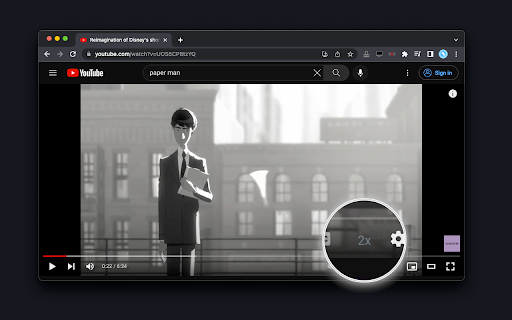
The product is positioned as a simple tool to double the volume of the YouTube player, mimicking the functionality of VLC player. It emphasizes seamless integration by adding a dedicated '2x' button directly into the YouTube player interface.
Inferred product pattern
Single-purpose utility extension that modifies the target site's audio node for a specific enhancement.
Review-backed pain points
Users have reported that the booster button overlaps and obstructs the autoplay settings button. Additionally, it does not function on YouTube Clips.
Observed feature gaps
Lack of support for YouTube Clips and a desire for volume boosts exceeding the current 2x/4x limits.
- YouTube viewers with low-volume hardware
- Users seeking audio levels beyond standard browser limits
- People preferring VLC-style audio boosting on the web
- Compensating for quiet laptop speakers
- Increasing audio impact for music or videos
- Quickly toggling volume boost without leaving the video player
- Seamless UI integration
- Effective volume increase
- Ease of setup
- Helpfulness for hardware with volume issues
- UI element overlap
- Lack of support for YouTube Clips
- Intermittent functionality issues
- No pricing friction observed; the tool appears to be free.
Support
No specific support or account complaints found, though some users requested bug fixes for UI overlaps.
Reliability
Some reports of the extension not working in certain browser contexts or specifically on YouTube Clips.
Privacy
No privacy or security complaints observed.
- Free usage observed
- No account requirement observed
- Free plan or free usage claimed
Store listing facts
- Screenshots: 1
- Videos: 0
- Languages: 1
- Privacy policy
- Developer contact
- Official website
- Version: 0.2.2
- Size: 89.97KiB
- Last updated:
Listing SEO keywords
Core discovery
Comparison
Problem
Alternative
Similar extensions
Jump to related discovery paths:
FAQ
Screenshots
Links
Website: webextension.org
Privacy policy: https://add0n.com/policies/mery.dev.txt