Tab Auto Refresh icon

Tab Auto Refresh Chrome Extension Analysis

Automation & Workflow Efficiency

Chrome extension ID: jaioibhbkffompljnnipmpkeafhpicpd

Tab Auto Refresh is a Chrome extension that enables users to automatically refresh specific web tabs based on configurable time intervals. It provides a toolbar popup for setting refresh rates, stopping tasks, and a global reset option for all active refreshes, also supporting a dark mode interface.

Developer:MeryDev
Version:0.2.3
Size:48.91KiB
Last updated:

Overview

Installs

100K+

Rating

4.2

76 reviews

Languages

1 locales

Includes English

Market analysis

Review-backed positioning, friction, and market signals for this Chrome extension.

Backed by review samples

Macro category

Automation & Workflow Efficiency

Pricing friction

Low review signal

Complaint intensity

High review signal

Listing & review signals
Observed signals from store listing text and review samples.

Listing positioning

The store listing positions Tab Auto Refresh as a browser addon designed to automatically reload selected tabs at custom time intervals. It highlights ease of use with a simple UI for setting intervals, and features to stop individual tasks or globally reset all refreshing.

Inferred product pattern

A free browser extension providing basic tab auto-refresh functionality with a simple user interface for setting intervals and managing refresh tasks.

Review-backed pain points

Users frequently report core functionality issues, with the extension often failing to work, resetting unexpectedly, or only refreshing once. Significant pain points include extreme memory usage, incorrect URL/tab detection across multiple windows, and a worrying claim of search result manipulation, leading to trust concerns. Developer support is also cited as unhelpful.

Observed feature gaps

Reviews suggest a lack of robust handling for complex scenarios like multiple browser windows or dynamically changing URLs. There is also an absence of more advanced features such as conditional refreshing or specific element monitoring. Developer communication and clear usage documentation appear to be significant gaps.

Tags
Tab Auto RefreshProductivityAutomationBrowser Tool
Target users

- Users monitoring dynamic web content (e.g., news feeds, stock tickers, dashboards)

- Individuals requiring constant webpage activity to prevent session timeouts

- Users seeking to automate repetitive browser tab refreshing

Primary use cases

- Automatically refreshing web pages at specified intervals

- Keeping web sessions active without manual interaction

- Monitoring websites for updates or changes

Positive themes

- Reliable functionality and stability even after browser restarts (from a 4-star review)

- Small extension size and efficient resource usage (from a 4-star review)

Negative themes

- Frequent reports of the extension failing to work or stopping unexpectedly

- High memory consumption leading to significant performance issues

- Incorrect detection or handling of URLs, especially across multiple browser windows

- The extension resetting itself or only performing a single refresh before deactivating

- Concerns about the extension 'tweaking' Google search results and lack of trustworthiness

- Confusing post-installation behavior, including requests to download other software perceived as spam

- Poor developer support and lack of helpful documentation on the website

Observed friction

- Performance complaints detected

- Privacy complaints detected

- No payment-related information or complaints are available in the public listing or review samples, suggesting the product is offered for free.

Evidence boundary: Analysis is based on the Chrome Web Store listing's title, short description, long description, and 10 review samples (5 one-star, 2 two-star, 2 three-star, 1 four-star). The provided review samples are predominantly low-rated, which may not fully represent the sentiment of the entire user base. There is no explicit information regarding payment structures or specific business models within the listing.
Complaint summaries
Review-backed complaint signals grouped by operational area.

Support

One review notes poor developer support, with questions going unanswered and a lack of comprehensive information on the website, indicating a friction point for users seeking assistance.

Reliability

Multiple reviews report severe reliability issues, including the extension failing to work, resetting automatically, stopping after a single refresh, and causing extreme memory usage that impacts PC performance.

Privacy

One review explicitly states the extension 'tweaks Google search results' and 'cannot be trusted', raising significant privacy and security concerns.

Access & pricing

- Free usage observed

- No account requirement observed

- Free plan or free usage claimed

Store listing facts

Listing assets

- Screenshots: 3

- Videos: 1

- Languages: 1

Trust signals

- Privacy policy

- Developer contact

- Official website

Store metadata

- Version: 0.2.3

- Size: 48.91KiB

- Last updated:

Store description excerpt
Short excerpt from the public Chrome Web Store listing; full copy is available on the official store page.
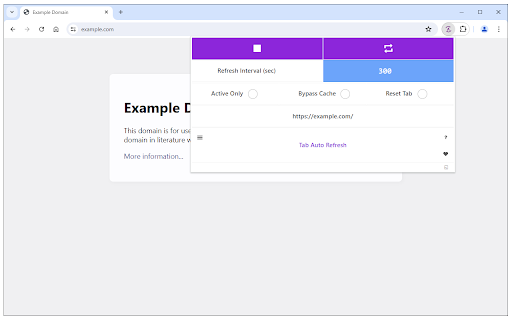
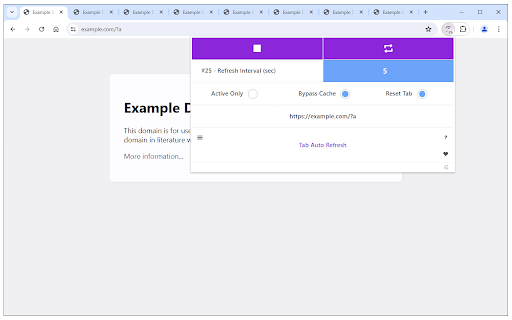
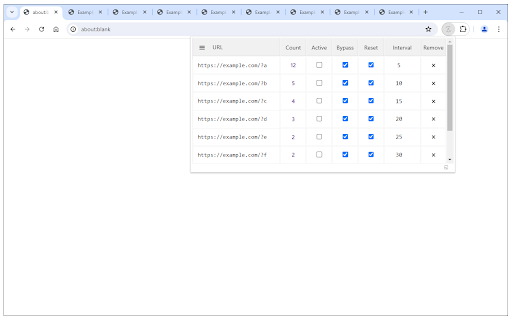
Tab Auto Refresh is a browser addon that helps you automatically reload (refresh) tabs of your choice. To operate with this addon, please open toolbar popup UI while you are visiting a website. Adjust time interval in seconds (i.e. 120 sec) and you are all set. Selected tab will be reloaded based on the interval you just set. Please note reloading occurs based on tab URL not tab ID or domain. If you want to stop the current "reload" task, please press on the "stop" button at top left corner in toolbar popup UI. Alternatively you can set the interval to 0 which is equal to stop function. If you have many tabs reloading and do not want to visit each tab to clear the reloading task, please open toolbar popup UI and press on the "reset" (top right) button to do so. This button serves as a global reset button and clears the reloading task for all tabs. Note: The toolbar popup interface suppo…

Listing SEO keywords

Search intent keywords
Keyword signals for evaluating how users may discover, compare, or search for this extension category.

Core discovery

tab auto refreshautomatic tab reloadbrowser tab refreshwebsite auto refreshchrome auto refresh extensionpage auto reload

Comparison

Tab Auto Refresh vs Auto Refresh Plusbest tab refresher chromeautomatic page refresh tools

Problem

chrome tab not refreshingwebsite session timeout solutionbrowser tab stuck refreshhow to auto refresh chrome tab

Alternative

Tab Auto Refresh alternativessimilar to tab auto refreshother auto reload extensions

Similar extensions

Jump to related discovery paths:

FAQ

What is Tab Auto Refresh mainly used for?
Tab Auto Refresh is a Chrome extension that enables users to automatically refresh specific web tabs based on configurable time intervals. It provides a toolbar popup for setting refresh rates, stopping tasks, and a global reset option for all active refreshes, also supporting a dark mode interface.
What market signals stand out?
Established adoption with limited review base. Last known update: 04/30/2026.
What should builders compare before entering this space?
Compare install concentration, rating quality, update recency, screenshots, developer portfolio, listing claims, and review-backed friction signals.
Is this page review-backed?
Backed by review samples. This page combines store metadata with selected review signals, while raw store metrics remain visible for comparison.

Screenshots

Tab Auto Refresh screenshot

Links

Recommended Chrome extensions

Related listings from the same category, trending peers, and the same publisher portfolio.

Browse tools
Download All Images icon

Download All Images

MeryDev

Easily save images with a wide range of customization features, such as file size, dimensions, and image type.

Installs

200K+

Rating

4.3

Pie Adblock - A Powerful Free Ad Blocker icon

Pie Adblock - A Powerful Free Ad Blocker

Pie Extensions

Pie Adblock blocks ads & pop-ups, plus YouTube & Twitch video ads. You can customize your ad experience with Pie!

Installs

2.0M+

Rating

4.9

Dark Mode icon

Dark Mode

Grephy

A global dark theme for the web.

Installs

2.0M+

Rating

3.6

Google Dictionary (by Google) icon

Google Dictionary (by Google)

dictionary-extension-dev

View definitions easily as you browse the web.

Installs

2.0M+

Rating

4.4

AI Chat for Search icon

AI Chat for Search

AI Chat for Search Team

Display AI Chat response alongside search engine results

Installs

2.0M+

Rating

4.6

WPS浏览器助手:文档在线阅读编辑 icon

WPS浏览器助手:文档在线阅读编辑

金山PDF

PDF、Excel、Word、PPT等文档无需下载即可在线预览,还能对文档进行编辑、打印、转换等处理。

Installs

2.0M+

Rating

3.0

Planet Search icon

Planet Search

Free VPN Planet

Enchanced default search engine.

Installs

2.0M+

Rating

3.4

Lightshot (screenshot tool) icon

Lightshot (screenshot tool)

Skillbrains

Simple and convenient screenshot tool. Select an area, edit your screenshot and upload it to the server.

Installs

2.0M+

Rating

4.4

PrintFriendly: Print Clean Pages, Save as PDF & Screenshot, AI Tools icon

PrintFriendly: Print Clean Pages, Save as PDF & Screenshot, AI Tools

PrintFriendly

Print clean web pages, save as PDF, take screenshots, or use reader mode. AI summaries & ad removal. Works on ChatGPT & Gemini.

Installs

1.0M+

Rating

4.6

Mobile simulator - responsive testing tool icon

Mobile simulator - responsive testing tool

François Duprat

Smartphone and tablet simulator on computer with several models to test mobile responsive websites.

Installs

1.0M+

Rating

4.9