Desktop Screen Recorder icon

Desktop Screen Recorder Chrome Extension Analysis

Automation & Workflow Efficiency

Chrome extension ID: chjblpopkoelbkolfboniibdhjmlkphf

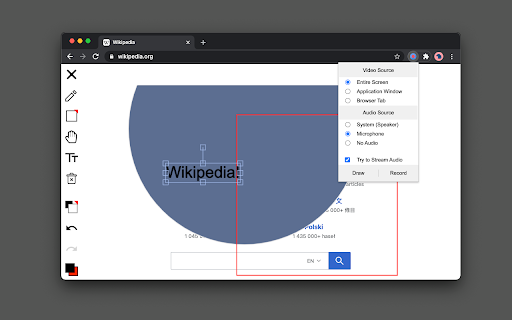
A Chrome extension that records screen activity in WebM format with support for system audio and microphone input. It includes a built-in drawing tool for presentations and allows users to customize video quality and global shortcuts.

Developer:brian.girko
Version:0.3.3
Size:282KiB
Last updated:

Overview

Installs

10K+

Rating

3.8

11 reviews

Languages

1 locales

Includes English

Market analysis

Review-backed positioning, friction, and market signals for this Chrome extension.

Backed by review samples

Macro category

Automation & Workflow Efficiency

Pricing friction

Low review signal

Complaint intensity

Moderate review signal

Listing & review signals
Observed signals from store listing text and review samples.

Listing positioning

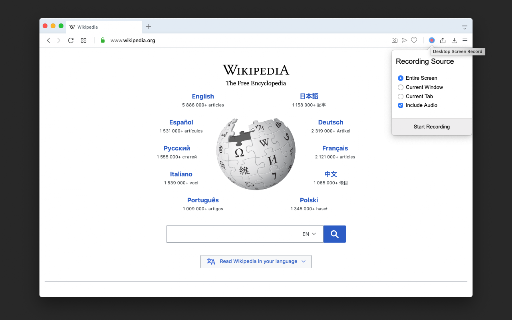
The product positions itself as a versatile, powerful recording tool capable of capturing the entire screen, specific application windows, or individual browser tabs. It emphasizes high-quality HD output, the absence of watermarks, and reliability through direct-to-disk writing and crash recovery.

Inferred product pattern

A utility-focused capture tool that prioritizes local file generation (WebM) and versatility in source selection over cloud integration.

Review-backed pain points

Users report significant frustration with the inability to record audio from other applications and glitches when using the browser tab capture mode.

Observed feature gaps

Some users expressed a desire for direct integration with platforms like YouTube, and others noted issues with camera functionality.

Tags
Screen RecorderVideo CapturePresentation ToolWebM Recording
Target users

- Content creators

- Online educators

- Remote presenters

- Software testers

Primary use cases

- Creating video tutorials

- Recording software demonstrations

- Capturing browser-based activity

- Sharing presentations with annotations

Positive themes

- Ease of use

- High output quality

- Lack of usage limitations

Negative themes

- System audio capture failures

- Camera integration issues

- Instability in browser tab mode

Observed friction

- Performance complaints detected

- No pricing friction observed; reviews suggest the tool is free with no limitations.

Evidence boundary: Analysis based on the official store listing and 10 available user reviews. The review sample size is very small (11 total comments), which may not represent the experience of the full 10,000+ user base.
Complaint summaries
Review-backed complaint signals grouped by operational area.

Support

No specific complaints regarding customer support interactions were observed.

Reliability

Reports of audio recording failure for system sounds and stability issues in browser tab mode.

Privacy

No privacy or security complaints observed in the provided data.

Access & pricing

- Free usage observed

- No account requirement observed

- Free plan or free usage claimed

Store listing facts

Listing assets

- Screenshots: 4

- Videos: 0

- Languages: 1

Trust signals

- Developer contact

- Official website

Store metadata

- Version: 0.3.3

- Size: 282KiB

- Last updated:

Store description excerpt
Short excerpt from the public Chrome Web Store listing; full copy is available on the official store page.
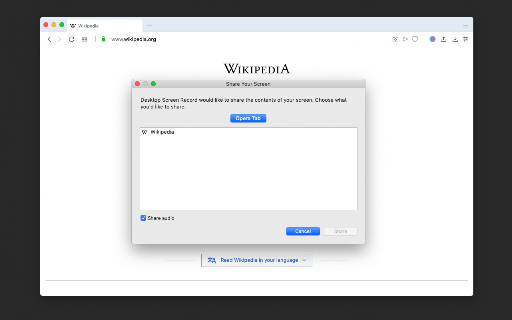
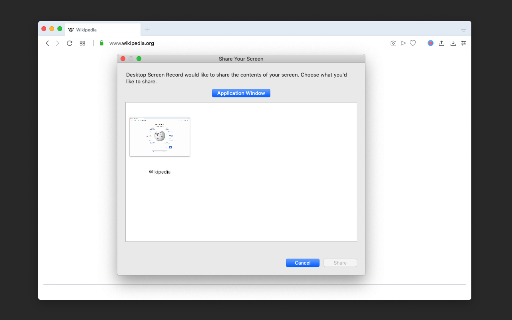
Desktop Screen Record is a powerful recording tool that captures the screen for sharing content. This extension has three modes: 1. Capture the entire screen. This mode supports monitor selection if more than one display is detected. 2. Application window capturing. It only captures one application's window, and the video size would be equal to the application's window size. 3. Browser tab mode. The extension captures the content of one browser tab only. You can optionally switch to a different tab during the recording This extension can record in HD quality if the recording is placed on a high-quality LCD monitor. Also, it supports audio recording. The user can either ask the extension to record the system sound (whatever is playing in the background) or use the user's microphone device for recording. The output format of the media files is the WebM format, which is the best choice for…

Listing SEO keywords

Search intent keywords
Keyword signals for evaluating how users may discover, compare, or search for this extension category.

Core discovery

chrome screen recorderrecord browser tabcapture application windowno watermark screen record

Comparison

best free screen recorder for chromedesktop recorder vs tab recorder

Problem

how to record system audio chromescreen recorder with drawing tool

Alternative

free webm screen capturechrome extension for recording screen

Similar extensions

Jump to related discovery paths:

FAQ

What is Desktop Screen Recorder mainly used for?
A Chrome extension that records screen activity in WebM format with support for system audio and microphone input. It includes a built-in drawing tool for presentations and allows users to customize video quality and global shortcuts.
What market signals stand out?
Visible niche traction with limited review base. Last known update: 06/10/2025.
What should builders compare before entering this space?
Compare install concentration, rating quality, update recency, screenshots, developer portfolio, listing claims, and review-backed friction signals.
Is this page review-backed?
Backed by review samples. This page combines store metadata with selected review signals, while raw store metrics remain visible for comparison.

Screenshots

Desktop Screen Recorder screenshot

Links

Recommended Chrome extensions

Related listings from the same category, trending peers, and the same publisher portfolio.

Browse social